

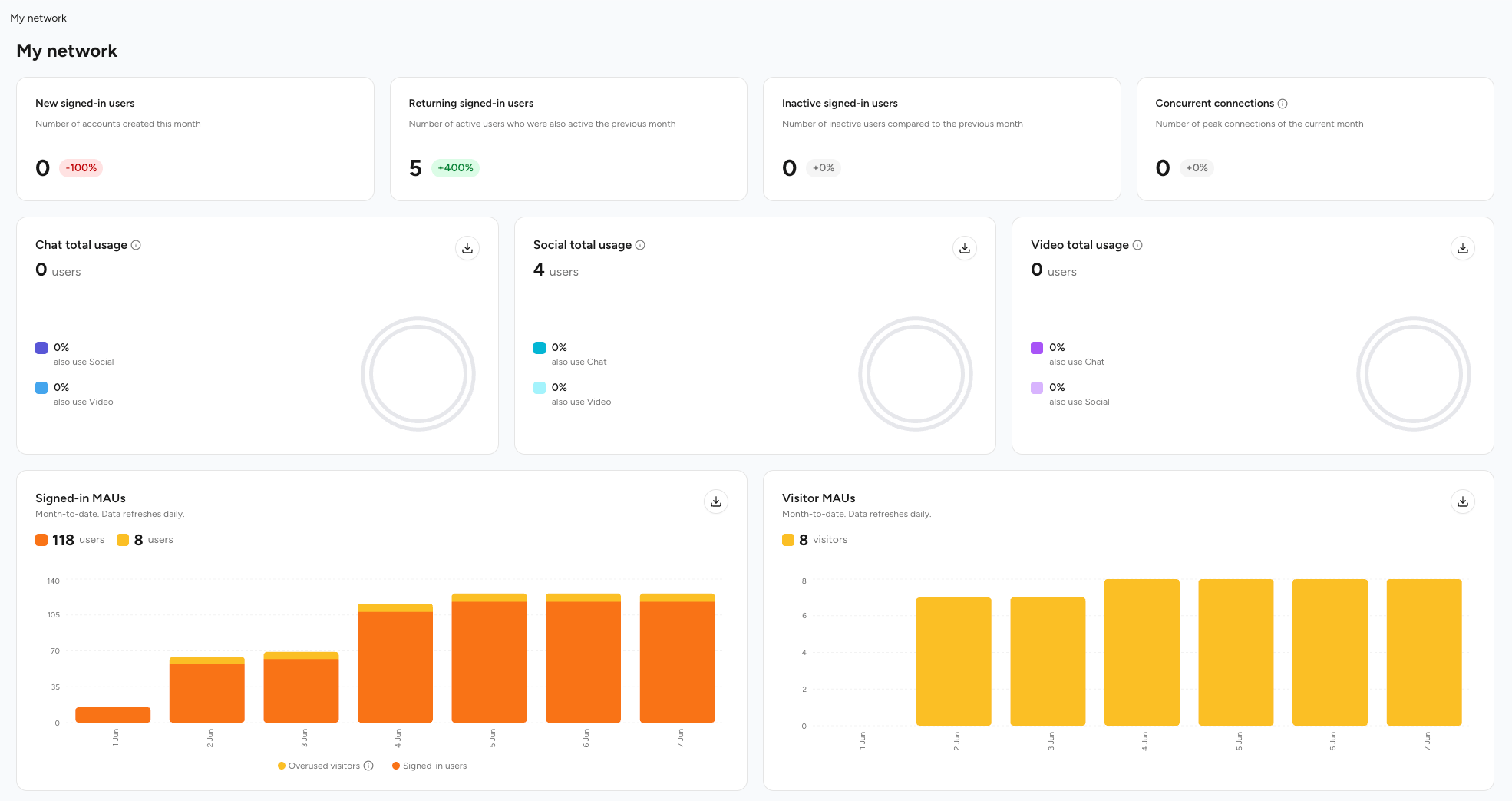
Use this dashboard to monitor acquisition, retention, concurrency load, visitor traffic, and cross-feature adoption so you can prioritize growth levers and capacity planning.
Acquisition
Track new user inflow
Retention
Monitor returning vs inactive
Concurrency
Peak load insights
Feature Adoption
Cross‑usage patterns
Consumption
Usage for each module
Churn Risk
Identify inactivity early
Visitor Conversion
Track visitor traffic and fair-use reclassification
KPI Overview (Main View)
- New Users
- Returning Users
- Inactive Users
- Concurrent Connections
- Feature Usage
- Signed-in MAUs
- Visitor MAUs
Users created in selected period. % delta compares to prior equivalent period. Sudden spikes: evaluate campaign attribution; drops: audit funnel.
Interpreting Feature Overlap
Why It Matters
Why It Matters
Users engaging in multiple modalities (e.g., Chat + Video) typically have higher lifetime value.
Optimization
Optimization
If one feature shows low overlap, embed contextual entry points or cross-prompts.
Understanding Visitor Traffic & Fair-Use Classification
Visitors are anonymous, unauthenticated users browsing your community without signing in. To keep platform costs aligned with actual resource usage, visitor activity is tracked and classified into the following buckets:Visitor MAU
Visitor MAU
An anonymous visitor (identified by device ID) who stays within the monthly fair-use threshold. Billed at the standard, lower visitor rate.
Overused Visitor MAU
Overused Visitor MAU
A visitor who exceeds the monthly fair-use threshold of API requests. Once reclassified, they’re removed from the Visitor MAU count and added to the Signed-in MAU count for billing — they’re never counted in both buckets at once.
Daily sign-in nudge
Daily sign-in nudge
When a visitor reaches the daily request limit, they’re shown a sign-in prompt encouraging them to register. This nudge persists until the daily limit resets, gently converting frequent visitors into registered members.
Overused Visitor MAU figures refresh daily. Because reclassification moves a visitor out of the Visitor MAU bucket entirely, your Visitor MAU and Overused Visitor MAU counts always reconcile without double-counting.
Historical Trends
1
Select Range
Adjust date selector (e.g., last 30 / 90 days).
2
Concurrency Trend
Identify recurring daily/weekly peaks; align scaling schedule.
3
Monthly Table
Review active, churned (inactive), resource consumption (video minutes, storage), and the Visitor MAU / Overused Visitor MAU columns for billing reconciliation.
4
Pattern Flags
Look for divergence between active growth and returning stability (possible shallow engagement), or a rising share of Overused Visitor MAUs (possible scraping or heavy anonymous usage).
Core Metrics Definitions
Leading Indicators & Actions
- Early Churn
- Capacity Risk
- Adoption Gap
- Storage Surge
- Quality Shift
- Overused Visitor Growth
Inactive users rising week over week. Action: trigger lifecycle emails, in-app nudges.
Dashboards Operating Cadence
Daily
Daily
Check new vs returning, concurrency anomalies, and Overused Visitor MAU movement (this figure refreshes daily).
Weekly
Weekly
Trend inactive, overlap %, video quality distribution.
Monthly
Monthly
Cohort retention, capacity headroom, cost drivers.
Quarterly
Quarterly
Benchmark adoption vs product roadmap targets.
Troubleshooting
Related
Raw Data Export
Granular export tooling
User History
Behavioral deep dive
Need additional custom metrics? Contact support to discuss extended analytics or data export options.