

SDK v7.x · Last verified March 2026 · iOS · Android · Web · Flutter
Speed run — just the code
Speed run — just the code
Prerequisites: SDK installed with authenticated users, Admin Console access for moderator configuration, and a server endpoint to receive webhook events.Also recommended: Complete Rich Content Creation and Community Platform first — you need content and communities to moderate.
After completing this guide you’ll have:
- User-side flag/unflag implemented for posts and comments
- Admin Console moderation review queue receiving flagged content
- An AI moderation rule set configured with at least one auto-action
- A webhook handler receiving moderation events for downstream automation
Layer 1: SDK — User Flagging
Let users flag content they find inappropriate. Flagged content enters a moderation queue. The SDK provides methods to flag posts, comments, and users.Quick Start: Flag a Post
Layer 2: AI Content Moderation
Configure automatic content screening in the Admin Console. AI moderation runs before content goes live.1
Enable AI moderation in the Admin Console
Navigate to Admin Console → Settings → AI Content Moderation.
- Text moderation: Screen post text and comments for policy violations (hate speech, spam, explicit content, etc.)
- Image moderation: Screen uploaded images for nudity, violence, and other violations
- Auto-action: Configure whether violations are auto-rejected or flagged for human review
2
Configure pre-hook events (optional)
Pre-hook events let your server intercept content before it’s published. Your endpoint receives the content, evaluates it, and returns an allow/deny decision.→ Pre-Hook Events
Node.js pre-hook handler
Layer 3: Admin Console — Human Review
Flagged content and AI-held content lands in the Admin Console review queues. The Posts and comments management page shows every post with its AI moderation status inline — making it fast to spot, review, and action flagged content.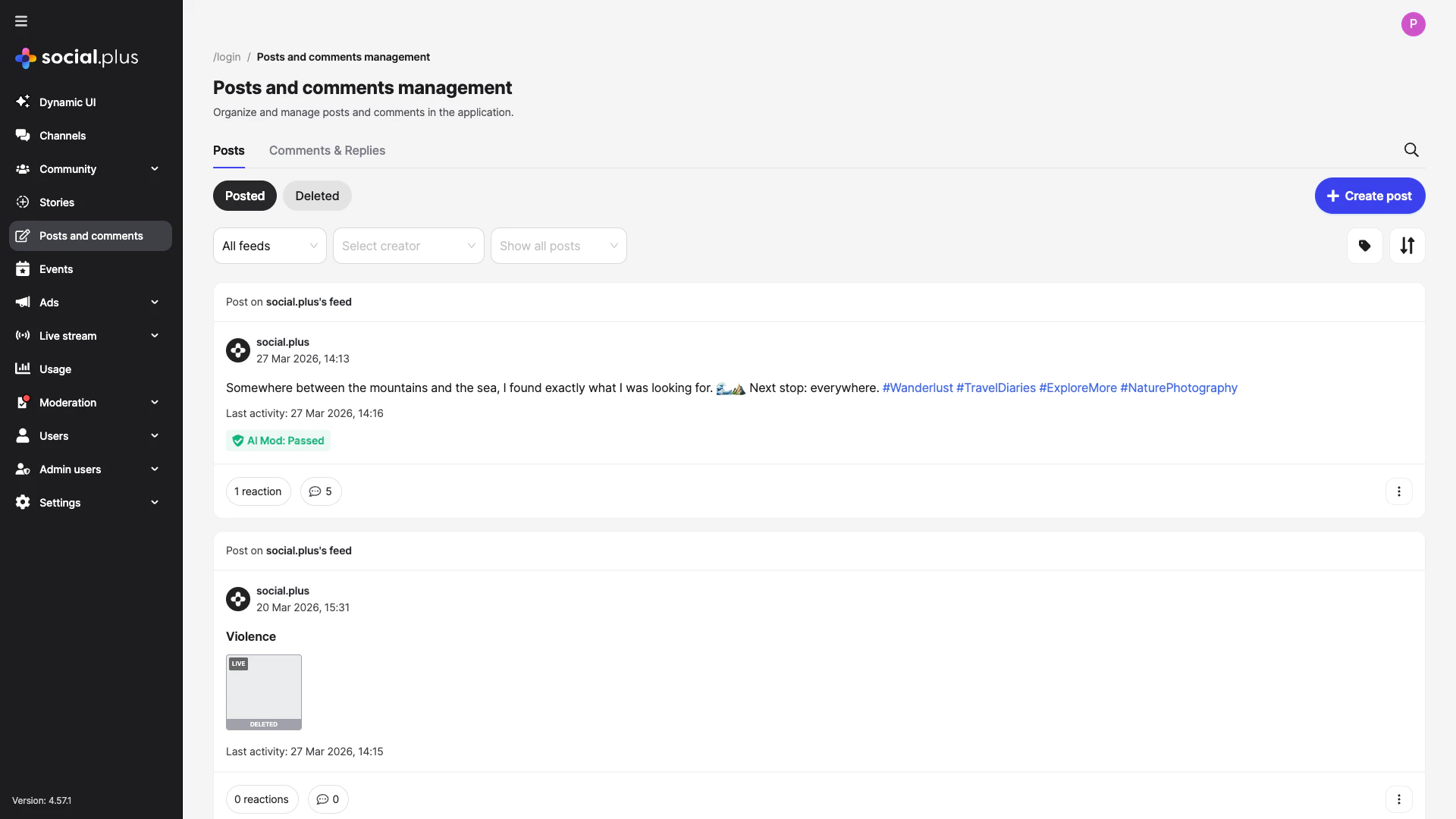
Admin Console — Posts & comments management page with inline AI moderation status badges
1
Review flagged content
- Admin Console → Content Moderation → Flagged Content: Posts, comments, and stories flagged by users
- Each item shows: content, reporter, flag reason, and action buttons (approve, remove, warn user)
- Bulk actions available for high-volume queues
2
Manage post review queues
For communities using
ADMIN_REVIEW_POST_REQUIRED, new posts land in a review queue:- Admin Console → Social Management → Posts: Review pending posts
- Approve → post goes live; Reject → post removed
3
Assign moderator roles
Give community moderators access to their community’s moderation queue without granting full admin access:
- Admin Console → Admin Access Control → Roles: Create community moderator roles
- Assign users to roles per community
Layer 4: Webhooks — Automation
Receive real-time events when content is actioned to trigger downstream workflows.1
Register your webhook endpoint
In Admin Console → Settings → Integrations → Webhooks, register your endpoint URL and select which events to subscribe to.→ Admin Console: Integrations
2
Implement secure webhook handling
Always verify the webhook signature before processing:
Node.js
3
Handle moderation events
Common Mistakes
Best Practices
Tiered moderation strategy
Tiered moderation strategy
Run three complementary layers for best coverage:
- Pre-publish AI screening — catches obvious violations before content is visible
- Community self-moderation — users flag what AI misses
- Human moderator review — maintains context and handles edge cases
Webhook reliability
Webhook reliability
- Return
200 OKquickly and process events asynchronously — slow responses cause webhook retries - Implement idempotent handlers — webhooks may be delivered more than once
- Log all received events before processing so you can replay them if your handler fails
- Set up a dead-letter queue for events that fail processing
Moderator experience
Moderator experience
- Set up role-based access so community moderators only see their community’s queue
- Define clear escalation paths: community moderator → admin → legal
- Log all moderator actions with reason codes for audit trails
- Provide moderators with appeal management tools for banned users
User communication
User communication
- Always notify users when their content is removed — explain why and link to guidelines
- Provide an appeal process for content removal decisions
- Show a submission confirmation to users who flag content so they know it was received
Next Steps
Your next step → Roles, Permissions & Governance
Moderation is active — now set up community roles and permission gates for fine-grained governance.
Rich Content Creation
Understand how posts feed into the moderation pipeline
Community Platform
Configure post moderation settings per community
Notifications & Engagement
Notify users of moderation actions via push or in-app