> ## Documentation Index
> Fetch the complete documentation index at: https://learn.social.plus/llms.txt
> Use this file to discover all available pages before exploring further.
# Product Tagging & Social Commerce
> Turn posts and livestreams into shoppable experiences — set up your catalogue, tag products in text, image, video, and livestream content, and track engagement.
**SDK v7.x** · Last verified March 2026 · iOS · Android · Web
```typescript theme={null}
import { PostRepository } from '@amityco/ts-sdk';
// 1. Text post with product tags
const textPost = await PostRepository.createPost({
targetType: 'community',
targetId: communityId,
dataType: 'text',
data: { text: 'Loving this Nike Air Max for my morning runs!' },
productTags: [
{ productId: 'prod_001', text: 'Nike Air Max', index: 12, length: 12 },
],
});
// 2. Image post with attachment product tags
const imagePost = await PostRepository.createPost({
targetType: 'community',
targetId: communityId,
dataType: 'image',
data: { text: 'Check out these products!' },
attachments: [
{ fileId: 'image-file-id-1', type: 'image' },
{ fileId: 'image-file-id-2', type: 'image' },
],
attachmentProductTags: {
'image-file-id-1': [{ productId: 'prod_001' }],
'image-file-id-2': [{ productId: 'prod_002' }],
},
});
// 3. Track engagement
product.analytics.markAsViewed('feed_page/product_list/product_item', 'post', postId);
product.analytics.markAsClicked('feed_page/product_list/product_item', 'post', postId);
```
Full walkthrough below ↓
**Platform note** — code samples below use TypeScript. Every method has an equivalent in the iOS (Swift) and Android (Kotlin) SDKs — see the linked SDK reference in each section.
 Product tagging lets users attach products from your catalogue to posts and livestreams, turning social content into a shoppable storefront. Viewers see product cards with images, prices, and direct links — without leaving the feed or stream.
```mermaid theme={null}
graph LR
A[Admin Console
Product tagging lets users attach products from your catalogue to posts and livestreams, turning social content into a shoppable storefront. Viewers see product cards with images, prices, and direct links — without leaving the feed or stream.
```mermaid theme={null}
graph LR
A[Admin Console
Product Catalogue] --> B{Content type}
B -->|Post| C[Text tags
+ attachment tags]
B -->|Livestream| D[Room post tags
+ pin/unpin]
C --> E[Viewers browse
& click products]
D --> E
E --> F[Analytics:
views + clicks]
```
## Where Product Tagging Works
| Content type | Tag mechanism | Max tags | Pinning | Platforms |
| -------------- | ---------------------------------------------------------------------- | -------- | ----------- | ----------------- |
| **Text post** | `productTags` — reference product by position in text | 20 | — | iOS, Android, Web |
| **Image post** | `attachmentProductTags` — link products to specific images by `fileId` | 20 | — | iOS, Android, Web |
| **Video post** | `attachmentProductTags` — link products to specific videos by `fileId` | 20 | — | iOS, Android, Web |
| **Livestream** | `productTags` + `pinnedProductId` on room post | 20 | 1 at a time | iOS, Android, Web |
Flutter and React Native do not yet support product tagging.
***
## Step 0: Set Up Your Product Catalogue
Before any tagging can happen, products must exist in **Admin Console → Product catalogue**.
Navigate to **Product catalogue** in the Admin Console sidebar.
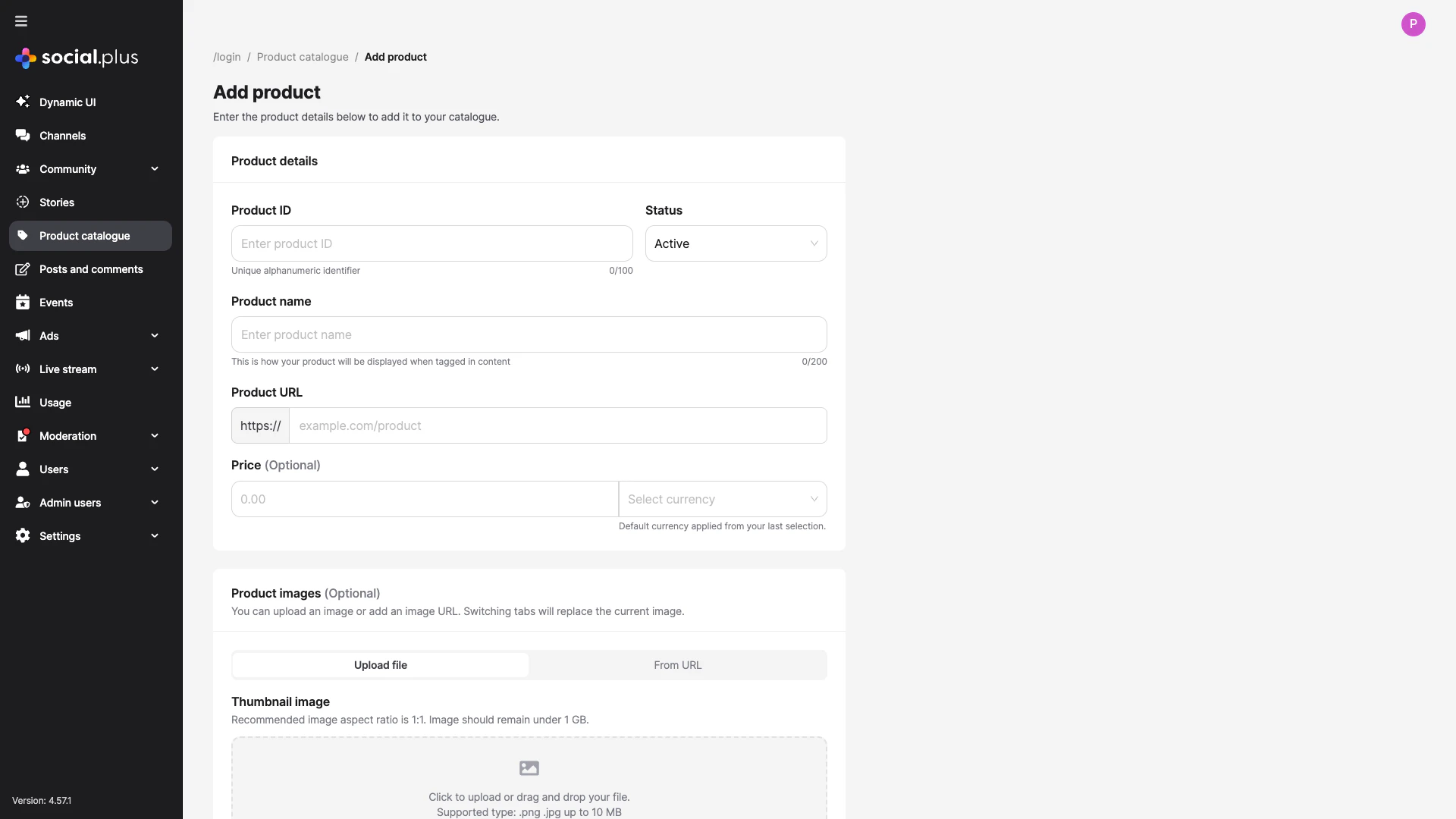
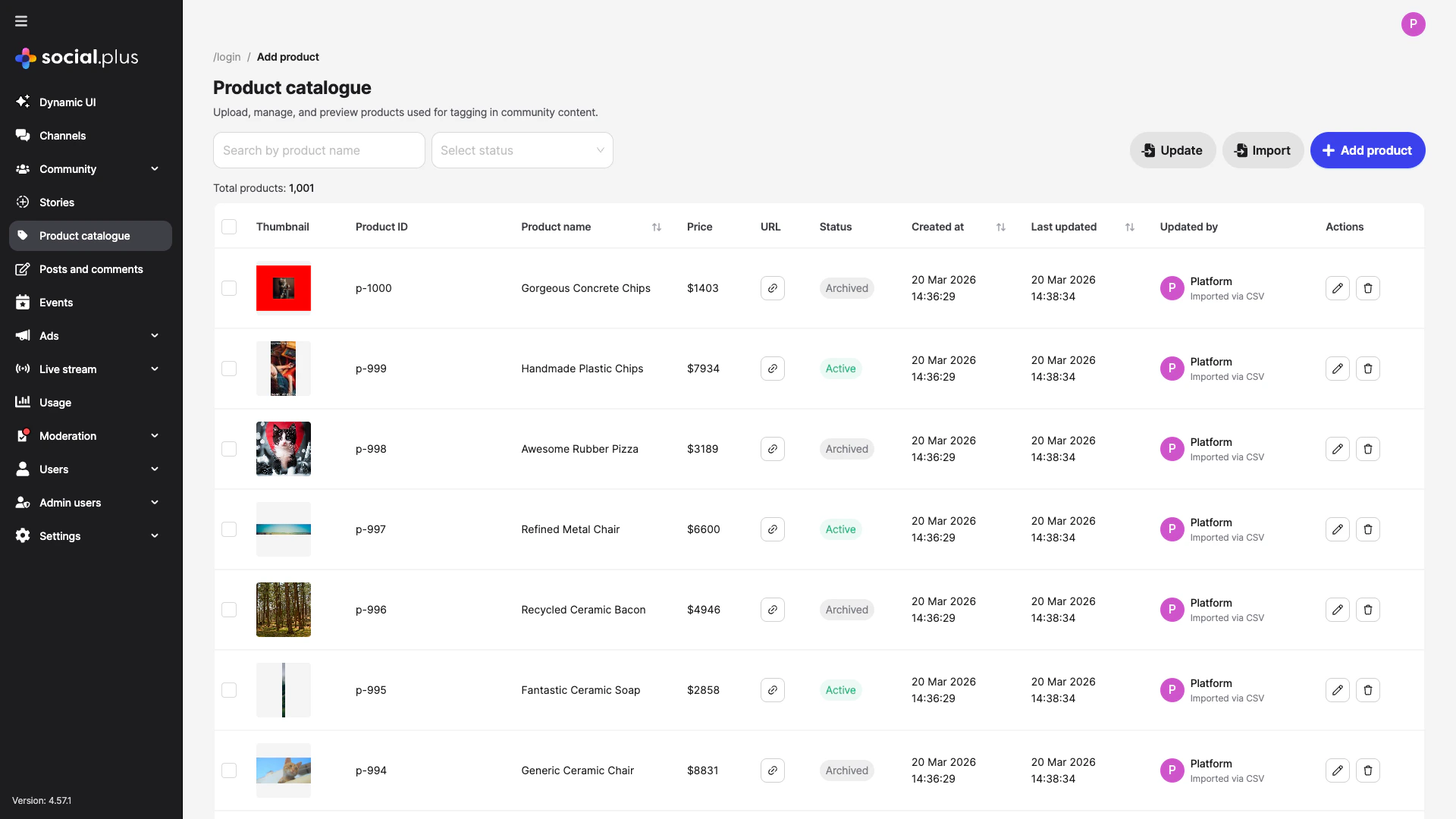 Click **+ Add product** to create one product at a time, or use **Import** to upload a CSV for bulk creation. Each product needs:
* **Product ID** — unique identifier (cannot change after creation)
* **Product Name** — display name shown when tagged
* **Product URL** — link for viewers to click through
* **Status** — must be **Active** to appear in tag search
Click **+ Add product** to create one product at a time, or use **Import** to upload a CSV for bulk creation. Each product needs:
* **Product ID** — unique identifier (cannot change after creation)
* **Product Name** — display name shown when tagged
* **Product URL** — link for viewers to click through
* **Status** — must be **Active** to appear in tag search
 Only **Active** products are discoverable in the tag-product search. Set seasonal or discontinued products to **Archived** to hide them without deleting.
Full Admin Console guide → [Product Catalogue](/analytics-and-moderation/console/product-management/overview)
***
## Tag Products in Posts
### UIKit (recommended)
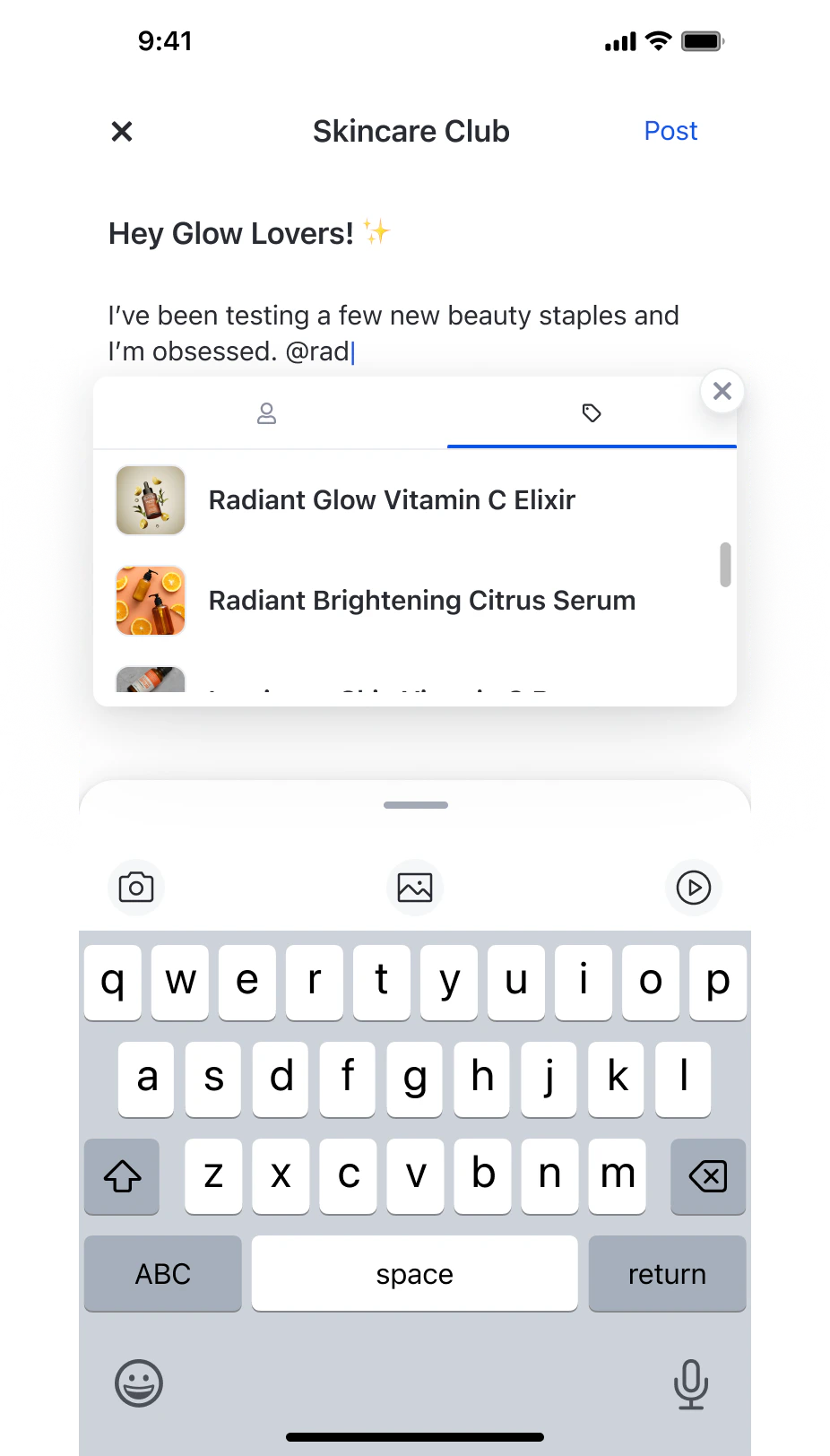
The post composer includes built-in product tagging — type `@` and switch to the product tab:
Only **Active** products are discoverable in the tag-product search. Set seasonal or discontinued products to **Archived** to hide them without deleting.
Full Admin Console guide → [Product Catalogue](/analytics-and-moderation/console/product-management/overview)
***
## Tag Products in Posts
### UIKit (recommended)
The post composer includes built-in product tagging — type `@` and switch to the product tab:
 UIKit components used:
| Component | Role |
| ------------------------------ | ---------------------------------------------------------------------------- |
| `ProductTagSelectionComponent` | Search and multi-select products (mode: `create`, `edit`, or `livestream`) |
| `ProductTagListComponent` | Read-only list below the post (mode: `post`, `image`, `video`, `livestream`) |
Component reference → [Product Tagging Components](/uikit/components/social/product-tagging)
### SDK: Text Post with Product Tags
Tag products inline within the text. Each tag references a product by ID and a position range in the text.
```typescript theme={null}
const post = await PostRepository.createPost({
targetType: 'community',
targetId: communityId,
dataType: 'text',
data: { text: 'Loving this Nike Air Max for my morning runs!' },
productTags: [
{ productId: 'prod_001', text: 'Nike Air Max', index: 12, length: 12 },
],
});
```
### SDK: Image Post with Attachment Product Tags
For image (and video) posts, attach products to specific media files using `attachmentProductTags`. Products are linked by the `fileId` of each uploaded image.
```typescript theme={null}
const post = await PostRepository.createPost({
targetType: 'community',
targetId: communityId,
dataType: 'image',
data: { text: 'Check out these products!' },
attachments: [
{ fileId: 'image-file-id-1', type: 'image' },
{ fileId: 'image-file-id-2', type: 'image' },
],
attachmentProductTags: {
'image-file-id-1': [{ productId: 'prod_001' }],
'image-file-id-2': [{ productId: 'prod_002' }],
},
});
```
SDK reference → [Text Posts](/social-plus-sdk/social/content-management/posts/creation/text-post) · [Image Posts](/social-plus-sdk/social/content-management/posts/creation/image-post) · [Video Posts](/social-plus-sdk/social/content-management/posts/creation/video-post)
***
## Tag Products in Livestreams
Livestream product tagging adds **pinning** — the host (or authorized co-host) can pin one product at a time as a prominent overlay visible to all viewers.
UIKit components used:
| Component | Role |
| ------------------------------ | ---------------------------------------------------------------------------- |
| `ProductTagSelectionComponent` | Search and multi-select products (mode: `create`, `edit`, or `livestream`) |
| `ProductTagListComponent` | Read-only list below the post (mode: `post`, `image`, `video`, `livestream`) |
Component reference → [Product Tagging Components](/uikit/components/social/product-tagging)
### SDK: Text Post with Product Tags
Tag products inline within the text. Each tag references a product by ID and a position range in the text.
```typescript theme={null}
const post = await PostRepository.createPost({
targetType: 'community',
targetId: communityId,
dataType: 'text',
data: { text: 'Loving this Nike Air Max for my morning runs!' },
productTags: [
{ productId: 'prod_001', text: 'Nike Air Max', index: 12, length: 12 },
],
});
```
### SDK: Image Post with Attachment Product Tags
For image (and video) posts, attach products to specific media files using `attachmentProductTags`. Products are linked by the `fileId` of each uploaded image.
```typescript theme={null}
const post = await PostRepository.createPost({
targetType: 'community',
targetId: communityId,
dataType: 'image',
data: { text: 'Check out these products!' },
attachments: [
{ fileId: 'image-file-id-1', type: 'image' },
{ fileId: 'image-file-id-2', type: 'image' },
],
attachmentProductTags: {
'image-file-id-1': [{ productId: 'prod_001' }],
'image-file-id-2': [{ productId: 'prod_002' }],
},
});
```
SDK reference → [Text Posts](/social-plus-sdk/social/content-management/posts/creation/text-post) · [Image Posts](/social-plus-sdk/social/content-management/posts/creation/image-post) · [Video Posts](/social-plus-sdk/social/content-management/posts/creation/video-post)
***
## Tag Products in Livestreams
Livestream product tagging adds **pinning** — the host (or authorized co-host) can pin one product at a time as a prominent overlay visible to all viewers.

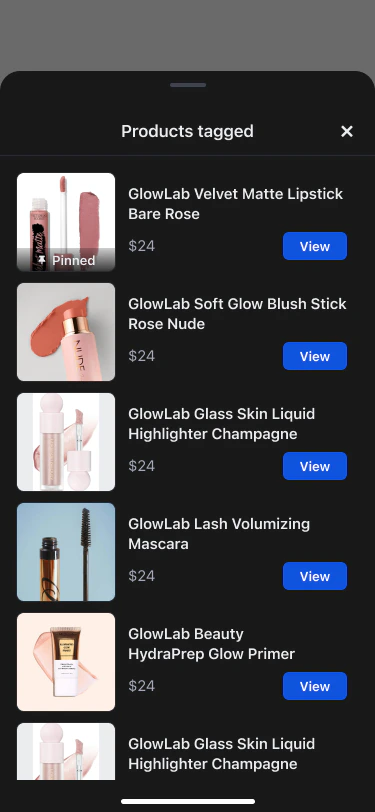 ### Key differences from post tagging
| Capability | Posts | Livestreams |
| --------------------------- | ----- | ------------------------------------ |
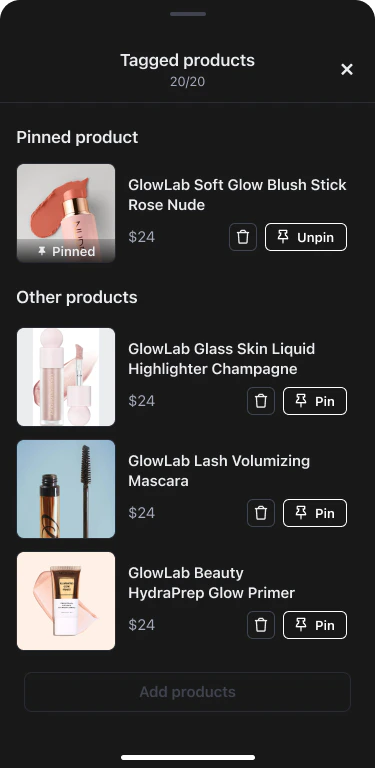
| Pin a product as overlay | — | ✅ (1 at a time, auto-replaces) |
| Swap pin mid-session | — | ✅ |
| Co-host product permissions | — | ✅ (host grants per co-host) |
| Update tags after creation | ✅ | ✅ (full replacement) |
| Viewer click-through | ✅ | ✅ (in-app browser, stream continues) |
Full livestream product tagging walkthrough → [Livestream: Product Tagging](/use-cases/social/livestream/product-tagging)
### Manage tagged products during the stream
### Key differences from post tagging
| Capability | Posts | Livestreams |
| --------------------------- | ----- | ------------------------------------ |
| Pin a product as overlay | — | ✅ (1 at a time, auto-replaces) |
| Swap pin mid-session | — | ✅ |
| Co-host product permissions | — | ✅ (host grants per co-host) |
| Update tags after creation | ✅ | ✅ (full replacement) |
| Viewer click-through | ✅ | ✅ (in-app browser, stream continues) |
Full livestream product tagging walkthrough → [Livestream: Product Tagging](/use-cases/social/livestream/product-tagging)
### Manage tagged products during the stream
 ***
## Track Product Engagement
Both post and livestream product tags support fire-and-forget analytics for views and clicks. Events are automatically deduplicated per product per source.
```typescript theme={null}
// When a product card enters the viewport
product.analytics.markAsViewed(
'feed_page/product_list/product_item', // location
AnalyticsSourceTypeEnum.POST, // or ROOM for livestreams
postId, // source ID
);
// When a viewer taps the product link
product.analytics.markAsClicked(
'feed_page/product_list/product_item',
AnalyticsSourceTypeEnum.POST,
postId,
);
```
| Event | Deduplication key | Notes |
| --------------- | ------------------------------------------------- | ------------------------------------------------- |
| `markAsViewed` | `{productId}.view.{sourceType}.{sourceId}` | Same product in different posts = separate events |
| `markAsClicked` | `{productId}.linkClicked.{sourceType}.{sourceId}` | Fire before opening the product URL |
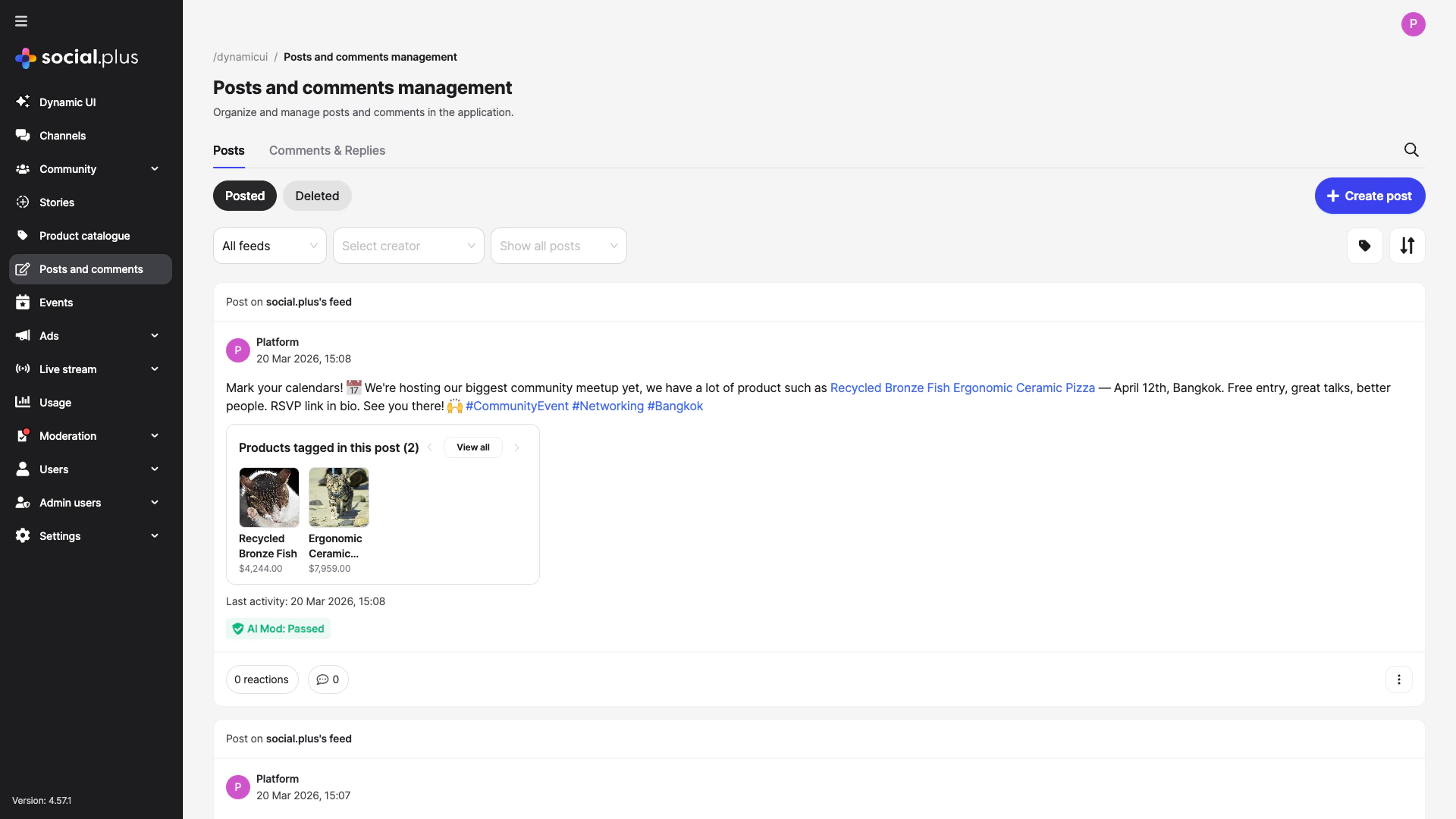
### Admin Console: Review product performance
Tagged posts surface in the console with linked product cards — admins can see which products are referenced and filter posts by tag.
***
## Track Product Engagement
Both post and livestream product tags support fire-and-forget analytics for views and clicks. Events are automatically deduplicated per product per source.
```typescript theme={null}
// When a product card enters the viewport
product.analytics.markAsViewed(
'feed_page/product_list/product_item', // location
AnalyticsSourceTypeEnum.POST, // or ROOM for livestreams
postId, // source ID
);
// When a viewer taps the product link
product.analytics.markAsClicked(
'feed_page/product_list/product_item',
AnalyticsSourceTypeEnum.POST,
postId,
);
```
| Event | Deduplication key | Notes |
| --------------- | ------------------------------------------------- | ------------------------------------------------- |
| `markAsViewed` | `{productId}.view.{sourceType}.{sourceId}` | Same product in different posts = separate events |
| `markAsClicked` | `{productId}.linkClicked.{sourceType}.{sourceId}` | Fire before opening the product URL |
### Admin Console: Review product performance
Tagged posts surface in the console with linked product cards — admins can see which products are referenced and filter posts by tag.
 ***
## Posts vs. Livestreams: Choosing the Right Approach
**Best for**: Product reviews, influencer recommendations, curated collections, community marketplaces.
* Tag products in text, image, or video posts
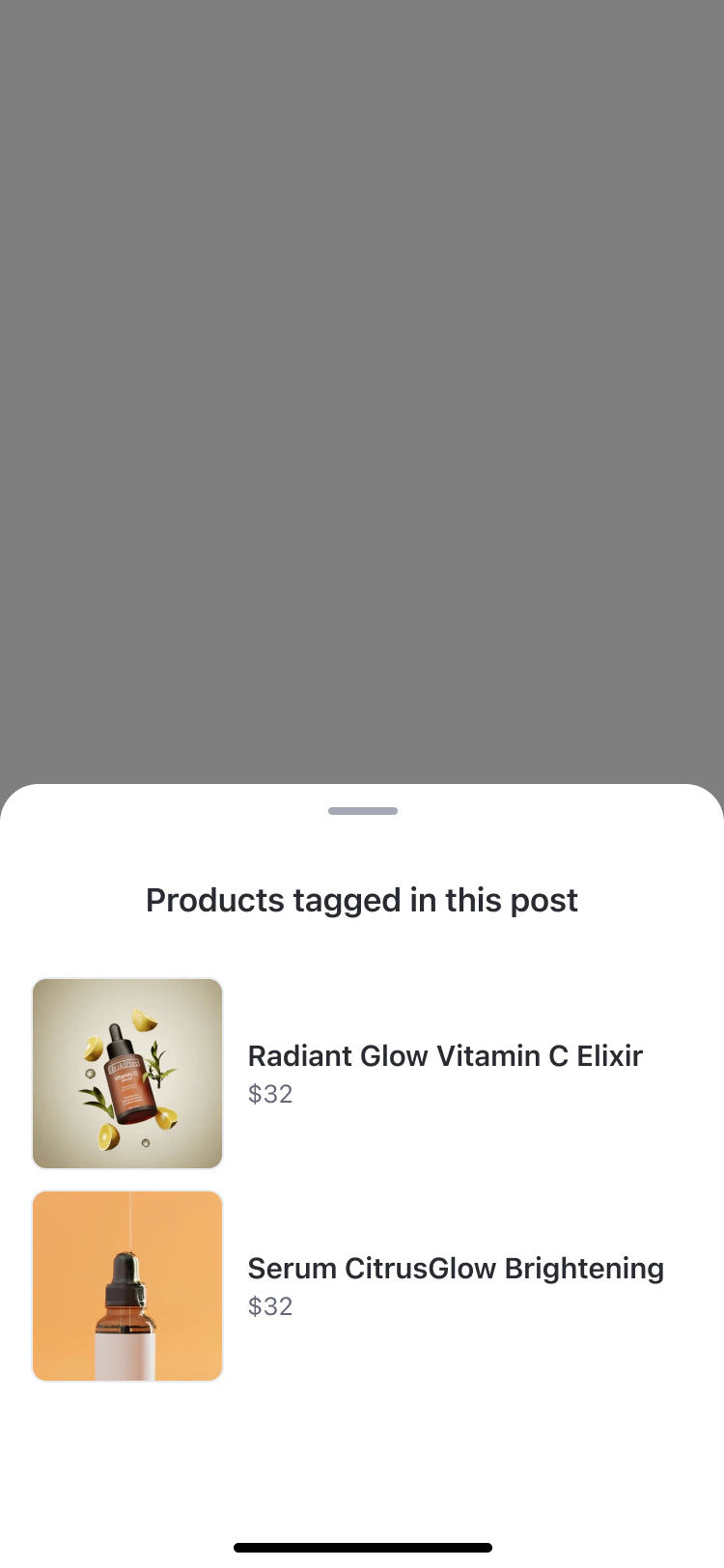
* Products appear as a "Products tagged in this post" section below the content
* Viewers browse and click through at their own pace
* No real-time coordination required
**Best for**: Flash sales, product demos, Q\&A sessions, unboxing events.
* Pin one product at a time as a prominent overlay
* Swap pins mid-stream to match what the host is discussing
* Co-hosts can manage products if the host grants permission
* Pair with live chat for real-time questions about the product
**Best for**: Maximizing content lifespan.
* After a livestream ends, the post remains in the feed with all tagged products still browsable
* Viewers who missed the live event can still shop the product list
* Pin overlay is removed in replay, but the product list persists
***
## Common Mistakes
**Tagging an Archived product** — Only products with **Active** status in the Admin Console appear in the tag-product search. If a host can't find a product, check its status.
**Confusing text tags vs. attachment tags** — Text posts use `productTags` (position in text). Image and video posts use `attachmentProductTags` (keyed by `fileId`). Mixing them up causes silent failures.
**Using the parent post ID for livestream pin/unpin** — `pinProduct` and `unpinProduct` require the **child** room post ID, not the parent. See [Livestream Product Tagging](/use-cases/social/livestream/product-tagging) for details.
## Best Practices
* Use CSV import for initial catalogue setup with many products
* Use consistent Product IDs (e.g., `SKU-001`) — they're immutable after creation
* Archive seasonal products instead of deleting to preserve tag history
* Keep thumbnails at 1:1 aspect ratio for consistent display
* Tag 3–5 products per post for best engagement — too many dilutes focus
* For livestreams, pre-tag all products before going live so they're ready immediately
* In image posts, link each product to the specific image that shows it
* Use text tags for editorial posts, attachment tags for visual-first content
* Call `markAsViewed` when the product card enters the viewport (use intersection observer on Web)
* Call `markAsClicked` on tap before opening the URL
* Review view-to-click ratios in the Admin Console to optimize product placement
* A/B test text tags vs. attachment tags to see which drives more clicks
***
## Related Topics
Deep-dive: pin/unpin, co-host permissions, and per-stream analytics.
Text, image, video, poll, and file posts with @mentions and hashtags.
Admin guide for uploading, importing, and managing your product database.
ProductTagSelectionComponent, ProductTagListComponent, and ManageProductTagListComponent.
productTags parameter reference for text posts.
Room post creation, pinProduct, unpinProduct, and co-host permissions.
***
## Posts vs. Livestreams: Choosing the Right Approach
**Best for**: Product reviews, influencer recommendations, curated collections, community marketplaces.
* Tag products in text, image, or video posts
* Products appear as a "Products tagged in this post" section below the content
* Viewers browse and click through at their own pace
* No real-time coordination required
**Best for**: Flash sales, product demos, Q\&A sessions, unboxing events.
* Pin one product at a time as a prominent overlay
* Swap pins mid-stream to match what the host is discussing
* Co-hosts can manage products if the host grants permission
* Pair with live chat for real-time questions about the product
**Best for**: Maximizing content lifespan.
* After a livestream ends, the post remains in the feed with all tagged products still browsable
* Viewers who missed the live event can still shop the product list
* Pin overlay is removed in replay, but the product list persists
***
## Common Mistakes
**Tagging an Archived product** — Only products with **Active** status in the Admin Console appear in the tag-product search. If a host can't find a product, check its status.
**Confusing text tags vs. attachment tags** — Text posts use `productTags` (position in text). Image and video posts use `attachmentProductTags` (keyed by `fileId`). Mixing them up causes silent failures.
**Using the parent post ID for livestream pin/unpin** — `pinProduct` and `unpinProduct` require the **child** room post ID, not the parent. See [Livestream Product Tagging](/use-cases/social/livestream/product-tagging) for details.
## Best Practices
* Use CSV import for initial catalogue setup with many products
* Use consistent Product IDs (e.g., `SKU-001`) — they're immutable after creation
* Archive seasonal products instead of deleting to preserve tag history
* Keep thumbnails at 1:1 aspect ratio for consistent display
* Tag 3–5 products per post for best engagement — too many dilutes focus
* For livestreams, pre-tag all products before going live so they're ready immediately
* In image posts, link each product to the specific image that shows it
* Use text tags for editorial posts, attachment tags for visual-first content
* Call `markAsViewed` when the product card enters the viewport (use intersection observer on Web)
* Call `markAsClicked` on tap before opening the URL
* Review view-to-click ratios in the Admin Console to optimize product placement
* A/B test text tags vs. attachment tags to see which drives more clicks
***
## Related Topics
Deep-dive: pin/unpin, co-host permissions, and per-stream analytics.
Text, image, video, poll, and file posts with @mentions and hashtags.
Admin guide for uploading, importing, and managing your product database.
ProductTagSelectionComponent, ProductTagListComponent, and ManageProductTagListComponent.
productTags parameter reference for text posts.
Room post creation, pinProduct, unpinProduct, and co-host permissions.