> ## Documentation Index
> Fetch the complete documentation index at: https://learn.social.plus/llms.txt
> Use this file to discover all available pages before exploring further.
# Post Impressions & Creator Analytics
> Track post views, measure reach, query who saw each post, and build a creator analytics dashboard.
**SDK v7.x** · Last verified March 2026 · iOS · Android · Web · Flutter
```typescript theme={null}
// 1. Mark a post as viewed (impression + reach)
await post.analytics.markAsViewed();
// 2. Read impression & reach counters
const { impressionsCount, reachCount } = post.analytics;
// 3. Query who viewed the post
const viewers = await post.analytics.getReachUsers({ limit: 50 });
```
Full walkthrough below ↓
**Platform note** — code samples below use TypeScript. Every method has an equivalent in the iOS (Swift), Android (Kotlin), and Flutter (Dart) SDKs — see the linked SDK reference in each step.
social.plus tracks two key content performance metrics for every post:
* **Impressions** — total number of times the post was viewed (same user can contribute multiple impressions)
* **Reach** — number of *unique* users who viewed the post
Both are updated in near-real time. This guide shows you how to record impressions as users scroll a feed, read the counters, and query the list of users who reached a post — the building blocks for a creator analytics dashboard.
```mermaid theme={null}
graph TD
A[Post appears in feed] --> B{Viewability check}
B -->|≥50% visible for ≥1s| C[post.analytics.markAsViewed]
C --> D[impression count +1]
C --> E{First view by this user?}
E -->|yes| F[reach count +1]
E -->|no| G[reach unchanged]
D & F --> H[Dashboard reads post.impression + post.reach]
H --> I[Creator sees updated stats]
I --> J[Creator queries who viewed the post]
J --> K[UserRepository.getViewedUsers]
K --> L[Paginated list of Amity.User]
classDef action fill:#e1f5fe,stroke:#0288d1,color:#01579b
classDef decision fill:#fff8e1,stroke:#f9a825,color:#f57f17
classDef process fill:#f3e5f5,stroke:#7b1fa2,color:#4a148c
classDef outcome fill:#e8f5e9,stroke:#388e3c,color:#1b5e20
class A action
class B,E decision
class C,D,F,G,H,J,K process
class I,L outcome
```
**After completing this guide you'll have:**
* Post impression tracking firing on every feed scroll event
* Unique reach (`impression`) and total views (`markAsViewed`) both captured
* A "Who viewed this" list queryable per post for creator dashboards
***
## Quick Start: Record a View and Read the Counters
```typescript theme={null}
import { PostRepository } from '@amityco/ts-sdk';
// Called from your IntersectionObserver when a post is ≥50% visible
function onPostVisible(post: Amity.Post) {
post.analytics.markAsViewed();
console.log(`Impressions: ${post.impression} · Reach: ${post.reach}`);
}
```
Full reference → [Post Impressions](/social-plus-sdk/social/content-management/posts/analytics/post-impressions)
***
## Step-by-Step Implementation
Call `markAsViewed()` when a post becomes meaningfully visible. In web apps, use an `IntersectionObserver`; in native apps, use your list's viewability callbacks. Aim for a threshold of ≥50% visible for at least 1 second to avoid counting rapid scroll-past views.
```typescript theme={null}
import { PostRepository } from '@amityco/ts-sdk';
// Subscribe to the feed so we have live post objects
const unsubscribe = PostRepository.getPosts(
{ targetType: 'community', targetId: communityId },
({ data: posts }) => {
posts.forEach(post => trackVisibility(post));
},
);
function trackVisibility(post: Amity.Post) {
const observer = new IntersectionObserver(
(entries) => {
entries.forEach(entry => {
if (entry.isIntersecting) {
post.analytics.markAsViewed();
observer.disconnect(); // count each scroll-into-view once per session
}
});
},
{ threshold: 0.5 }
);
observer.observe(document.getElementById(post.postId)!);
}
```
Full reference → [Post Impressions](/social-plus-sdk/social/content-management/posts/analytics/post-impressions)
Read `post.impression` and `post.reach` from the live post object. Both update in near-real time as views come in.
```typescript theme={null}
import { PostRepository } from '@amityco/ts-sdk';
// Subscribe to a single post for live counter updates
const unsubscribe = PostRepository.getPost(postId, ({ data: post }) => {
updateDashboard({
impressions: post.impression,
reach: post.reach,
});
});
```
Full reference → [Post Impressions](/social-plus-sdk/social/content-management/posts/analytics/post-impressions)
Get a paginated list of every unique user who reached a post — useful for "Seen by" UI, audience profiling, and creator insights.
```typescript theme={null}
import { UserRepository } from '@amityco/ts-sdk';
const unsubscribe = UserRepository.getReachedUsers(
{ postId: post.postId, limit: 20 },
({ data: users, hasNextPage, onNextPage, loading, error }) => {
if (loading) return;
if (error) console.error(error);
renderViewedByList(users);
if (hasNextPage) {
loadMoreButton.onclick = onNextPage;
}
},
);
```
Full reference → [Post Impressions](/social-plus-sdk/social/content-management/posts/analytics/post-impressions)
Combine impressions, reach, reaction count, and comment count into a compact analytics card shown on the creator's post detail view.
```typescript theme={null}
import { PostRepository } from '@amityco/ts-sdk';
const unsubscribe = PostRepository.getPost(postId, ({ data: post }) => {
const stats = {
impressions: post.impression,
reach: post.reach,
reactions: post.reactionsCount, // total reactions across all types
comments: post.commentsCount,
// engagement rate: (reactions + comments) / reach * 100
engagementRate: post.reach > 0
? ((post.reactionsCount + post.commentsCount) / post.reach * 100).toFixed(1)
: '0',
};
renderCreatorStats(stats);
});
```
***
## Analytics Metrics Reference
| Metric | Where to read | What it means |
| --------------------- | ------------------------------- | -------------------------------------------- |
| `post.impression` | Post live object | Total views (one user can generate multiple) |
| `post.reach` | Post live object | Unique users who viewed the post |
| `post.reactionsCount` | Post live object | Total reactions across all reaction types |
| `post.commentsCount` | Post live object | Total comments including replies |
| Viewed users list | `UserRepository.getViewedUsers` | Paginated list of `Amity.User` objects |
***
## Connect to Moderation & Analytics
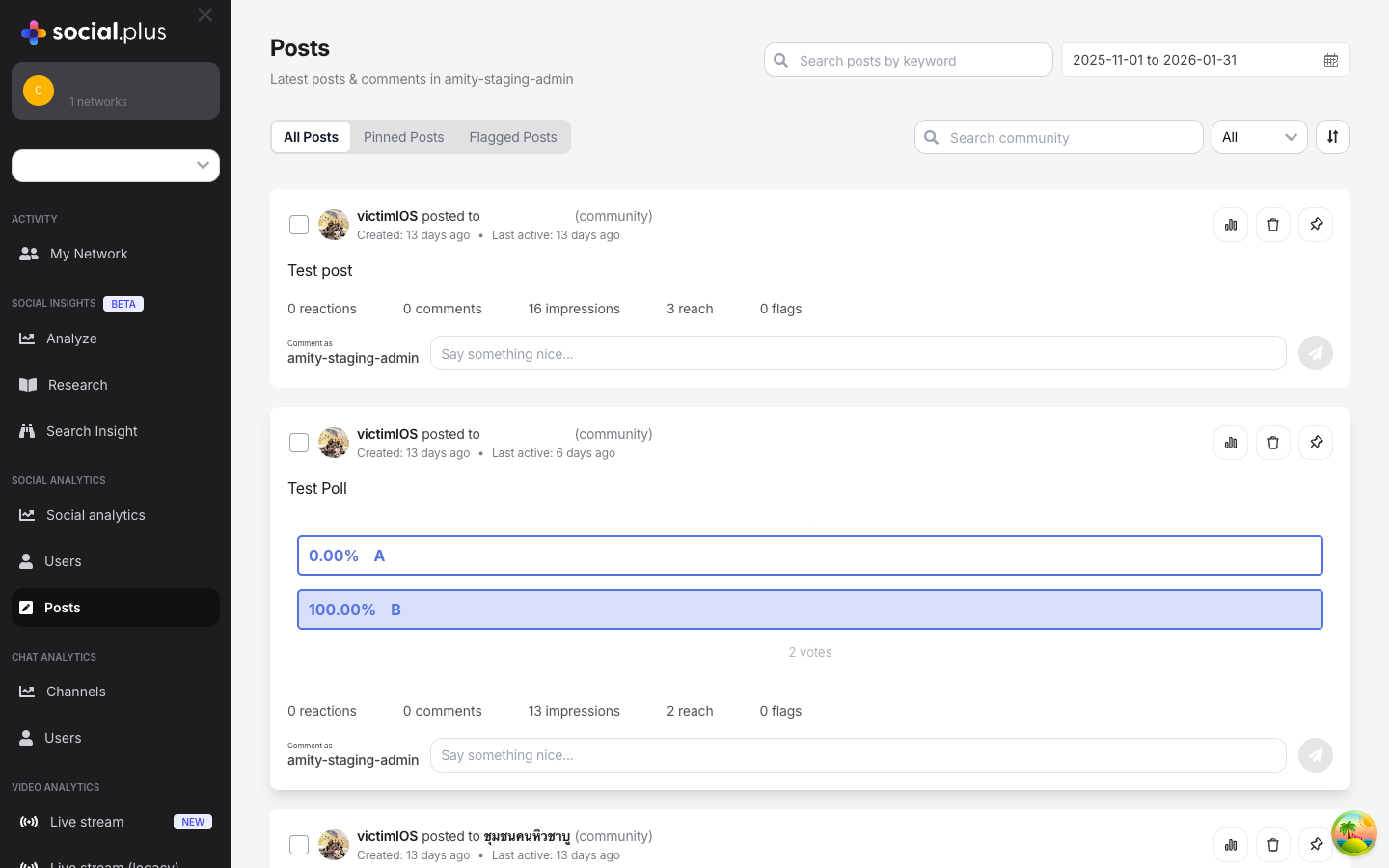 Impression and reach data aggregates across all posts and is visible in **Admin Console → Analytics → Content**. Filter by community, date range, or content type to spot high-performing content.
Stories have their own impression tracking via the Story SDK — the same impression/reach concept applies.
→ [Stories & Ephemeral Content](/use-cases/social/stories-and-ephemeral-content)
Although there's no real-time webhook per impression, you can combine `post.created` and `post.updated` webhooks with your own analytics pipeline to build server-side engagement scoring.
→ [Webhook Events](/analytics-and-moderation/social+-apis-and-services/webhook-event)
***
## Common Mistakes
**Calling `markAsViewed()` on every re-render** — React and Flutter components can re-render dozens of times. Debounce the call or use an Intersection Observer to fire it only when the post enters the viewport for the first time.
```typescript theme={null}
// ❌ Bad — fires on every render
useEffect(() => { post.analytics.markAsViewed(); });
// ✅ Good — fire once with Intersection Observer
const observer = new IntersectionObserver(([entry]) => {
if (entry.isIntersecting) {
post.analytics.markAsViewed();
observer.disconnect();
}
});
```
**Confusing impressions with reach** — Impressions count total views (one user can contribute many). Reach counts unique viewers. Display the right metric for the right context.
**Building analytics dashboards without caching** — Fetching reach user lists on every refresh is expensive. Cache the data for at least 30 seconds and show loading states for fresh queries.
## Best Practices
* **Feed scroll**: fire when ≥50% of the post card is visible for ≥1 second
* **Post detail view**: fire immediately on open — the user navigated intentionally
* **Clip reel**: fire when the clip starts playing (it's clearly in focus)
* **Don't fire** on posts that are briefly visible during a fast scroll-to-top gesture
* `markAsViewed()` is a fire-and-forget call — never `await` it in a render path
* If it fails due to network conditions, don't retry in the same session; impressions are best-effort
* Impression accuracy is near-real time; don't expect sub-second updates in the dashboard
* If your app shows creators a "Seen by" list, disclose this to viewers in your privacy policy
* The `getViewedUsers` API returns user objects — only show identifiable information (name, avatar) where appropriate for your app's context
* Respect user block relationships: don't show a blocked user's name to a creator in the viewed list
* Lead with **reach** (unique viewers) as the headline metric — it's more meaningful than raw impressions for most creators
* Show a 7-day or 28-day trend line, not just the current snapshot
* Display engagement rate (reactions + comments / reach) to help creators judge content quality
* For communities with many posts, sort by reach descending to surface top-performing content first
***
**Dive deeper**: [Posts API Reference](/social-plus-sdk/social/content-management/posts/overview) has full parameter tables, method signatures, and platform-specific details for every API used in this guide.
## Next Steps
You're tracking views — now monetize that attention with native ads in the feed.
Or explore related guides:
Track impressions on clip posts as users scroll a vertical reel
Story-specific impression and reach analytics
The feed query that powers impression tracking at scale
Impression and reach data aggregates across all posts and is visible in **Admin Console → Analytics → Content**. Filter by community, date range, or content type to spot high-performing content.
Stories have their own impression tracking via the Story SDK — the same impression/reach concept applies.
→ [Stories & Ephemeral Content](/use-cases/social/stories-and-ephemeral-content)
Although there's no real-time webhook per impression, you can combine `post.created` and `post.updated` webhooks with your own analytics pipeline to build server-side engagement scoring.
→ [Webhook Events](/analytics-and-moderation/social+-apis-and-services/webhook-event)
***
## Common Mistakes
**Calling `markAsViewed()` on every re-render** — React and Flutter components can re-render dozens of times. Debounce the call or use an Intersection Observer to fire it only when the post enters the viewport for the first time.
```typescript theme={null}
// ❌ Bad — fires on every render
useEffect(() => { post.analytics.markAsViewed(); });
// ✅ Good — fire once with Intersection Observer
const observer = new IntersectionObserver(([entry]) => {
if (entry.isIntersecting) {
post.analytics.markAsViewed();
observer.disconnect();
}
});
```
**Confusing impressions with reach** — Impressions count total views (one user can contribute many). Reach counts unique viewers. Display the right metric for the right context.
**Building analytics dashboards without caching** — Fetching reach user lists on every refresh is expensive. Cache the data for at least 30 seconds and show loading states for fresh queries.
## Best Practices
* **Feed scroll**: fire when ≥50% of the post card is visible for ≥1 second
* **Post detail view**: fire immediately on open — the user navigated intentionally
* **Clip reel**: fire when the clip starts playing (it's clearly in focus)
* **Don't fire** on posts that are briefly visible during a fast scroll-to-top gesture
* `markAsViewed()` is a fire-and-forget call — never `await` it in a render path
* If it fails due to network conditions, don't retry in the same session; impressions are best-effort
* Impression accuracy is near-real time; don't expect sub-second updates in the dashboard
* If your app shows creators a "Seen by" list, disclose this to viewers in your privacy policy
* The `getViewedUsers` API returns user objects — only show identifiable information (name, avatar) where appropriate for your app's context
* Respect user block relationships: don't show a blocked user's name to a creator in the viewed list
* Lead with **reach** (unique viewers) as the headline metric — it's more meaningful than raw impressions for most creators
* Show a 7-day or 28-day trend line, not just the current snapshot
* Display engagement rate (reactions + comments / reach) to help creators judge content quality
* For communities with many posts, sort by reach descending to surface top-performing content first
***
**Dive deeper**: [Posts API Reference](/social-plus-sdk/social/content-management/posts/overview) has full parameter tables, method signatures, and platform-specific details for every API used in this guide.
## Next Steps
You're tracking views — now monetize that attention with native ads in the feed.
Or explore related guides:
Track impressions on clip posts as users scroll a vertical reel
Story-specific impression and reach analytics
The feed query that powers impression tracking at scale