> ## Documentation Index
> Fetch the complete documentation index at: https://learn.social.plus/llms.txt
> Use this file to discover all available pages before exploring further.
# Polls & Interactive Content
> Add polls to community feeds — create single or multiple-choice votes with expiry timers, let users vote and change their minds, and close polls manually.
**SDK v7.x** · Last verified March 2026 · iOS · Android · Web · Flutter
```typescript theme={null}
import { PollRepository, PostRepository } from '@amityco/ts-sdk';
// 1. Create a poll
const { data: poll } = await PollRepository.createPoll({
question: 'Favorite color?', answerType: 'single',
answers: [{ dataType: 'text', data: 'Red' }, { dataType: 'text', data: 'Blue' }],
});
// 2. Wrap it in a post
const { data: post } = await PostRepository.createPost({
targetType: 'community',
targetId: communityId,
data: { text: 'Vote now! 👇', pollId: poll.pollId },
});
// 3. Vote
await PollRepository.votePoll(poll.pollId, ['answerId-1']);
// 4. Close the poll
await PollRepository.closePoll(poll.pollId);
```
Full walkthrough below ↓
**Platform note** — code samples below use TypeScript. Every method has an equivalent in the iOS (Swift), Android (Kotlin), and Flutter (Dart) SDKs — see the linked SDK reference in each step.
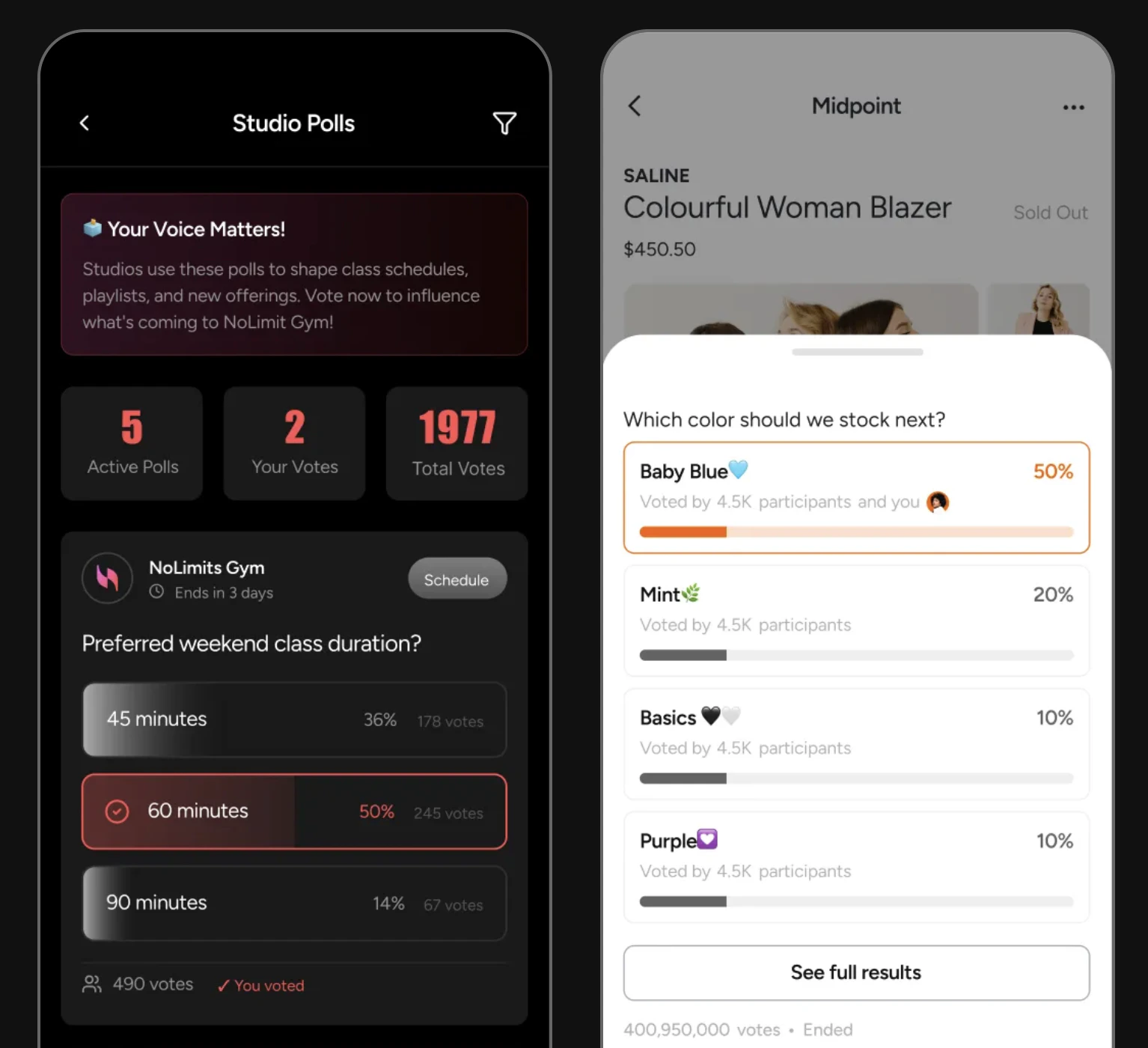 Polls are one of the highest-engagement content types in social apps. social.plus provides a full poll lifecycle: create the poll, wrap it in a feed post, let users vote (and change their vote), and close or delete when done. All four platforms are supported — iOS, Android, TypeScript, and Flutter.
```mermaid theme={null}
graph TD
A[Decide poll question + options] --> B[Create poll via PollRepository]
B --> C[pollId returned]
C --> D[Create poll post via PostRepository]
D --> E[Post appears in community feed]
E --> F{User action}
F -->|vote| G[PollRepository.votePoll]
F -->|change mind| H[PollRepository.unvotePoll]
G --> I[Real-time vote counts update]
H --> I
I --> J{Poll owner}
J -->|manual close| K[PollRepository.closePoll]
J -->|timer expires| K
K --> L[Poll locked — results final]
classDef action fill:#e1f5fe,stroke:#0288d1,color:#01579b
classDef decision fill:#fff8e1,stroke:#f9a825,color:#f57f17
classDef process fill:#f3e5f5,stroke:#7b1fa2,color:#4a148c
classDef outcome fill:#e8f5e9,stroke:#388e3c,color:#1b5e20
class A action
class F,J decision
class B,C,D,G,H,K process
class E,I,L outcome
```
Polls are always published as part of a post — there are no standalone polls in the current SDK. The two-step flow (create poll → create post) is by design so polls appear in feeds like any other content.
**Image polls**: Poll answers can include images instead of text — useful for "Which design do you prefer?" or "Which product looks better?" questions. Set `answer.dataType: 'image'` and provide a `fileId` (upload the image first) for each visual option. See [Poll Posts](/social-plus-sdk/social/content-management/posts/creation/poll-post) for the full answer object structure.
**After completing this guide you'll have:**
* Poll creation embedded inside a feed post (single and multiple choice)
* Voting, vote-change, and poll-close flows implemented
* Vote counts updating in real-time in your feed
## Limits at a Glance
| Property | Limit |
| ----------------- | ------------------------------------------ |
| Max poll options | 10 |
| Min poll options | 2 |
| Answer types | `single` or `multiple` |
| Answer data types | `text` or `image` |
| Question length | 500 characters |
| Poll closure | Manual close or auto-expire via `closedIn` |
| Vote changes | Allowed until poll closes |
***
## Quick Start: Create a Poll and Publish It
```typescript TypeScript theme={null}
import { PollRepository, PostRepository } from '@amityco/ts-sdk';
try {
// Step 1: Create the poll
const { data: poll } = await PollRepository.createPoll({
question: 'What feature should we build next?',
answerType: 'single',
answers: [
{ dataType: 'text', data: 'Dark mode' },
{ dataType: 'text', data: 'Offline support' },
{ dataType: 'text', data: 'Video reactions' },
],
});
// Step 2: Publish as a community post
const { data: post } = await PostRepository.createPost({
targetType: 'community',
targetId: communityId,
data: { text: 'Help us prioritise our roadmap! 👇', pollId: poll.pollId },
});
} catch (error) {
console.error('Failed to create poll post:', error);
}
```
Full reference → [Polls](/social-plus-sdk/core-concepts/content-handling/poll) · [Poll Posts](/social-plus-sdk/social/content-management/posts/creation/poll-post)
***
## Step-by-Step Implementation
Create the poll object first. Choose `'single'` for one answer or `'multiple'` for multi-select. Set `timeToClosePoll` in milliseconds — omit it for a poll that stays open until you manually close it.
```typescript TypeScript theme={null}
import { PollRepository } from '@amityco/ts-sdk';
const { data: poll } = await PollRepository.createPoll({
question: 'Which platform are you building on?',
answerType: 'single', // or 'multiple' for multi-select
answers: [
{ dataType: 'text', data: 'iOS' },
{ dataType: 'text', data: 'Android' },
{ dataType: 'text', data: 'Web' },
{ dataType: 'text', data: 'Flutter' },
],
// Optional: close automatically after 24 hours
// timeToClosePoll: 24 * 60 * 60 * 1000,
});
const pollId = poll.pollId;
```
Full reference → [Polls](/social-plus-sdk/core-concepts/content-handling/poll)
Create a poll post with the `pollId`. Add context text as the post caption — this is what users see before expanding the poll.
```typescript TypeScript theme={null}
import { PostRepository } from '@amityco/ts-sdk';
const { data: post } = await PostRepository.createPost({
targetType: 'community',
targetId: communityId,
data: { text: 'Vote now! 👇', pollId: pollId },
});
```
Full reference → [Poll Posts](/social-plus-sdk/social/content-management/posts/creation/poll-post)
Pass the poll ID and an array of answer IDs. For `single` polls, the array will have one item. For `multiple`, users can select up to all options.
```typescript TypeScript theme={null}
import { PollRepository } from '@amityco/ts-sdk';
// Cast the vote
const { data: updatedPoll } = await PollRepository.votePoll(
poll.pollId,
[selectedAnswerId] // array of answer IDs
);
// Show updated vote counts immediately
updatedPoll.answers.forEach(answer => {
console.log(`${answer.data}: ${answer.voteCount} votes`);
});
```
Full reference → [Polls](/social-plus-sdk/core-concepts/content-handling/poll)
Users can unvote and re-vote as long as the poll is still open. Call `unvotePoll` first, then `votePoll` with the new selection.
```typescript TypeScript theme={null}
import { PollRepository } from '@amityco/ts-sdk';
// Remove existing vote
await PollRepository.unvotePoll(poll.pollId);
// Cast a new vote
await PollRepository.votePoll(poll.pollId, [newAnswerId]);
```
Full reference → [Polls](/social-plus-sdk/core-concepts/content-handling/poll)
Poll owners and admins can close a poll early — for example, after a timed announcement. Once closed, no new votes are accepted and results are final.
```typescript TypeScript theme={null}
import { PollRepository } from '@amityco/ts-sdk';
const { data: closedPoll } = await PollRepository.closePoll(poll.pollId);
// closedPoll.isVotable === false — show results, hide vote button
if (!closedPoll.isVotable) {
showFinalResults(closedPoll);
}
```
Full reference → [Polls](/social-plus-sdk/core-concepts/content-handling/poll)
Permanently removes the poll and all vote data. Only the poll creator or an admin can delete. The associated post should also be deleted separately.
```typescript TypeScript theme={null}
import { PollRepository } from '@amityco/ts-sdk';
const isDeleted = await PollRepository.deletePoll(poll.pollId);
```
Full reference → [Polls](/social-plus-sdk/core-concepts/content-handling/poll)
***
## Rendering Poll Results
Use the poll's `answers` array to render a visual results bar. Show current vote percentages while the poll is open, and pin the winner after it closes.
```typescript TypeScript theme={null}
function renderPollResults(poll: Amity.Poll) {
const totalVotes = poll.answers.reduce((sum, a) => sum + a.voteCount, 0);
return poll.answers.map(answer => ({
text: answer.data,
votes: answer.voteCount,
percentage: totalVotes > 0 ? Math.round((answer.voteCount / totalVotes) * 100) : 0,
isSelected: answer.isVoted, // true if current user voted for this option
}));
}
```
***
## Connect to Moderation & Analytics
Use the pin-post API to pin a poll post to the top of a community feed during active voting.
→ [Pin Post](/social-plus-sdk/social/content-management/posts/moderation/pin-post)
Poll posts can be flagged by users and reviewed in **Admin Console → Moderation → Flagged Content** like any other post type.
Receive `post.created` and `post.updated` events for poll posts to trigger downstream actions like push notifications to community members when a new poll is published.
→ [Webhook Events](/analytics-and-moderation/social+-apis-and-services/webhook-event)
***
## Common Mistakes
**Creating a poll with fewer than 2 answers** — The API requires at least 2 answer options. Validate your form before calling `createPoll`.
**Forgetting to close polls** — Polls without a `closedAt` date stay open forever. If your poll is time-bound, either set `closedAt` at creation or call `closePoll` explicitly when the window ends.
**Displaying results before the user votes** — Showing percentages before voting biases choices. Hide results until the current user has voted or the poll is closed.
## Best Practices
* Keep questions under 100 characters — readable at a glance in a feed card
* Provide 2–5 options for most polls; more than 6 reduces completion rates
* Avoid vague options like "Option A" — every answer should be self-explanatory without reading the question
* Use `'multiple'` answer type for taste/preference questions, `'single'` for factual or decision polls
* Check `poll.isVotable` before showing the vote button — hide it entirely when `false`
* Highlight the winning option (most votes) with a distinct visual treatment after close
* Show the total vote count prominently — social proof drives engagement on future polls
* Keep the poll post visible in the feed after closing; don't delete it just because voting has ended
* Subscribe to the post live object to receive vote count updates without manual refresh
* Animate the percentage bar as it changes — a smooth transition feels more alive than a jump
* Debounce vote button presses to prevent accidental double-votes
***
**Dive deeper**: [Posts API Reference](/social-plus-sdk/social/content-management/posts/overview) has full parameter tables, method signatures, and platform-specific details for every API used in this guide.
## Next Steps
Polls are interactive — now add comments and reactions so users can discuss the results.
Or explore related guides:
Polls alongside all other post types in one guide
Publish polls to community feeds with pinning support
Notify members when a new poll is published
Polls are one of the highest-engagement content types in social apps. social.plus provides a full poll lifecycle: create the poll, wrap it in a feed post, let users vote (and change their vote), and close or delete when done. All four platforms are supported — iOS, Android, TypeScript, and Flutter.
```mermaid theme={null}
graph TD
A[Decide poll question + options] --> B[Create poll via PollRepository]
B --> C[pollId returned]
C --> D[Create poll post via PostRepository]
D --> E[Post appears in community feed]
E --> F{User action}
F -->|vote| G[PollRepository.votePoll]
F -->|change mind| H[PollRepository.unvotePoll]
G --> I[Real-time vote counts update]
H --> I
I --> J{Poll owner}
J -->|manual close| K[PollRepository.closePoll]
J -->|timer expires| K
K --> L[Poll locked — results final]
classDef action fill:#e1f5fe,stroke:#0288d1,color:#01579b
classDef decision fill:#fff8e1,stroke:#f9a825,color:#f57f17
classDef process fill:#f3e5f5,stroke:#7b1fa2,color:#4a148c
classDef outcome fill:#e8f5e9,stroke:#388e3c,color:#1b5e20
class A action
class F,J decision
class B,C,D,G,H,K process
class E,I,L outcome
```
Polls are always published as part of a post — there are no standalone polls in the current SDK. The two-step flow (create poll → create post) is by design so polls appear in feeds like any other content.
**Image polls**: Poll answers can include images instead of text — useful for "Which design do you prefer?" or "Which product looks better?" questions. Set `answer.dataType: 'image'` and provide a `fileId` (upload the image first) for each visual option. See [Poll Posts](/social-plus-sdk/social/content-management/posts/creation/poll-post) for the full answer object structure.
**After completing this guide you'll have:**
* Poll creation embedded inside a feed post (single and multiple choice)
* Voting, vote-change, and poll-close flows implemented
* Vote counts updating in real-time in your feed
## Limits at a Glance
| Property | Limit |
| ----------------- | ------------------------------------------ |
| Max poll options | 10 |
| Min poll options | 2 |
| Answer types | `single` or `multiple` |
| Answer data types | `text` or `image` |
| Question length | 500 characters |
| Poll closure | Manual close or auto-expire via `closedIn` |
| Vote changes | Allowed until poll closes |
***
## Quick Start: Create a Poll and Publish It
```typescript TypeScript theme={null}
import { PollRepository, PostRepository } from '@amityco/ts-sdk';
try {
// Step 1: Create the poll
const { data: poll } = await PollRepository.createPoll({
question: 'What feature should we build next?',
answerType: 'single',
answers: [
{ dataType: 'text', data: 'Dark mode' },
{ dataType: 'text', data: 'Offline support' },
{ dataType: 'text', data: 'Video reactions' },
],
});
// Step 2: Publish as a community post
const { data: post } = await PostRepository.createPost({
targetType: 'community',
targetId: communityId,
data: { text: 'Help us prioritise our roadmap! 👇', pollId: poll.pollId },
});
} catch (error) {
console.error('Failed to create poll post:', error);
}
```
Full reference → [Polls](/social-plus-sdk/core-concepts/content-handling/poll) · [Poll Posts](/social-plus-sdk/social/content-management/posts/creation/poll-post)
***
## Step-by-Step Implementation
Create the poll object first. Choose `'single'` for one answer or `'multiple'` for multi-select. Set `timeToClosePoll` in milliseconds — omit it for a poll that stays open until you manually close it.
```typescript TypeScript theme={null}
import { PollRepository } from '@amityco/ts-sdk';
const { data: poll } = await PollRepository.createPoll({
question: 'Which platform are you building on?',
answerType: 'single', // or 'multiple' for multi-select
answers: [
{ dataType: 'text', data: 'iOS' },
{ dataType: 'text', data: 'Android' },
{ dataType: 'text', data: 'Web' },
{ dataType: 'text', data: 'Flutter' },
],
// Optional: close automatically after 24 hours
// timeToClosePoll: 24 * 60 * 60 * 1000,
});
const pollId = poll.pollId;
```
Full reference → [Polls](/social-plus-sdk/core-concepts/content-handling/poll)
Create a poll post with the `pollId`. Add context text as the post caption — this is what users see before expanding the poll.
```typescript TypeScript theme={null}
import { PostRepository } from '@amityco/ts-sdk';
const { data: post } = await PostRepository.createPost({
targetType: 'community',
targetId: communityId,
data: { text: 'Vote now! 👇', pollId: pollId },
});
```
Full reference → [Poll Posts](/social-plus-sdk/social/content-management/posts/creation/poll-post)
Pass the poll ID and an array of answer IDs. For `single` polls, the array will have one item. For `multiple`, users can select up to all options.
```typescript TypeScript theme={null}
import { PollRepository } from '@amityco/ts-sdk';
// Cast the vote
const { data: updatedPoll } = await PollRepository.votePoll(
poll.pollId,
[selectedAnswerId] // array of answer IDs
);
// Show updated vote counts immediately
updatedPoll.answers.forEach(answer => {
console.log(`${answer.data}: ${answer.voteCount} votes`);
});
```
Full reference → [Polls](/social-plus-sdk/core-concepts/content-handling/poll)
Users can unvote and re-vote as long as the poll is still open. Call `unvotePoll` first, then `votePoll` with the new selection.
```typescript TypeScript theme={null}
import { PollRepository } from '@amityco/ts-sdk';
// Remove existing vote
await PollRepository.unvotePoll(poll.pollId);
// Cast a new vote
await PollRepository.votePoll(poll.pollId, [newAnswerId]);
```
Full reference → [Polls](/social-plus-sdk/core-concepts/content-handling/poll)
Poll owners and admins can close a poll early — for example, after a timed announcement. Once closed, no new votes are accepted and results are final.
```typescript TypeScript theme={null}
import { PollRepository } from '@amityco/ts-sdk';
const { data: closedPoll } = await PollRepository.closePoll(poll.pollId);
// closedPoll.isVotable === false — show results, hide vote button
if (!closedPoll.isVotable) {
showFinalResults(closedPoll);
}
```
Full reference → [Polls](/social-plus-sdk/core-concepts/content-handling/poll)
Permanently removes the poll and all vote data. Only the poll creator or an admin can delete. The associated post should also be deleted separately.
```typescript TypeScript theme={null}
import { PollRepository } from '@amityco/ts-sdk';
const isDeleted = await PollRepository.deletePoll(poll.pollId);
```
Full reference → [Polls](/social-plus-sdk/core-concepts/content-handling/poll)
***
## Rendering Poll Results
Use the poll's `answers` array to render a visual results bar. Show current vote percentages while the poll is open, and pin the winner after it closes.
```typescript TypeScript theme={null}
function renderPollResults(poll: Amity.Poll) {
const totalVotes = poll.answers.reduce((sum, a) => sum + a.voteCount, 0);
return poll.answers.map(answer => ({
text: answer.data,
votes: answer.voteCount,
percentage: totalVotes > 0 ? Math.round((answer.voteCount / totalVotes) * 100) : 0,
isSelected: answer.isVoted, // true if current user voted for this option
}));
}
```
***
## Connect to Moderation & Analytics
Use the pin-post API to pin a poll post to the top of a community feed during active voting.
→ [Pin Post](/social-plus-sdk/social/content-management/posts/moderation/pin-post)
Poll posts can be flagged by users and reviewed in **Admin Console → Moderation → Flagged Content** like any other post type.
Receive `post.created` and `post.updated` events for poll posts to trigger downstream actions like push notifications to community members when a new poll is published.
→ [Webhook Events](/analytics-and-moderation/social+-apis-and-services/webhook-event)
***
## Common Mistakes
**Creating a poll with fewer than 2 answers** — The API requires at least 2 answer options. Validate your form before calling `createPoll`.
**Forgetting to close polls** — Polls without a `closedAt` date stay open forever. If your poll is time-bound, either set `closedAt` at creation or call `closePoll` explicitly when the window ends.
**Displaying results before the user votes** — Showing percentages before voting biases choices. Hide results until the current user has voted or the poll is closed.
## Best Practices
* Keep questions under 100 characters — readable at a glance in a feed card
* Provide 2–5 options for most polls; more than 6 reduces completion rates
* Avoid vague options like "Option A" — every answer should be self-explanatory without reading the question
* Use `'multiple'` answer type for taste/preference questions, `'single'` for factual or decision polls
* Check `poll.isVotable` before showing the vote button — hide it entirely when `false`
* Highlight the winning option (most votes) with a distinct visual treatment after close
* Show the total vote count prominently — social proof drives engagement on future polls
* Keep the poll post visible in the feed after closing; don't delete it just because voting has ended
* Subscribe to the post live object to receive vote count updates without manual refresh
* Animate the percentage bar as it changes — a smooth transition feels more alive than a jump
* Debounce vote button presses to prevent accidental double-votes
***
**Dive deeper**: [Posts API Reference](/social-plus-sdk/social/content-management/posts/overview) has full parameter tables, method signatures, and platform-specific details for every API used in this guide.
## Next Steps
Polls are interactive — now add comments and reactions so users can discuss the results.
Or explore related guides:
Polls alongside all other post types in one guide
Publish polls to community feeds with pinning support
Notify members when a new poll is published