> ## Documentation Index
> Fetch the complete documentation index at: https://learn.social.plus/llms.txt
> Use this file to discover all available pages before exploring further.
# Notifications & Engagement
> Build a notification inbox with seen/unseen state, real-time delivery, push notification setup, and granular event-based triggers.
**SDK v7.x** · Last verified March 2026 · iOS · Android · Web · Flutter
**TypeScript SDK gap**: `Client.registerPushNotification` is not available in the TypeScript SDK. iOS and Android use native push token registration. In TS/Web, configure push notifications via your web push service (e.g., Firebase Messaging). Tracking: see `.docs-ops/evals/sdk-tickets-to-file.md`.
```typescript theme={null}
// 1. Get notification tray items
const { data } = await notificationTray.getNotificationTrayItems({ limit: 20 });
// 2. Mark a notification as seen
await notificationTray.markTraySeen('notificationId');
// 3. Register push token
// Push token registration not in TS SDK (see Warning above)
// Configure push via your web push service (e.g., Firebase Messaging)
});
// 4. Subscribe to real-time tray updates
notificationTray.onNotificationTraySeenUpdated(({ data }) => {
showBadge(data.unseenCount);
});
```
Full walkthrough below ↓
**Platform note** — code samples below use TypeScript. Every method has an equivalent in the iOS (Swift), Android (Kotlin), and Flutter (Dart) SDKs — see the linked SDK reference in each step.
Notifications are your primary re-engagement tool. This guide covers building an in-app notification tray with seen/unseen tracking, setting up push notifications across all platforms, and subscribing to real-time social events.
```mermaid theme={null}
graph TD
A[Social activity occurs] --> B{Who triggered it?}
B -->|Comment on post| C[Post author notified]
B -->|Reaction on content| D[Content author notified]
B -->|Mention in comment| E[Mentioned user notified]
B -->|New follower| F[Followed user notified]
B -->|Community post| G[Community member notified]
C & D & E & F & G --> H{Delivery channel}
H -->|In-app open| I[Notification tray item]
H -->|App backgrounded| J[Push notification]
I --> K[User taps → navigates to content]
J --> K
classDef action fill:#e1f5fe,stroke:#0288d1,color:#01579b
classDef decision fill:#fff8e1,stroke:#f9a825,color:#f57f17
classDef process fill:#f3e5f5,stroke:#7b1fa2,color:#4a148c
classDef outcome fill:#e8f5e9,stroke:#388e3c,color:#1b5e20
class A action
class B,H decision
class C,D,E,F,G,I,J process
class K outcome
```
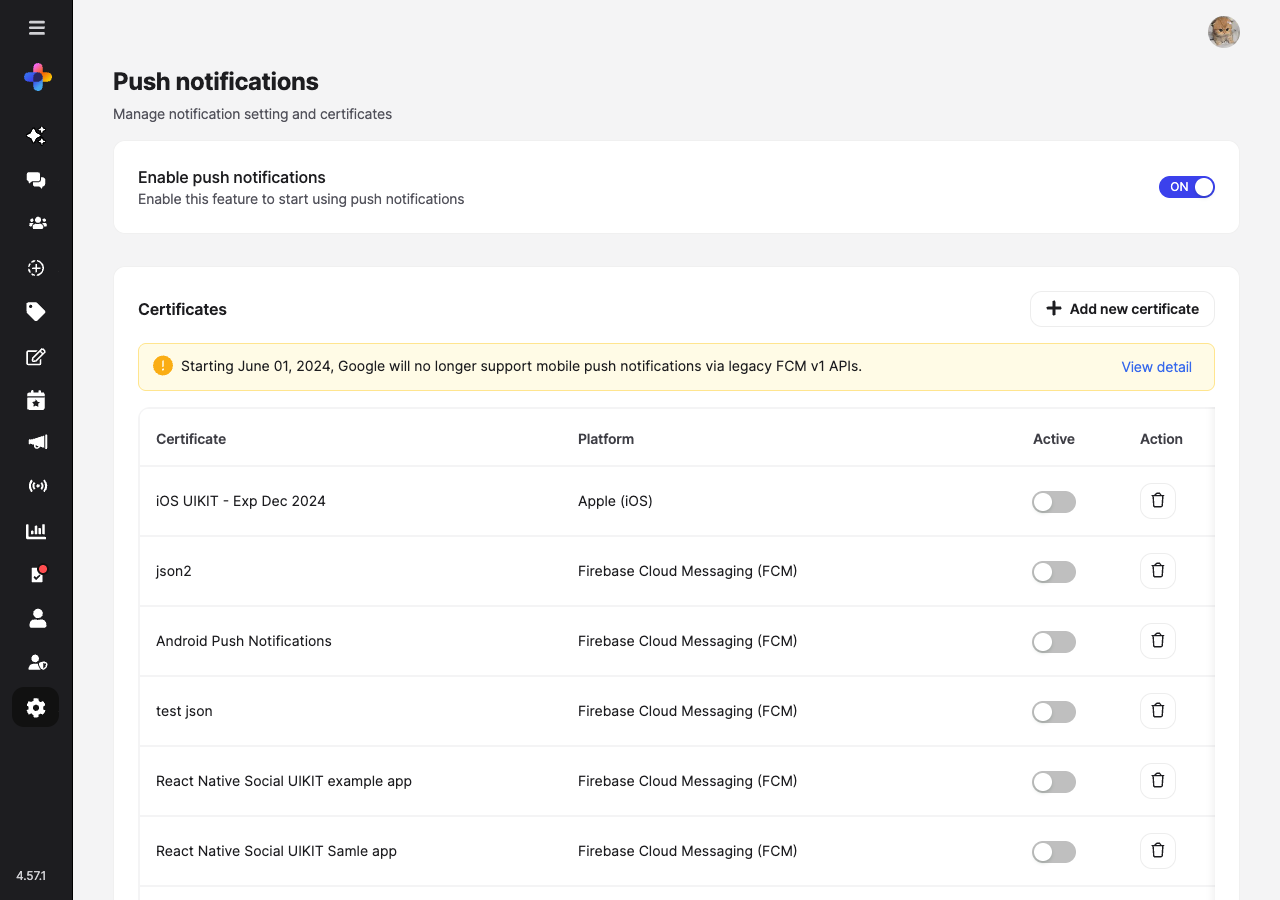
**Prerequisites**: SDK installed and authenticated. For push notifications: APNs certificate (iOS) or FCM credentials (Android) configured in **Admin Console → Settings → Integrations**.
**Also recommended:** Complete [Build a Social Feed](/use-cases/social/build-a-social-feed) and [Community Platform](/use-cases/social/community-platform) first — notifications are triggered by feed and community events.
**After completing this guide you'll have:**
* An in-app notification tray with seen/unseen state and real-time delivery
* Push notifications (APNs and FCM) registered and firing for key events
* Notification triggers mapped to SDK events and webhook callbacks
***
## Quick Start: Query Notification Tray
```typescript TypeScript theme={null}
import { notificationTray } from '@amityco/ts-sdk';
const unsubscribe = notificationTray.getNotificationTrayItems(
{ limit: 20 },
({ data: items, onNextPage, hasNextPage, loading, error }) => {
if (loading) return;
if (error) {
handleError(error);
return;
}
renderResults(items);
if (hasNextPage) {
onNextPage?.();
}
},
);
unsubscribe();
```
***
## Part 1: In-App Notification Tray
Use the tray status to show a badge count on your notification icon. The `unseenCount` updates in real-time.
```typescript theme={null}
import { notificationTray } from '@amityco/ts-sdk';
const unsubscribe = await notificationTray.getNotificationTraySeen(
({ data: notificationTraySeen, loading }) => {
if (!loading && notificationTraySeen) {
updateBadge(notificationTraySeen.unseenCount);
}
},
);
```
Full reference → [Notification Tray Status](/social-plus-sdk/social/discovery-engagement/notifications/notification-tray-status)
When the user opens the tray, mark all unseen items as seen. Or mark individual items as seen on tap. Both bulk and per-item marking are supported.
```typescript theme={null}
import { notificationTray } from '@amityco/ts-sdk';
// Mark all as seen
await notificationTray.markTraySeen();
// Or mark a single item
await item.markSeen();
```
Full reference → [Notification Tray Status](/social-plus-sdk/social/discovery-engagement/notifications/notification-tray-status)
Each notification item contains `targetType` and `targetId` fields you can use to deep-link to the source content (post, comment, user, or community).
Reference all notification types → [Notification Events Reference](/social-plus-sdk/social/discovery-engagement/notifications/notification-events-reference)
***
## Part 2: Push Notifications
```mermaid theme={null}
sequenceDiagram
participant Device as User's Device
participant SDK
participant Server as social.plus Server
participant APNs as APNs / FCM
Device->>SDK: registerPushNotification(token)
SDK->>Server: Register device token
Server-->>SDK: Registered
Note over Server: Another user comments on the post
Server->>Server: Generate notification
alt App in foreground
Server->>SDK: Real-time event
SDK->>Device: In-app notification tray item
else App in background
Server->>APNs: Push payload
APNs->>Device: System push notification
Device->>SDK: User taps → deep link to content
end
```
Before registering devices, add your push credentials in **Admin Console → Settings → Push Notifications**:
* **iOS**: Upload your APNs certificate or key
* **Android**: Add your FCM Server Key
* **React Native / Flutter**: Configure per platform
→ Platform setup guides: [iOS](/social-plus-sdk/core-concepts/realtime-communication/push-notifications/setup/ios-setup) · [Android](/social-plus-sdk/core-concepts/realtime-communication/push-notifications/setup/android-setup) · [React Native](/social-plus-sdk/core-concepts/realtime-communication/push-notifications/setup/react-native-setup) · [Flutter](/social-plus-sdk/core-concepts/realtime-communication/push-notifications/setup/flutter-setup)
After the user logs in, retrieve the device token and register it with the SDK. This associates the device with the authenticated user so the backend can route pushes correctly.
```typescript theme={null}
import { Client } from '@amityco/ts-sdk';
// Register a device token (web push or React Native FCM token)
await client.registerPushNotification({ token: deviceToken });
```
Full reference → [Register Push Notifications](/social-plus-sdk/core-concepts/realtime-communication/push-notifications/register-and-unregister-push-notifications-on-a-device)
Always unregister the device token when the user logs out to prevent push notifications being sent to the wrong user's device.
```typescript theme={null}
// Unregister on logout — stops push notifications to this device
await client.unregisterPushNotification({ token: deviceToken });
```
Full reference → [Register Push Notifications](/social-plus-sdk/core-concepts/realtime-communication/push-notifications/register-and-unregister-push-notifications-on-a-device)
***
## Part 3: User Notification Preferences
Let users control what they're notified about at a granular level. Settings are organised by module (`SOCIAL`, `CHAT`, `LIVE_STREAM`) and apply across all of the user's devices.
Read the user's current preferences to populate a settings screen.
```typescript theme={null}
import { UserRepository } from '@amityco/ts-sdk';
// Notification settings API: see push-notification docs for v6 SDK approach
console.log('Notifications enabled:', settings.isEnabled);
settings.modules.forEach(m => console.log(m.moduleType, m.isEnabled));
```
Enable or disable individual modules, or turn off all notifications at once.
```typescript theme={null}
import { UserRepository } from '@amityco/ts-sdk';
// Disable social, keep chat enabled
// Notification settings update: see push-notification docs for v6 SDK approach
// await legacySettingsUpdate({
modules: [
{ moduleType: 'social', isEnabled: false },
{ moduleType: 'chat', isEnabled: true },
],
});
// Or disable all notifications at once
// Notification settings update: see push-notification docs for v6 SDK approach
// await legacySettingsUpdate({ isEnabled: false });
```
Full reference → [User Notification Settings](/social-plus-sdk/core-concepts/realtime-communication/push-notifications/settings/user-settings)
For finer control, users can configure which notification types they receive per community (new post, new comment, mentions). This is separate from the global user setting above.
Full reference → [Community Notification Settings](/social-plus-sdk/core-concepts/realtime-communication/push-notifications/settings/community-settings)
***
## Connect to Moderation & Analytics
 When a moderator removes content, use webhook events (`post.deleted`, `user.banned`) to send a custom in-app or push notification explaining the action to the affected user.
→ [Webhook Events](/analytics-and-moderation/social+-apis-and-services/webhook-event)
Track notification open rates and click-through rates in **Admin Console → Analytics Dashboard → Engagement Metrics** to understand which notification types drive the most re-engagement.
***
## Common Mistakes
**Polling for notifications on a timer** — This drains battery and creates unnecessary API calls. Use real-time tray subscriptions instead:
```typescript theme={null}
// ❌ Bad — polling every 5 seconds
setInterval(() => fetchNotifications(), 5000);
// ✅ Good — real-time tray subscription
notificationTray.onNotificationTraySeenUpdated(({ data }) => {
updateBadge(data.unseenCount);
});
```
**Not handling push permission rejection** — On iOS, users can deny push permissions. Always check the permission status and provide an in-app fallback (notification tray) when push is disabled.
**Registering push tokens before login** — Push token registration requires an active session. Always call `registerPushNotification` after `login()` completes, not in parallel.
## Best Practices
* Group related notifications (e.g., "5 reactions on your post") instead of showing individual items
* Show a relative timestamp ("2 min ago") that updates while the tray is open
* Mark all as seen when the tray is closed, not opened — allows the user to scan without losing unseen state
* Include a thumbnail of the content the notification relates to
* Keep push payloads minimal — fetch full content on tap, not in the payload
* Include `userId` in the notification payload to support multi-account scenarios
* Group pushes by thread on iOS using `threadIdentifier`
* Respect iOS Critical Alert restrictions — social notifications should never be critical
* Default to email digest for low-activity users rather than per-event push
* Respect platform quiet hours (iOS Focus mode, Android DND)
* Provide granular opt-out: users should be able to mute a specific community without turning off all notifications
* Rate-limit push if a post gets hundreds of reactions — send "50+ reactions on your post" not one push per reaction
***
**Dive deeper**: [Discovery & Engagement API Reference](/social-plus-sdk/social/discovery-engagement/overview) has full parameter tables, method signatures, and platform-specific details for every API used in this guide.
## Next Steps
Notifications are flowing — now ensure content quality with flagging, AI moderation, and admin review.
Or explore related guides:
Follow activity that drives notification events
Engagement events that trigger notification items
Use webhooks to notify users of moderation actions
When a moderator removes content, use webhook events (`post.deleted`, `user.banned`) to send a custom in-app or push notification explaining the action to the affected user.
→ [Webhook Events](/analytics-and-moderation/social+-apis-and-services/webhook-event)
Track notification open rates and click-through rates in **Admin Console → Analytics Dashboard → Engagement Metrics** to understand which notification types drive the most re-engagement.
***
## Common Mistakes
**Polling for notifications on a timer** — This drains battery and creates unnecessary API calls. Use real-time tray subscriptions instead:
```typescript theme={null}
// ❌ Bad — polling every 5 seconds
setInterval(() => fetchNotifications(), 5000);
// ✅ Good — real-time tray subscription
notificationTray.onNotificationTraySeenUpdated(({ data }) => {
updateBadge(data.unseenCount);
});
```
**Not handling push permission rejection** — On iOS, users can deny push permissions. Always check the permission status and provide an in-app fallback (notification tray) when push is disabled.
**Registering push tokens before login** — Push token registration requires an active session. Always call `registerPushNotification` after `login()` completes, not in parallel.
## Best Practices
* Group related notifications (e.g., "5 reactions on your post") instead of showing individual items
* Show a relative timestamp ("2 min ago") that updates while the tray is open
* Mark all as seen when the tray is closed, not opened — allows the user to scan without losing unseen state
* Include a thumbnail of the content the notification relates to
* Keep push payloads minimal — fetch full content on tap, not in the payload
* Include `userId` in the notification payload to support multi-account scenarios
* Group pushes by thread on iOS using `threadIdentifier`
* Respect iOS Critical Alert restrictions — social notifications should never be critical
* Default to email digest for low-activity users rather than per-event push
* Respect platform quiet hours (iOS Focus mode, Android DND)
* Provide granular opt-out: users should be able to mute a specific community without turning off all notifications
* Rate-limit push if a post gets hundreds of reactions — send "50+ reactions on your post" not one push per reaction
***
**Dive deeper**: [Discovery & Engagement API Reference](/social-plus-sdk/social/discovery-engagement/overview) has full parameter tables, method signatures, and platform-specific details for every API used in this guide.
## Next Steps
Notifications are flowing — now ensure content quality with flagging, AI moderation, and admin review.
Or explore related guides:
Follow activity that drives notification events
Engagement events that trigger notification items
Use webhooks to notify users of moderation actions