> ## Documentation Index
> Fetch the complete documentation index at: https://learn.social.plus/llms.txt
> Use this file to discover all available pages before exploring further.
# Content Moderation Pipeline
> Wire up the full moderation loop: SDK flagging → admin review → AI moderation → webhook automation — keeping your platform safe at scale.
**SDK v7.x** · Last verified March 2026 · iOS · Android · Web · Flutter
```typescript theme={null}
// 1. Flag a post
await PostRepository.flagPost('postId', 'spam');
// 2. Unflag a post
await PostRepository.unflagPost('postId');
// 3. Flag a comment
await CommentRepository.flagComment('commentId', 'harassment');
// 4. Flag a user
await UserRepository.flagUser('userId', 'impersonation');
```
Full walkthrough below ↓
**Platform note** — code samples below use TypeScript. Every method has an equivalent in the iOS (Swift), Android (Kotlin), and Flutter (Dart) SDKs — see the linked SDK reference in each step.
At scale, manual moderation doesn't work. This guide shows how all the moderation pieces connect — from users flagging content in the SDK, to AI auto-screening, to moderators reviewing in the Admin Console, to webhooks triggering automated responses.
```mermaid theme={null}
graph TD
A[User creates content] --> B[AI screening]
B -->|Clean| C[Content goes live]
B -->|Violation| D[Auto-rejected or flagged for review]
C --> E{User reports content}
E -->|Flag via SDK| F[Flagged content queue]
F --> G[Moderator reviews in Admin Console]
G -->|Approve| C
G -->|Remove| H[Content deleted]
G -->|Warn/Ban user| I[User action taken]
H & I --> J[Webhook event fired]
J --> K[Your backend / automation]
K -->|Send notification| L[Notified user]
K -->|Log incident| M[Incident database]
classDef action fill:#e1f5fe,stroke:#0288d1,color:#01579b
classDef decision fill:#fff8e1,stroke:#f9a825,color:#f57f17
classDef process fill:#f3e5f5,stroke:#7b1fa2,color:#4a148c
classDef outcome fill:#e8f5e9,stroke:#388e3c,color:#1b5e20
class A action
class E decision
class B,D,F,G,J,K process
class C,H,I,L,M outcome
```
**Prerequisites**: SDK installed with authenticated users, Admin Console access for moderator configuration, and a server endpoint to receive webhook events.
**Also recommended:** Complete [Rich Content Creation](/use-cases/social/rich-content-creation) and [Community Platform](/use-cases/social/community-platform) first — you need content and communities to moderate.
**After completing this guide you'll have:**
* User-side flag/unflag implemented for posts and comments
* Admin Console moderation review queue receiving flagged content
* An AI moderation rule set configured with at least one auto-action
* A webhook handler receiving moderation events for downstream automation
***
## Layer 1: SDK — User Flagging
Let users flag content they find inappropriate. Flagged content enters a moderation queue. The SDK provides methods to flag posts, comments, and users.
### Quick Start: Flag a Post
```swift iOS theme={null}
do {
let success = try await postRepository.flagPost(withId: postId, reason: .spam)
} catch {
// Handle error here
}
```
```kotlin Android theme={null}
post.report()
.flag(AmityContentFlagReason.SpamOrScams)
.doOnComplete {
// Post flagged successfully
}
.doOnError { error ->
// Handle error
}
.subscribe()
```
```typescript TypeScript theme={null}
import { PostRepository } from '@amityco/ts-sdk';
const isFlagged = await PostRepository.flagPost(postId, reasonReport);
```
```dart Flutter theme={null}
post.report().flag().then((value) {
// Post flagged successfully
}).onError((error, stackTrace) {
// Handle error
});
```
Full reference → [Content Flagging](/social-plus-sdk/social/content-management/moderation/content-flagging)
***
## Layer 2: AI Content Moderation
Configure automatic content screening in the Admin Console. AI moderation runs before content goes live.
Navigate to **Admin Console → Settings → AI Content Moderation**.
* **Text moderation**: Screen post text and comments for policy violations (hate speech, spam, explicit content, etc.)
* **Image moderation**: Screen uploaded images for nudity, violence, and other violations
* **Auto-action**: Configure whether violations are auto-rejected or flagged for human review
→ [AI Content Moderation](/analytics-and-moderation/console/ai-content-moderation)
Pre-hook events let your server intercept content before it's published. Your endpoint receives the content, evaluates it, and returns an allow/deny decision.
```javascript Node.js pre-hook handler theme={null}
const express = require('express');
const app = express();
app.use(express.json());
app.post('/pre-hook', (req, res) => {
const { event, data } = req.body;
if (event === 'post.didCreate') {
const { text } = data;
const isAllowed = runCustomContentPolicy(text);
if (!isAllowed) {
// Reject the post
return res.status(200).json({ allow: false });
}
}
// Allow all other content
res.status(200).json({ allow: true });
});
```
→ [Pre-Hook Events](/analytics-and-moderation/social+-apis-and-services/pre-hook-event)
***
## Layer 3: Admin Console — Human Review
Flagged content and AI-held content lands in the Admin Console review queues. The **Posts and comments management** page shows every post with its AI moderation status inline — making it fast to spot, review, and action flagged content.
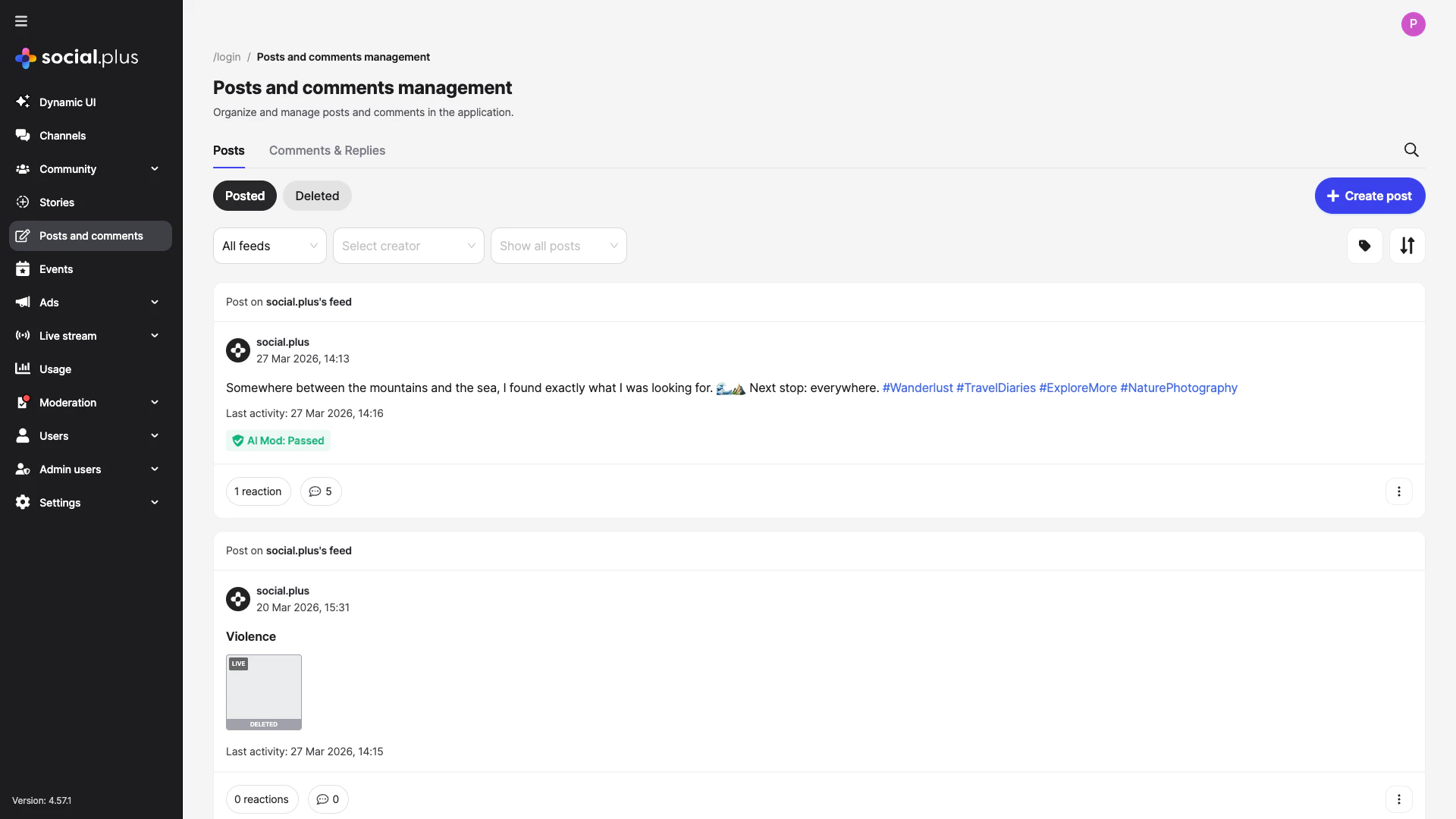 * **Admin Console → Content Moderation → Flagged Content**: Posts, comments, and stories flagged by users
* Each item shows: content, reporter, flag reason, and action buttons (approve, remove, warn user)
* Bulk actions available for high-volume queues
→ [Admin Console: Content Moderation](/analytics-and-moderation/console/moderation/overview)
For communities using `ADMIN_REVIEW_POST_REQUIRED`, new posts land in a review queue:
* **Admin Console → Social Management → Posts**: Review pending posts
* Approve → post goes live; Reject → post removed
→ [Post Review](/social-plus-sdk/social/content-management/posts/moderation/post-review)
Give community moderators access to their community's moderation queue without granting full admin access:
* **Admin Console → Admin Access Control → Roles**: Create community moderator roles
* Assign users to roles per community
→ [Roles & Privileges](/analytics-and-moderation/console/moderation/roles-and-privileges)
***
## Layer 4: Webhooks — Automation
Receive real-time events when content is actioned to trigger downstream workflows.
```mermaid theme={null}
sequenceDiagram
participant User
participant SDK
participant Server as social.plus Server
participant PreHook as Your Pre-Hook
participant Webhook as Your Webhook
User->>SDK: createPost(text, images)
SDK->>Server: POST /posts
Server->>PreHook: pre-hook: post.didCreate
PreHook-->>Server: { allow: true } or { allow: false }
alt Allowed
Server-->>SDK: 201 Post created
SDK-->>User: Post appears in feed
Note over Server: AI moderation runs async
Server->>Webhook: post.created event
Webhook-->>Webhook: Log & index
else Rejected by pre-hook
Server-->>SDK: 403 Rejected
SDK-->>User: "Post could not be published"
end
Note over User: Later — another user flags the post
User->>SDK: flagPost(postId)
SDK->>Server: POST /posts/{id}/flag
Server->>Webhook: post.flagged event
Webhook-->>Webhook: Notify moderator
```
In **Admin Console → Settings → Integrations → Webhooks**, register your endpoint URL and select which events to subscribe to.
→ [Admin Console: Integrations](/analytics-and-moderation/console/settings/)
Always verify the webhook signature before processing:
```javascript Node.js theme={null}
const crypto = require('crypto');
const express = require('express');
const app = express();
app.use('/webhook', express.raw({ type: 'application/json' }));
app.post('/webhook', (req, res) => {
const signature = req.headers['x-amity-signature'];
const secret = process.env.WEBHOOK_SECRET;
const expectedSig = crypto
.createHmac('sha256', secret)
.update(req.body)
.digest('hex');
if (!crypto.timingSafeEqual(
Buffer.from(signature, 'hex'),
Buffer.from(expectedSig, 'hex')
)) {
return res.status(401).json({ error: 'Invalid signature' });
}
const event = JSON.parse(req.body);
handleModerationEvent(event);
res.status(200).json({ received: true });
});
```
Key moderation webhook events to subscribe to:
| Event | Trigger | Common action |
| ------------------------- | ----------------------------- | ------------------------------ |
| `post.flagged` | User flags a post | Notify moderator, log incident |
| `post.deleted` | Post removed by moderator | Notify author, log |
| `comment.flagged` | User flags a comment | Notify moderator |
| `user.banned` | User banned from community | Revoke access in your system |
| `community.post.approved` | Post approved in review queue | Notify author |
```javascript Node.js theme={null}
function handleModerationEvent(event) {
switch (event.event) {
case 'post.flagged':
notifyModerationTeam(event.data);
logIncident({ type: 'flag', content: event.data });
break;
case 'user.banned':
revokeUserAccess(event.data.userId);
notifyUser(event.data.userId, 'community-ban');
break;
case 'post.deleted':
notifyAuthor(event.data.userId, 'post-removed');
break;
}
}
```
→ [Webhook Events Reference](/analytics-and-moderation/social+-apis-and-services/webhook-event)
***
## Common Mistakes
**Exposing moderation status to content authors** — Telling a user their post was "flagged" or "under review" can encourage them to create alt accounts. Show the content normally to the author while hiding it from others (shadow moderation).
**Skipping webhook signature verification** — Moderation webhooks trigger automated actions (bans, deletions). Without signature verification, an attacker could send fake webhook payloads to your endpoint.
**Auto-deleting all AI-flagged content** — AI moderation produces false positives. Use AI to queue content for human review, not to delete automatically. Reserve auto-actions only for high-confidence categories like CSAM.
## Best Practices
Run three complementary layers for best coverage:
1. **Pre-publish AI screening** — catches obvious violations before content is visible
2. **Community self-moderation** — users flag what AI misses
3. **Human moderator review** — maintains context and handles edge cases
Avoid relying on any single layer alone.
* Return `200 OK` quickly and process events asynchronously — slow responses cause webhook retries
* Implement idempotent handlers — webhooks may be delivered more than once
* Log all received events before processing so you can replay them if your handler fails
* Set up a dead-letter queue for events that fail processing
* Set up role-based access so community moderators only see their community's queue
* Define clear escalation paths: community moderator → admin → legal
* Log all moderator actions with reason codes for audit trails
* Provide moderators with appeal management tools for banned users
* Always notify users when their content is removed — explain why and link to guidelines
* Provide an appeal process for content removal decisions
* Show a submission confirmation to users who flag content so they know it was received
***
**Dive deeper**: [Content Moderation API Reference](/social-plus-sdk/social/content-management/moderation/overview) has full parameter tables, method signatures, and platform-specific details for every API used in this guide.
## Next Steps
Moderation is active — now set up community roles and permission gates for fine-grained governance.
Or explore related guides:
Understand how posts feed into the moderation pipeline
Configure post moderation settings per community
Notify users of moderation actions via push or in-app
* **Admin Console → Content Moderation → Flagged Content**: Posts, comments, and stories flagged by users
* Each item shows: content, reporter, flag reason, and action buttons (approve, remove, warn user)
* Bulk actions available for high-volume queues
→ [Admin Console: Content Moderation](/analytics-and-moderation/console/moderation/overview)
For communities using `ADMIN_REVIEW_POST_REQUIRED`, new posts land in a review queue:
* **Admin Console → Social Management → Posts**: Review pending posts
* Approve → post goes live; Reject → post removed
→ [Post Review](/social-plus-sdk/social/content-management/posts/moderation/post-review)
Give community moderators access to their community's moderation queue without granting full admin access:
* **Admin Console → Admin Access Control → Roles**: Create community moderator roles
* Assign users to roles per community
→ [Roles & Privileges](/analytics-and-moderation/console/moderation/roles-and-privileges)
***
## Layer 4: Webhooks — Automation
Receive real-time events when content is actioned to trigger downstream workflows.
```mermaid theme={null}
sequenceDiagram
participant User
participant SDK
participant Server as social.plus Server
participant PreHook as Your Pre-Hook
participant Webhook as Your Webhook
User->>SDK: createPost(text, images)
SDK->>Server: POST /posts
Server->>PreHook: pre-hook: post.didCreate
PreHook-->>Server: { allow: true } or { allow: false }
alt Allowed
Server-->>SDK: 201 Post created
SDK-->>User: Post appears in feed
Note over Server: AI moderation runs async
Server->>Webhook: post.created event
Webhook-->>Webhook: Log & index
else Rejected by pre-hook
Server-->>SDK: 403 Rejected
SDK-->>User: "Post could not be published"
end
Note over User: Later — another user flags the post
User->>SDK: flagPost(postId)
SDK->>Server: POST /posts/{id}/flag
Server->>Webhook: post.flagged event
Webhook-->>Webhook: Notify moderator
```
In **Admin Console → Settings → Integrations → Webhooks**, register your endpoint URL and select which events to subscribe to.
→ [Admin Console: Integrations](/analytics-and-moderation/console/settings/)
Always verify the webhook signature before processing:
```javascript Node.js theme={null}
const crypto = require('crypto');
const express = require('express');
const app = express();
app.use('/webhook', express.raw({ type: 'application/json' }));
app.post('/webhook', (req, res) => {
const signature = req.headers['x-amity-signature'];
const secret = process.env.WEBHOOK_SECRET;
const expectedSig = crypto
.createHmac('sha256', secret)
.update(req.body)
.digest('hex');
if (!crypto.timingSafeEqual(
Buffer.from(signature, 'hex'),
Buffer.from(expectedSig, 'hex')
)) {
return res.status(401).json({ error: 'Invalid signature' });
}
const event = JSON.parse(req.body);
handleModerationEvent(event);
res.status(200).json({ received: true });
});
```
Key moderation webhook events to subscribe to:
| Event | Trigger | Common action |
| ------------------------- | ----------------------------- | ------------------------------ |
| `post.flagged` | User flags a post | Notify moderator, log incident |
| `post.deleted` | Post removed by moderator | Notify author, log |
| `comment.flagged` | User flags a comment | Notify moderator |
| `user.banned` | User banned from community | Revoke access in your system |
| `community.post.approved` | Post approved in review queue | Notify author |
```javascript Node.js theme={null}
function handleModerationEvent(event) {
switch (event.event) {
case 'post.flagged':
notifyModerationTeam(event.data);
logIncident({ type: 'flag', content: event.data });
break;
case 'user.banned':
revokeUserAccess(event.data.userId);
notifyUser(event.data.userId, 'community-ban');
break;
case 'post.deleted':
notifyAuthor(event.data.userId, 'post-removed');
break;
}
}
```
→ [Webhook Events Reference](/analytics-and-moderation/social+-apis-and-services/webhook-event)
***
## Common Mistakes
**Exposing moderation status to content authors** — Telling a user their post was "flagged" or "under review" can encourage them to create alt accounts. Show the content normally to the author while hiding it from others (shadow moderation).
**Skipping webhook signature verification** — Moderation webhooks trigger automated actions (bans, deletions). Without signature verification, an attacker could send fake webhook payloads to your endpoint.
**Auto-deleting all AI-flagged content** — AI moderation produces false positives. Use AI to queue content for human review, not to delete automatically. Reserve auto-actions only for high-confidence categories like CSAM.
## Best Practices
Run three complementary layers for best coverage:
1. **Pre-publish AI screening** — catches obvious violations before content is visible
2. **Community self-moderation** — users flag what AI misses
3. **Human moderator review** — maintains context and handles edge cases
Avoid relying on any single layer alone.
* Return `200 OK` quickly and process events asynchronously — slow responses cause webhook retries
* Implement idempotent handlers — webhooks may be delivered more than once
* Log all received events before processing so you can replay them if your handler fails
* Set up a dead-letter queue for events that fail processing
* Set up role-based access so community moderators only see their community's queue
* Define clear escalation paths: community moderator → admin → legal
* Log all moderator actions with reason codes for audit trails
* Provide moderators with appeal management tools for banned users
* Always notify users when their content is removed — explain why and link to guidelines
* Provide an appeal process for content removal decisions
* Show a submission confirmation to users who flag content so they know it was received
***
**Dive deeper**: [Content Moderation API Reference](/social-plus-sdk/social/content-management/moderation/overview) has full parameter tables, method signatures, and platform-specific details for every API used in this guide.
## Next Steps
Moderation is active — now set up community roles and permission gates for fine-grained governance.
Or explore related guides:
Understand how posts feed into the moderation pipeline
Configure post moderation settings per community
Notify users of moderation actions via push or in-app