> ## Documentation Index
> Fetch the complete documentation index at: https://learn.social.plus/llms.txt
> Use this file to discover all available pages before exploring further.
# Comments & Reactions
> Add threaded comments with @mentions and emoji reactions to posts, stories, and messages.
**SDK v7.x** · Last verified March 2026 · iOS · Android · Web · Flutter
```typescript theme={null}
// 1. Add a reaction
await ReactionRepository.addReaction('post', 'postId', 'like');
// 2. Remove a reaction
await ReactionRepository.removeReaction('post', 'postId', 'like');
// 3. Create a comment
await CommentRepository.createComment({
referenceId: 'postId', referenceType: 'post',
data: { text: 'Great post!' },
});
// 4. Query comments
CommentRepository.getComments(
{ referenceId: 'postId', referenceType: 'post', limit: 20 },
({ data: comments }) => { /* render */ }
);
```
Full walkthrough below ↓
**Platform note** — code samples below use TypeScript. Every method has an equivalent in the iOS (Swift), Android (Kotlin), and Flutter (Dart) SDKs — see the linked SDK reference in each step.
Comments and reactions turn passive content consumption into active engagement. This guide covers creating threaded comments, adding reactions to any content object, querying both in real-time, and surfacing them in your UI.
```mermaid theme={null}
graph TD
A[Post / Story / Message] --> B[Add Reaction]
A --> C[Add Comment]
B --> D[Reaction stored on content]
C --> E[Top-level comment]
E --> F[Reply comment]
F --> G[Nested thread]
D & E & G --> H[Live Collection update]
H --> I[UI updates in real-time]
classDef action fill:#e1f5fe,stroke:#0288d1,color:#01579b
classDef decision fill:#fff8e1,stroke:#f9a825,color:#f57f17
classDef process fill:#f3e5f5,stroke:#7b1fa2,color:#4a148c
classDef outcome fill:#e8f5e9,stroke:#388e3c,color:#1b5e20
class A action
class B,C,D,E,F,G,H process
class I outcome
```
**Prerequisites**: SDK installed and authenticated. You'll need a `referenceId` (post ID, comment ID, or story ID) and `referenceType` to attach comments and reactions to.
**Also recommended:** Complete [Rich Content Creation](/use-cases/social/rich-content-creation) first — you need posts to comment on and react to.
**After completing this guide you'll have:**
* Threaded comments (comments + replies) on any post or story
* Emoji reactions added and removed in real-time
* Reaction counts and comment counts updating live in your UI
***
## Quick Start: Add a Reaction
Use the reactions API to add emoji reactions to posts, comments, stories, and messages:
```typescript TypeScript theme={null}
import { ReactionRepository } from '@amityco/ts-sdk';
const isAdded = await ReactionRepository.addReaction('post', 'postId', 'like');
```
Full reference → [Reactions](/social-plus-sdk/core-concepts/content-handling/reactions)
***
## Step-by-Step Implementation
Use `referenceType: .post` for post comments. Other valid values: `.content` (stories), `.message` (chat).
```typescript TypeScript theme={null}
import { CommentRepository } from '@amityco/ts-sdk';
const { data: comment } = await CommentRepository.createComment({
data: { text: 'hello!' },
referenceId: 'postId',
referenceType: 'post' as Amity.CommentReferenceType,
});
```
Full reference → [Text Comment](/social-plus-sdk/social/content-management/comments/creation/text-comment)
Pass the parent comment's ID as `parentId` to create a nested reply.
```typescript TypeScript theme={null}
const { data: reply } = await CommentRepository.createComment({
data: { text: 'I agree!' },
referenceId: 'postId',
referenceType: 'post' as Amity.CommentReferenceType,
parentId: 'parent-comment-id', // makes this a reply
});
```
Full reference → [Text Comment](/social-plus-sdk/social/content-management/comments/creation/text-comment)
Use a Live Collection to get comments and subscribe to new additions. Filter by `filterByParentId` to get top-level comments only or a flat list.
```typescript TypeScript theme={null}
import { CommentRepository } from '@amityco/ts-sdk';
const unsubscribe = CommentRepository.getComments(
{ referenceType: 'post', referenceId: 'postId', dataTypes: { values: ['text'], matchType: 'exact' } },
({ data: comments, onNextPage, hasNextPage, loading }) => {
if (comments) { /* render comment thread */ }
},
);
```
Full reference → [Query Comments](/social-plus-sdk/social/content-management/comments/retrieval/query-comments)
Reactions use a single `addReaction()` call. Built-in types: `like`, `love`, `wow`, `laugh`, `sad`, `angry`. Custom types are also supported.
```typescript TypeScript theme={null}
import { ReactionRepository } from '@amityco/ts-sdk';
const isAdded = await ReactionRepository.addReaction('post', 'postId', 'like');
```
```typescript TypeScript theme={null}
import { ReactionRepository } from '@amityco/ts-sdk';
const isRemoved = await ReactionRepository.removeReaction('post', 'postId', 'like');
```
Full reference → [Reactions](/social-plus-sdk/core-concepts/content-handling/reactions)
Pass user IDs and their positions in the comment text to trigger mention notifications.
```typescript TypeScript theme={null}
const { data: comment } = await CommentRepository.createComment({
data: { text: 'great point @userId1!' },
referenceId: 'postId',
referenceType: 'post' as Amity.CommentReferenceType,
mentionees: [{ type: 'user', userIds: ['userId1'] }] as Amity.UserMention[],
});
```
Full reference → [Mentions](/social-plus-sdk/core-concepts/content-handling/mentions)
***
## Connect to Moderation & Analytics
The Admin Console **Posts and comments management** page gives moderators full visibility into every comment thread — including threaded replies, AI moderation status, and direct action menus.
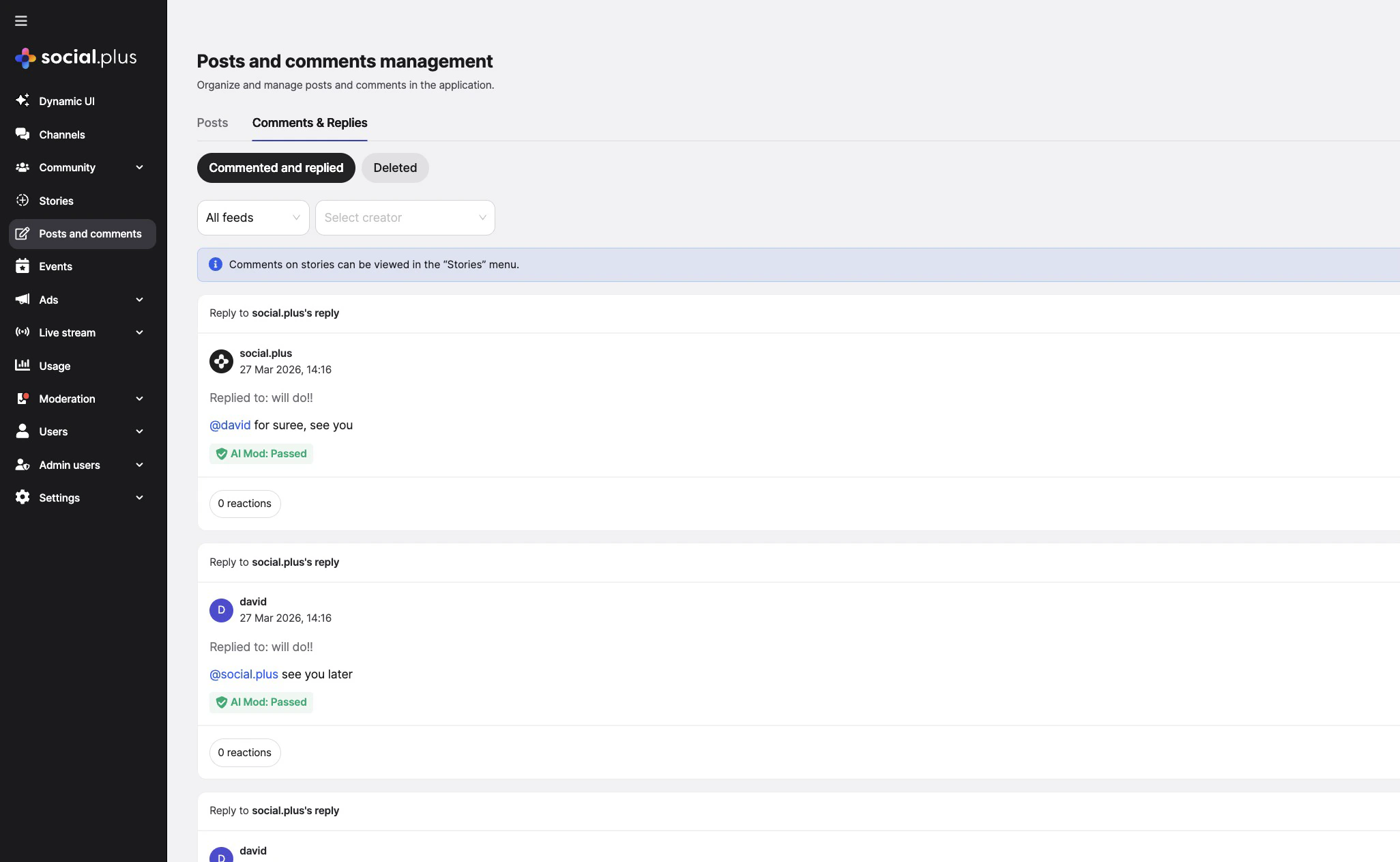 Users can flag comments for moderator review using the same flagging system as posts. Flagged comments appear in the Admin Console moderation queue.
→ [Content Flagging](/social-plus-sdk/social/content-management/moderation/content-flagging) · [Admin Console Moderation](/analytics-and-moderation/console/moderation/overview)
Query aggregated reaction counts and per-user reaction data via the SDK. View engagement metrics in the Admin Console analytics dashboard.
→ [Reactions](/social-plus-sdk/core-concepts/content-handling/reactions) · [Admin Console Social Analytics](/analytics-and-moderation/console/analytics/)
Receive `comment.created` webhook events to build notification workflows or sync comment data to your own backend.
→ [Webhook Events](/analytics-and-moderation/social+-apis-and-services/webhook-event)
***
## Common Mistakes
**Adding duplicate reactions** — Calling `addReaction` twice with the same reaction name throws an error. Check the post's `myReactions` array before adding.
```typescript theme={null}
// ❌ Bad — no check
await ReactionRepository.addReaction('post', postId, 'like');
// ✅ Good — check first
if (!post.myReactions.includes('like')) {
await ReactionRepository.addReaction('post', postId, 'like');
}
```
**Loading all comments without pagination** — Deeply nested threads can have hundreds of replies. Always set a `limit` and let users tap "Load more" for the rest.
**Not subscribing to comment Live Collections** — If another user replies while the thread is open, your UI won't update. Use the observable pattern so new comments appear in real time.
## Best Practices
* Limit visible nesting depth to 2-3 levels in the UI — deeper nesting is confusing to users
* Show a "View X replies" collapsed state instead of rendering all replies upfront
* Use `getLatestComment()` to show a preview of the most recent comment in feed cards without loading the full comment thread
* Sort by `lastCreated` (newest first) for fast-moving communities; `firstCreated` for long-form discussion
* Display a compact reaction pill with the top 3 reactions and total count
* Show the user's own reaction as highlighted/selected so they can tap to remove it
* Animate reaction additions — a small bounce or pop goes a long way
* For communities that want positivity-only, restrict available reactions to a custom subset
* Paginate comments — load 20 at a time and use `loadMore()` on scroll
* Unsubscribe comment Live Collections when the user navigates away
* Cache reaction counts client-side and reconcile with server state on resume
***
**Dive deeper**: [Comments API Reference](/social-plus-sdk/social/content-management/comments/overview) has full parameter tables, method signatures, and platform-specific details for every API used in this guide.
## Next Steps
Engagement is working — now build profile pages, follow/unfollow flows, and friend connections.
Or explore related guides:
Create the posts that comments attach to
Notify users of new comments and reactions
Handle flagged comments and abusive content
Users can flag comments for moderator review using the same flagging system as posts. Flagged comments appear in the Admin Console moderation queue.
→ [Content Flagging](/social-plus-sdk/social/content-management/moderation/content-flagging) · [Admin Console Moderation](/analytics-and-moderation/console/moderation/overview)
Query aggregated reaction counts and per-user reaction data via the SDK. View engagement metrics in the Admin Console analytics dashboard.
→ [Reactions](/social-plus-sdk/core-concepts/content-handling/reactions) · [Admin Console Social Analytics](/analytics-and-moderation/console/analytics/)
Receive `comment.created` webhook events to build notification workflows or sync comment data to your own backend.
→ [Webhook Events](/analytics-and-moderation/social+-apis-and-services/webhook-event)
***
## Common Mistakes
**Adding duplicate reactions** — Calling `addReaction` twice with the same reaction name throws an error. Check the post's `myReactions` array before adding.
```typescript theme={null}
// ❌ Bad — no check
await ReactionRepository.addReaction('post', postId, 'like');
// ✅ Good — check first
if (!post.myReactions.includes('like')) {
await ReactionRepository.addReaction('post', postId, 'like');
}
```
**Loading all comments without pagination** — Deeply nested threads can have hundreds of replies. Always set a `limit` and let users tap "Load more" for the rest.
**Not subscribing to comment Live Collections** — If another user replies while the thread is open, your UI won't update. Use the observable pattern so new comments appear in real time.
## Best Practices
* Limit visible nesting depth to 2-3 levels in the UI — deeper nesting is confusing to users
* Show a "View X replies" collapsed state instead of rendering all replies upfront
* Use `getLatestComment()` to show a preview of the most recent comment in feed cards without loading the full comment thread
* Sort by `lastCreated` (newest first) for fast-moving communities; `firstCreated` for long-form discussion
* Display a compact reaction pill with the top 3 reactions and total count
* Show the user's own reaction as highlighted/selected so they can tap to remove it
* Animate reaction additions — a small bounce or pop goes a long way
* For communities that want positivity-only, restrict available reactions to a custom subset
* Paginate comments — load 20 at a time and use `loadMore()` on scroll
* Unsubscribe comment Live Collections when the user navigates away
* Cache reaction counts client-side and reconcile with server state on resume
***
**Dive deeper**: [Comments API Reference](/social-plus-sdk/social/content-management/comments/overview) has full parameter tables, method signatures, and platform-specific details for every API used in this guide.
## Next Steps
Engagement is working — now build profile pages, follow/unfollow flows, and friend connections.
Or explore related guides:
Create the posts that comments attach to
Notify users of new comments and reactions
Handle flagged comments and abusive content