> ## Documentation Index
> Fetch the complete documentation index at: https://learn.social.plus/llms.txt
> Use this file to discover all available pages before exploring further.
# Build a Social Feed
> Query user feeds, community feeds, and a global aggregated feed with real-time updates and custom post ranking.
**SDK v7.x** · Last verified March 2026 · iOS · Android · Web · Flutter
```typescript theme={null}
// 1. Query a user feed
const repository = new AmityFeedRepository();
const posts = await repository.getUserFeed(
'user-123',
['user', 'community'],
undefined,
'lastCreated',
false,
true
);
// 2. Query a community feed with live updates
import { PostRepository, subscribeTopic, getCommunityTopic, SubscriptionLevels } from '@amityco/ts-sdk';
const unsubscribe = PostRepository.getPosts(
{ targetId: 'communityId', targetType: 'community', sortBy: 'lastCreated' },
({ data: posts }) => {
if (posts) { /* render posts */ }
},
);
// 3. Subscribe to real-time events (required for server-side updates)
subscribeTopic(getCommunityTopic(community, SubscriptionLevels.POST));
// 4. Unsubscribe when done
unsubscribe();
```
Full walkthrough below ↓
**Platform note** — code samples below use TypeScript. Every method has an equivalent in the iOS (Swift), Android (Kotlin), and Flutter (Dart) SDKs — see the linked SDK reference in each step.
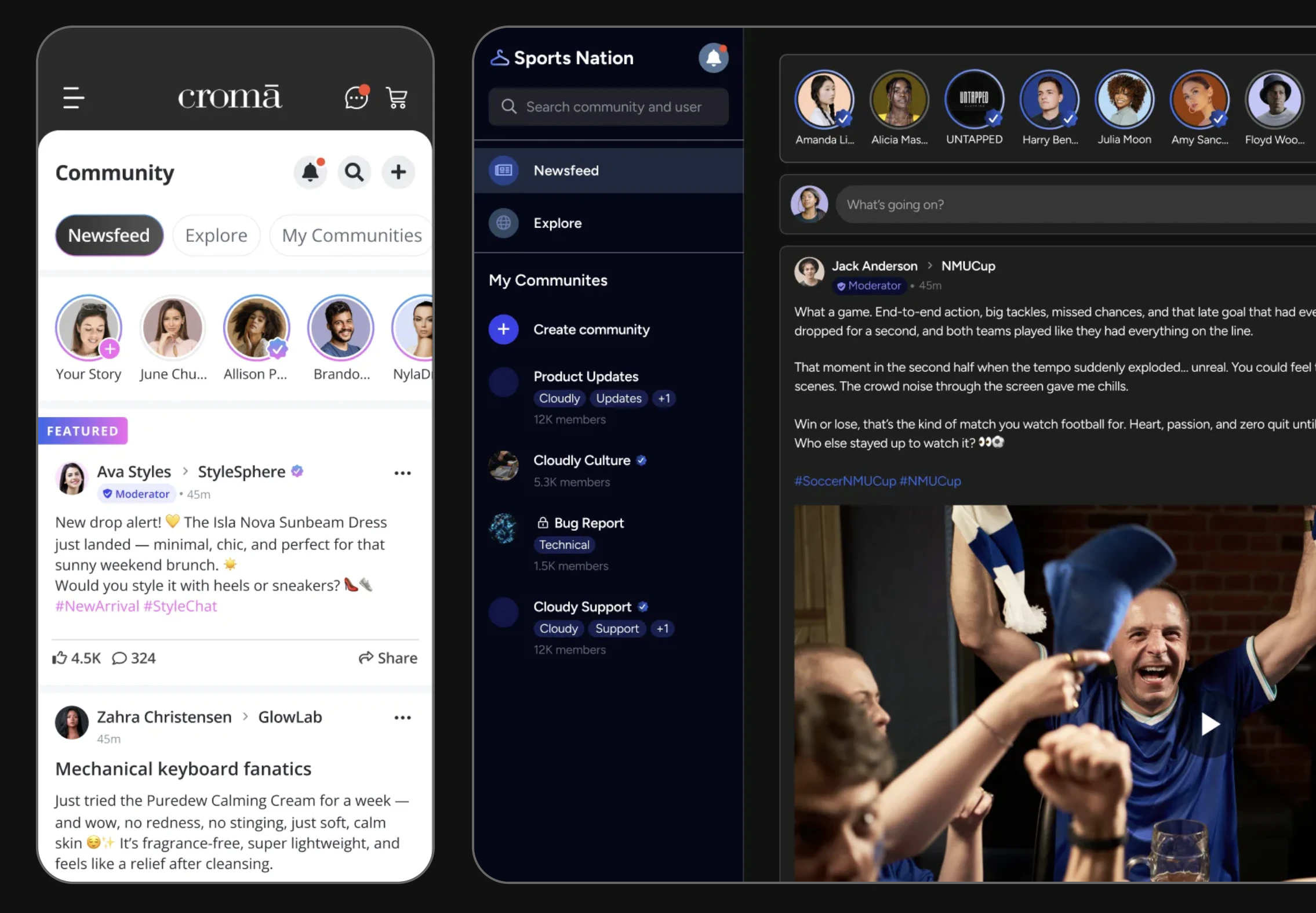 A social feed is the heart of any social app. This guide walks through querying the right feed for each context, subscribing to real-time updates, and controlling post ranking.
```mermaid theme={null}
graph TD
A[User opens app] --> B{Feed type?}
B -->|Home timeline| C[User Feed]
B -->|Inside a community| D[Community Feed]
B -->|Explore page| E[Global Feed]
C --> F[Live Collection]
D --> F
E --> F
F --> G[Posts render in-app]
G --> H{Post flagged?}
H -->|Yes| I[Hidden from feed]
H -->|No| G
classDef action fill:#e1f5fe,stroke:#0288d1,color:#01579b
classDef decision fill:#fff8e1,stroke:#f9a825,color:#f57f17
classDef process fill:#f3e5f5,stroke:#7b1fa2,color:#4a148c
classDef outcome fill:#e8f5e9,stroke:#388e3c,color:#1b5e20
class A action
class B,H decision
class C,D,E,F process
class G,I outcome
```
**Prerequisites**: SDK installed and authenticated → [SDK Setup](/social-plus-sdk/getting-started/overview). You'll need a valid `userId` for the current user and optionally a `communityId` for community-scoped feeds.
**After completing this guide you'll have:**
* A live-updating user feed, community feed, and global feed rendering in your app
* Real-time post additions and deletions via Live Collections
* Post ranking configured and connected to the Admin Console
***
## Quick Start: Query a User Feed
Use `AmityFeedRepository` to query a user's combined feed (their own posts + community posts they authored):
**TypeScript SDK gap**: `AmityFeedRepository` is not yet available in the TypeScript SDK. iOS, Android, and Flutter all expose `AmityFeedRepository` with `getCommunityFeed` and user feed queries. TS `FeedRepository` only has `queryGlobalFeed`. Tracking: see `.docs-ops/evals/sdk-tickets-to-file.md`.
Full reference → [Get User Feed](/social-plus-sdk/social/discovery-engagement/feed/overview)
***
## Step-by-Step Implementation
Use `PostRepository.getPosts()` to query all posts within a specific community. Filter by post type, sort order, and deletion status.
```typescript TypeScript theme={null}
import { PostRepository } from '@amityco/ts-sdk';
const unsubscribe = PostRepository.getPosts(
{ targetId: 'communityId', targetType: 'community', sortBy: 'lastCreated' },
({ data: posts, onNextPage, hasNextPage, loading }) => {
if (posts) { /* render posts */ }
},
);
```
Full reference → [Query Posts](/social-plus-sdk/social/content-management/posts/retrieval/query-posts)
The global feed aggregates posts across all communities. The SDK provides both chronological ordering and custom-ranked feeds based on engagement metrics.
```typescript TypeScript theme={null}
import { FeedRepository } from '@amityco/ts-sdk';
const unsubscribe = FeedRepository.getGlobalFeed(
{ limit: 20, includeDeleted: false },
({ data: posts, onNextPage, hasNextPage, loading }) => {
if (posts) { /* render global feed */ }
},
);
```
Full reference → [Query Global Feed](/social-plus-sdk/social/discovery-engagement/feed/overview)
Live Collections auto-update from **local cache** changes (e.g., the current user creates a post). To also receive **server-side** updates (new posts from other users, moderator deletions), you must explicitly subscribe to the relevant topic.
```typescript TypeScript theme={null}
import { subscribeTopic, getCommunityTopic, getUserTopic, SubscriptionLevels } from '@amityco/ts-sdk';
// For a community feed — receive new/edited/deleted post events
const disposers: (() => void)[] = [];
disposers.push(subscribeTopic(getCommunityTopic(community, SubscriptionLevels.POST)));
// For a user feed — receive events for that user's posts
disposers.push(subscribeTopic(getUserTopic(user, SubscriptionLevels.POST)));
// Clean up when the view unmounts
disposers.forEach(fn => fn());
unsubscribe(); // also stop the Live Collection query
```
Full reference → [Social Real-time Events](/social-plus-sdk/core-concepts/realtime-communication/realtime-events/social-realtime-events)
Live Collections provide `onNextPage` and `hasNextPage` in the callback. Trigger load-more when the user scrolls near the bottom.
```typescript TypeScript theme={null}
// Inside your callback, capture the pagination helpers:
let nextPageFn: (() => void) | undefined;
let hasMore: boolean | undefined;
// In the callback:
hasMore = hasNextPage;
nextPageFn = onNextPage;
// When user scrolls to bottom:
if (hasMore) nextPageFn?.();
```
Full reference → [Live Objects & Collections](/social-plus-sdk/core-concepts/realtime-communication/live-objects-collections/overview)
Pin specific posts to the top of a community feed or enable the engagement-based ranking algorithm that factors in comments, reactions, and time decay.
Full reference → [Custom Post Ranking](/social-plus-sdk/social/discovery-engagement/feed/overview)
***
## Connect to Moderation & Analytics
When a user flags a post via the SDK, the post is submitted for moderator review. By default, flagged posts remain visible until a moderator takes action. You can configure automatic hiding of reported content in the **Admin Console → Content Moderation → Settings**.
* SDK flagging → [Content Flagging](/social-plus-sdk/social/content-management/moderation/content-flagging)
* Console review → [Admin Console Moderation](/analytics-and-moderation/console/moderation/overview)
Track how many users viewed posts in the feed using impression analytics.
View aggregated impression data in **Admin Console → Social Management → Post Analytics**.
Full reference → [Post Impressions](/social-plus-sdk/social/content-management/posts/analytics/post-impressions)
Receive a webhook event whenever a post is created in a community your server monitors. Use this to send push notifications or trigger downstream workflows.
Reference → [Webhook Events](/analytics-and-moderation/social+-apis-and-services/webhook-event)
***
## Common Mistakes
**Fetching the entire feed at once** — Loading all posts without pagination causes memory spikes and slow initial renders. Always use `limit` and paginate with cursors.
```typescript theme={null}
// ❌ Bad — fetches everything at once
const allPosts = await repository.getUserFeed('user-123', ['user', 'community']);
// ✅ Good — use Live Collection with pagination
const unsubscribe = PostRepository.getPosts(
{ targetId: 'communityId', targetType: 'community', sortBy: 'lastCreated' },
({ data: posts, onNextPage, hasNextPage }) => {
renderPosts(posts);
// Load more only when the user scrolls down
},
);
```
**Skipping topic subscription** — Live Collections auto-update from local cache, but **not** from server-side events (other users' posts, moderator actions) unless you call `subscribeTopic()`. Without it your feed goes stale.
```typescript theme={null}
// ❌ Bad — no topic subscription, misses server events
const unsubscribe = PostRepository.getPosts(params, callback);
// ✅ Good — subscribe to the community topic for real-time post events
subscribeTopic(getCommunityTopic(community, SubscriptionLevels.POST));
```
**Not handling deleted or flagged posts** — Posts can be removed by moderators between fetches. Always check `post.isDeleted` before rendering to avoid showing blank cards.
## Best Practices
* Use `dataTypes` filtering to limit payload size when you only need specific post types
* Avoid observing the global feed on low-memory devices — use paginated queries instead
* Unsubscribe Live Collection observers when the screen goes off-screen (lifecycle-aware)
* Use `untilAt` (iOS/Android) for time-bounded pagination to prevent content jumping when new posts arrive
* Always show a skeleton/placeholder while the first page loads
* Show a "New posts" banner (like Twitter) rather than auto-scrolling to the top when live updates arrive
* Preserve scroll position when the user navigates away and returns
* Cache the first page of the feed for offline display
* Never expose the raw API key in client-side code — use the SDK's built-in auth flow
* Respect `isPublic: false` communities — the SDK automatically filters private communities from feeds
* Don't cache deleted posts — observe deletions via Live Collections and remove them immediately
***
## Next Steps
Now that you have a working feed, give users something to post — text, images, videos, polls, and file posts.
Or explore related guides:
Create the posts that appear in the feed
Add engagement features to feed posts
Build the communities that power community feeds
A social feed is the heart of any social app. This guide walks through querying the right feed for each context, subscribing to real-time updates, and controlling post ranking.
```mermaid theme={null}
graph TD
A[User opens app] --> B{Feed type?}
B -->|Home timeline| C[User Feed]
B -->|Inside a community| D[Community Feed]
B -->|Explore page| E[Global Feed]
C --> F[Live Collection]
D --> F
E --> F
F --> G[Posts render in-app]
G --> H{Post flagged?}
H -->|Yes| I[Hidden from feed]
H -->|No| G
classDef action fill:#e1f5fe,stroke:#0288d1,color:#01579b
classDef decision fill:#fff8e1,stroke:#f9a825,color:#f57f17
classDef process fill:#f3e5f5,stroke:#7b1fa2,color:#4a148c
classDef outcome fill:#e8f5e9,stroke:#388e3c,color:#1b5e20
class A action
class B,H decision
class C,D,E,F process
class G,I outcome
```
**Prerequisites**: SDK installed and authenticated → [SDK Setup](/social-plus-sdk/getting-started/overview). You'll need a valid `userId` for the current user and optionally a `communityId` for community-scoped feeds.
**After completing this guide you'll have:**
* A live-updating user feed, community feed, and global feed rendering in your app
* Real-time post additions and deletions via Live Collections
* Post ranking configured and connected to the Admin Console
***
## Quick Start: Query a User Feed
Use `AmityFeedRepository` to query a user's combined feed (their own posts + community posts they authored):
**TypeScript SDK gap**: `AmityFeedRepository` is not yet available in the TypeScript SDK. iOS, Android, and Flutter all expose `AmityFeedRepository` with `getCommunityFeed` and user feed queries. TS `FeedRepository` only has `queryGlobalFeed`. Tracking: see `.docs-ops/evals/sdk-tickets-to-file.md`.
Full reference → [Get User Feed](/social-plus-sdk/social/discovery-engagement/feed/overview)
***
## Step-by-Step Implementation
Use `PostRepository.getPosts()` to query all posts within a specific community. Filter by post type, sort order, and deletion status.
```typescript TypeScript theme={null}
import { PostRepository } from '@amityco/ts-sdk';
const unsubscribe = PostRepository.getPosts(
{ targetId: 'communityId', targetType: 'community', sortBy: 'lastCreated' },
({ data: posts, onNextPage, hasNextPage, loading }) => {
if (posts) { /* render posts */ }
},
);
```
Full reference → [Query Posts](/social-plus-sdk/social/content-management/posts/retrieval/query-posts)
The global feed aggregates posts across all communities. The SDK provides both chronological ordering and custom-ranked feeds based on engagement metrics.
```typescript TypeScript theme={null}
import { FeedRepository } from '@amityco/ts-sdk';
const unsubscribe = FeedRepository.getGlobalFeed(
{ limit: 20, includeDeleted: false },
({ data: posts, onNextPage, hasNextPage, loading }) => {
if (posts) { /* render global feed */ }
},
);
```
Full reference → [Query Global Feed](/social-plus-sdk/social/discovery-engagement/feed/overview)
Live Collections auto-update from **local cache** changes (e.g., the current user creates a post). To also receive **server-side** updates (new posts from other users, moderator deletions), you must explicitly subscribe to the relevant topic.
```typescript TypeScript theme={null}
import { subscribeTopic, getCommunityTopic, getUserTopic, SubscriptionLevels } from '@amityco/ts-sdk';
// For a community feed — receive new/edited/deleted post events
const disposers: (() => void)[] = [];
disposers.push(subscribeTopic(getCommunityTopic(community, SubscriptionLevels.POST)));
// For a user feed — receive events for that user's posts
disposers.push(subscribeTopic(getUserTopic(user, SubscriptionLevels.POST)));
// Clean up when the view unmounts
disposers.forEach(fn => fn());
unsubscribe(); // also stop the Live Collection query
```
Full reference → [Social Real-time Events](/social-plus-sdk/core-concepts/realtime-communication/realtime-events/social-realtime-events)
Live Collections provide `onNextPage` and `hasNextPage` in the callback. Trigger load-more when the user scrolls near the bottom.
```typescript TypeScript theme={null}
// Inside your callback, capture the pagination helpers:
let nextPageFn: (() => void) | undefined;
let hasMore: boolean | undefined;
// In the callback:
hasMore = hasNextPage;
nextPageFn = onNextPage;
// When user scrolls to bottom:
if (hasMore) nextPageFn?.();
```
Full reference → [Live Objects & Collections](/social-plus-sdk/core-concepts/realtime-communication/live-objects-collections/overview)
Pin specific posts to the top of a community feed or enable the engagement-based ranking algorithm that factors in comments, reactions, and time decay.
Full reference → [Custom Post Ranking](/social-plus-sdk/social/discovery-engagement/feed/overview)
***
## Connect to Moderation & Analytics
When a user flags a post via the SDK, the post is submitted for moderator review. By default, flagged posts remain visible until a moderator takes action. You can configure automatic hiding of reported content in the **Admin Console → Content Moderation → Settings**.
* SDK flagging → [Content Flagging](/social-plus-sdk/social/content-management/moderation/content-flagging)
* Console review → [Admin Console Moderation](/analytics-and-moderation/console/moderation/overview)
Track how many users viewed posts in the feed using impression analytics.
View aggregated impression data in **Admin Console → Social Management → Post Analytics**.
Full reference → [Post Impressions](/social-plus-sdk/social/content-management/posts/analytics/post-impressions)
Receive a webhook event whenever a post is created in a community your server monitors. Use this to send push notifications or trigger downstream workflows.
Reference → [Webhook Events](/analytics-and-moderation/social+-apis-and-services/webhook-event)
***
## Common Mistakes
**Fetching the entire feed at once** — Loading all posts without pagination causes memory spikes and slow initial renders. Always use `limit` and paginate with cursors.
```typescript theme={null}
// ❌ Bad — fetches everything at once
const allPosts = await repository.getUserFeed('user-123', ['user', 'community']);
// ✅ Good — use Live Collection with pagination
const unsubscribe = PostRepository.getPosts(
{ targetId: 'communityId', targetType: 'community', sortBy: 'lastCreated' },
({ data: posts, onNextPage, hasNextPage }) => {
renderPosts(posts);
// Load more only when the user scrolls down
},
);
```
**Skipping topic subscription** — Live Collections auto-update from local cache, but **not** from server-side events (other users' posts, moderator actions) unless you call `subscribeTopic()`. Without it your feed goes stale.
```typescript theme={null}
// ❌ Bad — no topic subscription, misses server events
const unsubscribe = PostRepository.getPosts(params, callback);
// ✅ Good — subscribe to the community topic for real-time post events
subscribeTopic(getCommunityTopic(community, SubscriptionLevels.POST));
```
**Not handling deleted or flagged posts** — Posts can be removed by moderators between fetches. Always check `post.isDeleted` before rendering to avoid showing blank cards.
## Best Practices
* Use `dataTypes` filtering to limit payload size when you only need specific post types
* Avoid observing the global feed on low-memory devices — use paginated queries instead
* Unsubscribe Live Collection observers when the screen goes off-screen (lifecycle-aware)
* Use `untilAt` (iOS/Android) for time-bounded pagination to prevent content jumping when new posts arrive
* Always show a skeleton/placeholder while the first page loads
* Show a "New posts" banner (like Twitter) rather than auto-scrolling to the top when live updates arrive
* Preserve scroll position when the user navigates away and returns
* Cache the first page of the feed for offline display
* Never expose the raw API key in client-side code — use the SDK's built-in auth flow
* Respect `isPublic: false` communities — the SDK automatically filters private communities from feeds
* Don't cache deleted posts — observe deletions via Live Collections and remove them immediately
***
## Next Steps
Now that you have a working feed, give users something to post — text, images, videos, polls, and file posts.
Or explore related guides:
Create the posts that appear in the feed
Add engagement features to feed posts
Build the communities that power community feeds