> ## Documentation Index
> Fetch the complete documentation index at: https://learn.social.plus/llms.txt
> Use this file to discover all available pages before exploring further.
# Content Sharing
> Enable users to share content through customizable sharing interfaces with copy and native share options
**UIKit Component**: Sharing components are built on top of the social.plus
UIKit, providing ready-to-use sharing interfaces with customizable copy and
native share sheet functionality across all supported content types.
## Feature Overview
The Sharing UIKit components provide comprehensive tools for enabling content sharing throughout your application. Users can share posts, profiles, communities, live streams, and events through two primary methods: copying shareable links or using native platform share sheets. These components integrate seamlessly across multiple pages and content types.
### Key Features
**Copy link and native sharing** - Copy shareable links to clipboard -
Native platform share sheet integration - Consistent sharing experience
across content types - Platform-optimized sharing workflows
**Flexible UI customization** - Custom icons and text labels - Page-specific
configurations - Theme-consistent styling - Brand-aligned messaging
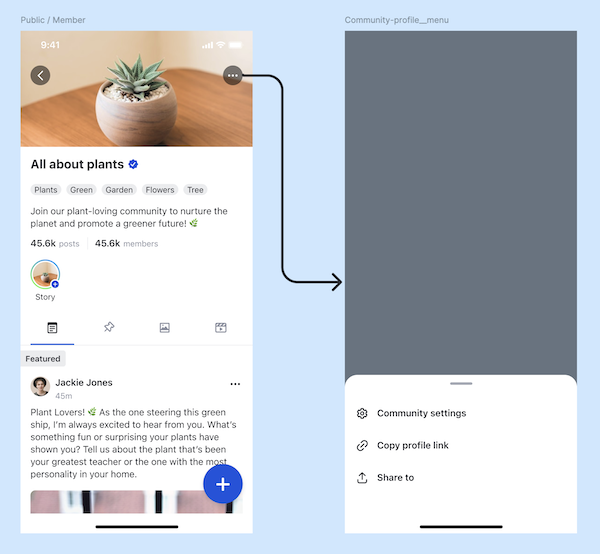
The sharing functionality is available across these key areas of your application:
| Location | Share Types | Description |
| --------------------------- | ----------------- | ---------------------------------------------------- |
| **User Profile Page** | Profile links | Share user profiles for networking and discovery |
| **Community Profile Page** | Community links | Share community pages to grow membership |
| **Post Content Component** | Post links | Share individual posts across all post types |
| **Post Detail Page** | Post links | Share posts from detailed view |
| **Live Stream Player Page** | Live stream links | Share active live streams |
| **Create Live Stream Page** | Live stream links | Share live stream setup and promotion |
| **Clip Feed Page** | Clip links | Share video clips from feed views |
| **Event Detail Page** | Event links | Share events from the event detail page's 3-dot menu |
## Customization
Enable sharing for user profiles and networking
User profile sharing allows users to share their own profiles or other users' profiles for networking, collaboration, and community building purposes.
#### Customization Options
| Config ID | Type | Description |
| -------------------------------- | ------- | ------------------------------------ |
| `user_profile_page/*/share_link` | Element | Customize share button icon and text |
| `user_profile_page/*/copy_link` | Element | Customize copy button icon and text |
Enable sharing for communities and growth
Community sharing facilitates community discovery and growth by allowing users to share community links through multiple channels.
#### Customization Options
| Config ID | Type | Description |
| ------------------------------------- | ------- | ------------------------------------ |
| `community_profile_page/*/share_link` | Element | Customize share button icon and text |
| `community_profile_page/*/copy_link` | Element | Customize copy button icon and text |
Enable sharing for all post types
Post content sharing allows users to share individual posts across all supported post types, including text, image, video, clip, and live stream posts.
#### Customization Options
| Config ID | Type | Description |
| ------------------------------- | ------- | --------------------------------------------------------- |
| `*/post_content/share_link` | Element | Customize share button icon and text for post components |
| `*/post_content/copy_link` | Element | Customize copy button icon and text for post components |
| `post_detail_page/*/share_link` | Element | Customize share button icon and text for post detail page |
| `post_detail_page/*/copy_link` | Element | Customize copy button icon and text for post detail page |
Enable sharing for live streaming content
Live stream sharing allows users to share live streaming content both during stream creation and while viewing active streams.
#### Customization Options
| Config ID | Type | Description |
| ------------------------------------- | ------- | --------------------------------------------- |
| `livestream_player_page/*/share_link` | Element | Customize share button for live stream player |
| `livestream_player_page/*/copy_link` | Element | Customize copy button for live stream player |
| `create_livestream_page/*/share_link` | Element | Customize share button for stream creation |
| `create_livestream_page/*/copy_link` | Element | Customize copy button for stream creation |
| `clip_feed_page/*/share_link` | Element | Customize share button for clip feeds |
| `clip_feed_page/*/copy_link` | Element | Customize copy button for clip feeds |
Enable sharing for events
Event sharing adds **Copy event link** (all platforms) and **Share to** (mobile only) to the event detail page's 3-dot action menu. Visibility follows the network shareable-link configuration and the event's community type — see [Event → Share an event](/uikit/components/social/event#share-an-event).
#### Customization Options
| Config ID | Type | Description |
| ----------------------- | ---- | ------------------------------------- |
| `event_detail_page/*/*` | Page | Customize the event detail page theme |
The Copy / Share actions are menu items rather than standalone elements — customize their labels through [localization](/uikit/customization/localization) (`amity_social_button_copy_event_link`, `amity_social_button_share_to`).
## Best Practices
* **Clear Visual Feedback**: Provide immediate feedback when links are copied
* **Consistent Placement**: Position share options consistently across similar content types
* **Contextual Messaging**: Use content-specific share messages and labels
* **Accessibility**: Ensure share buttons are accessible with proper labels and touch targets
{" "}
* **Brand Consistency**: Use consistent icons and messaging that match your
brand - **Platform Optimization**: Customize labels for platform-specific
sharing conventions - **Content Context**: Tailor share messages to the
specific content being shared - **User Guidance**: Use clear, action-oriented
text for share and copy buttons
* **Lazy Link Generation**: Generate share links only when sharing is initiated
* **Error Handling**: Implement graceful error handling for failed share operations
* **Network Optimization**: Cache share configurations to minimize API calls
* **Background Processing**: Handle link generation without blocking the UI
## Common Use Cases
* **Content Virality**: Enable easy sharing to increase content reach and engagement
* **Community Growth**: Share community links to attract new members and expand reach
* **User Acquisition**: Use profile sharing for networking and user discovery
* **Live Engagement**: Share live streams to maximize viewer participation
* **Content Discovery**: Share interesting posts to help users discover new content
## Troubleshooting
**Problem**: Share buttons are not visible in expected locations
**Solutions**:
* Verify sharing functionality is enabled in your app configuration
* Check that URL patterns are properly configured in the social.plus console
* Ensure proper authentication and permissions for content access
* Validate that the content exists and is accessible
```swift theme={null}
// Verify share configuration
let config = AmityUIKitManager.getShareConfiguration()
if config.isEnabled {
// Sharing should be available
}
```
**Problem**: Copy to clipboard functionality not working
**Solutions**:
* Check clipboard permissions on the platform
* Verify that the generated link is valid
* Ensure proper error handling for clipboard operations
* Test on different devices and platforms
```typescript theme={null}
try {
await navigator.clipboard.writeText(shareLink);
// Show success feedback
} catch (error) {
// Handle clipboard permission or other errors
console.error('Copy failed:', error);
}
```
**Problem**: Native share sheet not opening or functioning correctly
**Solutions**:
* Verify platform-specific share sheet permissions
* Check that the content and link are properly formatted
* Ensure the app has proper entitlements for sharing
* Test with different content types and platforms
```swift theme={null}
// iOS share sheet validation
if UIActivityViewController.canPerform(activity: .postToFacebook) {
// Share sheet should work
}
```
## Related Components
Learn about user profile components and profile sharing
Discover community components and community sharing
Explore post components and content sharing options
Learn about live streaming and stream sharing features
Understand feed components and inline sharing
Explore event components and event link sharing
Learn about the underlying SDK sharing implementation
**Implementation Strategy**: Start by enabling sharing in high-engagement
areas like post feeds and user profiles. Configure consistent branding and
messaging across all sharing locations. Test both copy and native share
functionality on all target platforms. Consider analytics tracking to
understand which sharing methods users prefer and optimize accordingly.