> ## Documentation Index
> Fetch the complete documentation index at: https://learn.social.plus/llms.txt
> Use this file to discover all available pages before exploring further.
# Product Tagging Components
> Shared UIKit components for product selection, display, and management used in posts and livestreams
These are shared UIKit components used by both post and livestream product tagging features. For feature-level documentation — including behaviour, limits, and when to use each component — see [Post Components](/uikit/components/social/posts#product-tagging) and [Livestream](/uikit/components/social/livestream#product-tagging).
## Platform Support
| Component | iOS | Android | Web | React Native | Flutter |
| ----------------------------- | --- | ------- | --- | ------------ | ------- |
| ProductTagSelectionComponent | ✅ | ✅ | ✅ | ❌ | ❌ |
| ProductTagListComponent | ✅ | ✅ | ✅ | ❌ | ❌ |
| ManageProductTagListComponent | ✅ | ✅ | ✅ | ❌ | ❌ |
## ProductTagSelectionComponent
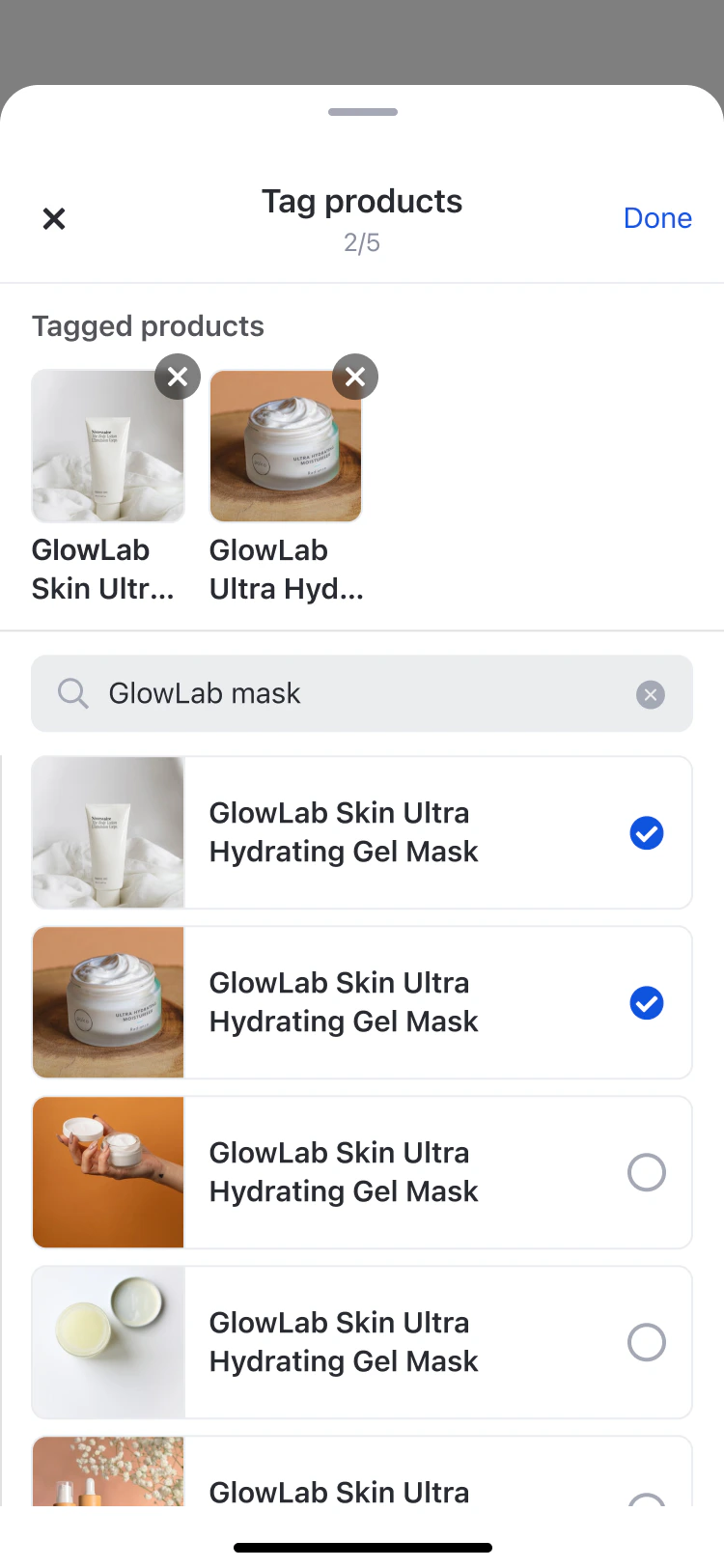
A searchable, multi-select product picker used when tagging products in a post or livestream. The component operates in one of three modes depending on context.
 ### Mode Behaviour
| Mode | Header Title | Used in |
| ------------ | -------------- | ------------------ |
| `create` | "Tag products" | Post creation |
| `edit` | "Edit tags" | Post editing |
| `livestream` | "Add products" | Livestream tagging |
Products already tagged elsewhere (e.g. on another media item) are shown in the list but appear disabled and cannot be re-selected.
### Code Examples
```swift iOS theme={null}
AmityProductTagSelectionComponent(
pageId: .postComposerPage,
selectedProductTags: selectedProducts,
existingProducts: ["product-3", "product-4"], // Already tagged - shown disabled
mode: .create, // .create | .edit | .livestream
onTagChanges: { tags in
// Handle selection changes
},
onDone: {
// Handle completion (create/edit modes)
},
onClose: {
// Handle dismissal (livestream mode)
}
)
```
```kotlin Android theme={null}
AmityProductTagSelectionComponent(
pageScope = pageScope,
selectedProductTags = selectedProductTags,
existingProducts = listOf("product-3", "product-4"),
mode = SelectionMode.CREATE, // CREATE | EDIT | LIVESTREAM
maxCount = 15,
canMultiSelect = true,
onTagChanges = { tags ->
// Handle selection changes
},
onDone = {
// Handle completion (create/edit modes)
},
onClose = {
// Handle dismissal
}
)
```
```typescript Web/React theme={null}
{
// Handle selection changes
}}
onDone={() => {
// Handle completion (create/edit modes)
}}
onClose={() => {
// Handle dismissal
}}
/>
```
## ProductTagListComponent
A read-only, vertically scrollable list that displays tagged products below post content. The header label adapts to the render mode context.
### Mode Behaviour
| Mode | Header Title | Used in |
| ------------ | -------------- | ------------------ |
| `create` | "Tag products" | Post creation |
| `edit` | "Edit tags" | Post editing |
| `livestream` | "Add products" | Livestream tagging |
Products already tagged elsewhere (e.g. on another media item) are shown in the list but appear disabled and cannot be re-selected.
### Code Examples
```swift iOS theme={null}
AmityProductTagSelectionComponent(
pageId: .postComposerPage,
selectedProductTags: selectedProducts,
existingProducts: ["product-3", "product-4"], // Already tagged - shown disabled
mode: .create, // .create | .edit | .livestream
onTagChanges: { tags in
// Handle selection changes
},
onDone: {
// Handle completion (create/edit modes)
},
onClose: {
// Handle dismissal (livestream mode)
}
)
```
```kotlin Android theme={null}
AmityProductTagSelectionComponent(
pageScope = pageScope,
selectedProductTags = selectedProductTags,
existingProducts = listOf("product-3", "product-4"),
mode = SelectionMode.CREATE, // CREATE | EDIT | LIVESTREAM
maxCount = 15,
canMultiSelect = true,
onTagChanges = { tags ->
// Handle selection changes
},
onDone = {
// Handle completion (create/edit modes)
},
onClose = {
// Handle dismissal
}
)
```
```typescript Web/React theme={null}
{
// Handle selection changes
}}
onDone={() => {
// Handle completion (create/edit modes)
}}
onClose={() => {
// Handle dismissal
}}
/>
```
## ProductTagListComponent
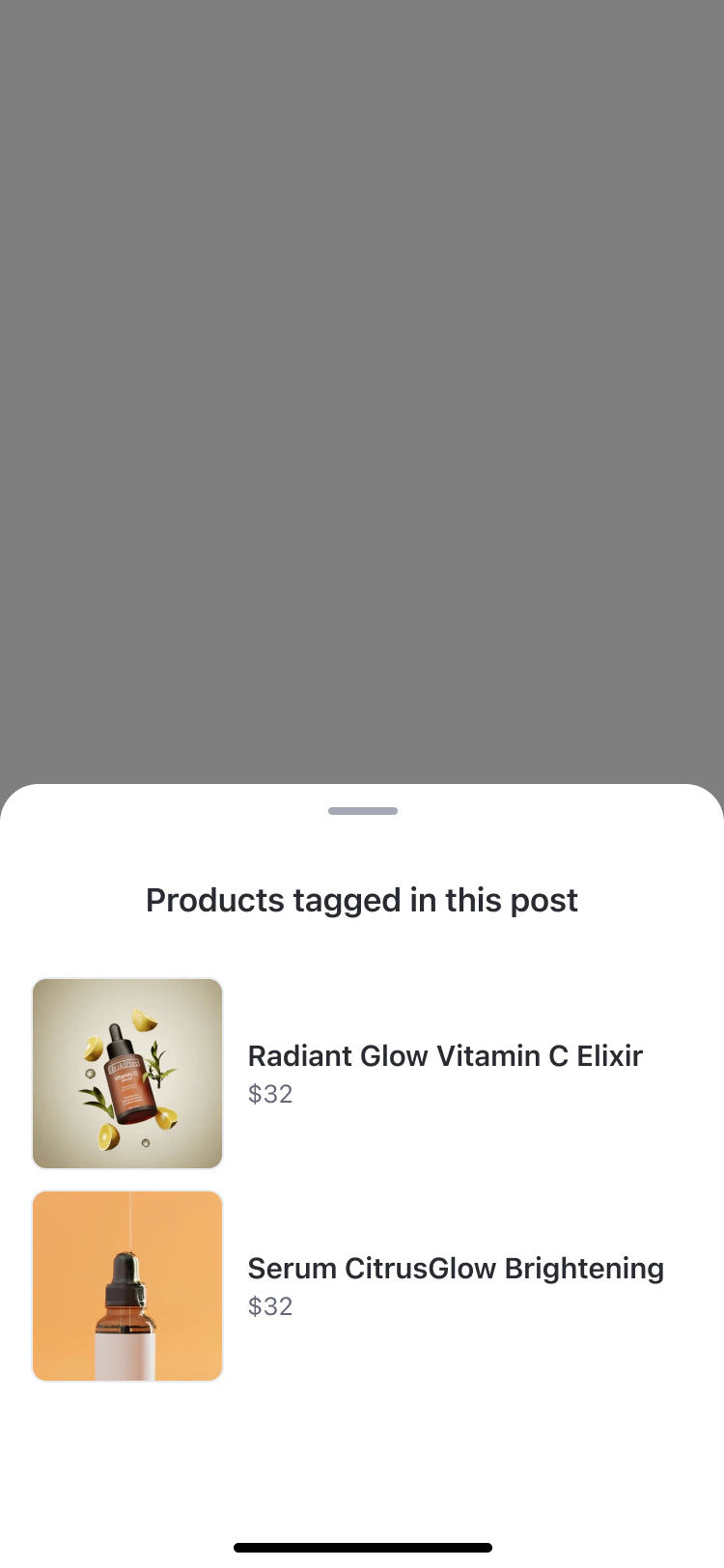
A read-only, vertically scrollable list that displays tagged products below post content. The header label adapts to the render mode context.
 ### Render Mode Header Text
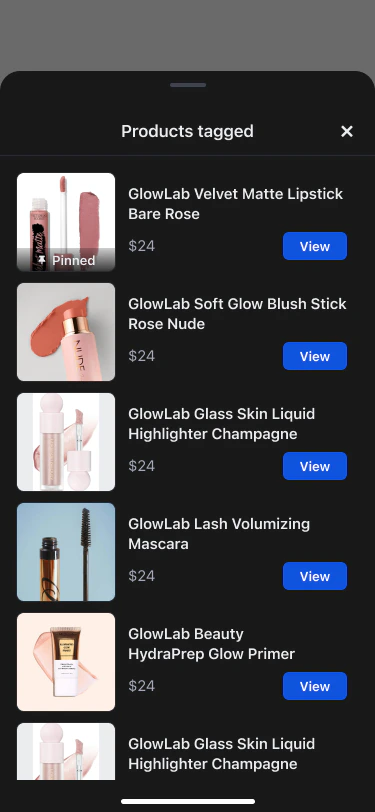
| Mode | Header Text | Used in |
| ------------ | ------------------------------- | ------------------------- |
| `post` | "Products tagged in this post" | Post feed and post detail |
| `image` | "Products tagged in this photo" | Image attachment view |
| `video` | "Products tagged in this video" | Video attachment view |
| `livestream` | "Products tagged" | Livestream viewer overlay |
### Render Mode Header Text
| Mode | Header Text | Used in |
| ------------ | ------------------------------- | ------------------------- |
| `post` | "Products tagged in this post" | Post feed and post detail |
| `image` | "Products tagged in this photo" | Image attachment view |
| `video` | "Products tagged in this video" | Video attachment view |
| `livestream` | "Products tagged" | Livestream viewer overlay |
 ### Code Examples
```swift iOS theme={null}
AmityProductTagListComponent(
pageId: .postDetailPage,
productTags: taggedProducts,
renderMode: .post, // .post | .livestream | .image | .video
onProductClick: { productTag in
// Handle product interaction
}
)
.environmentObject(host)
```
```kotlin Android theme={null}
AmityProductTagListComponent(
productTags = taggedProducts,
renderMode = RenderModeEnum.POST, // POST | LIVESTREAM | IMAGE | VIDEO
displayMode = "mobile",
onDismiss = {
// Handle dismissal
},
onProductClick = { product, analyticsLocation ->
// Handle product click
}
)
```
```typescript Web/React theme={null}
{
// Handle product interaction
}}
/>
```
## ManageProductTagListComponent
A management interface for hosts and co-hosts to tag, pin, and remove products during a livestream. Used in a bottom sheet (mobile) or popup (desktop). Also used in read-only mode for post-live replay.
### Code Examples
```swift iOS theme={null}
AmityProductTagListComponent(
pageId: .postDetailPage,
productTags: taggedProducts,
renderMode: .post, // .post | .livestream | .image | .video
onProductClick: { productTag in
// Handle product interaction
}
)
.environmentObject(host)
```
```kotlin Android theme={null}
AmityProductTagListComponent(
productTags = taggedProducts,
renderMode = RenderModeEnum.POST, // POST | LIVESTREAM | IMAGE | VIDEO
displayMode = "mobile",
onDismiss = {
// Handle dismissal
},
onProductClick = { product, analyticsLocation ->
// Handle product click
}
)
```
```typescript Web/React theme={null}
{
// Handle product interaction
}}
/>
```
## ManageProductTagListComponent
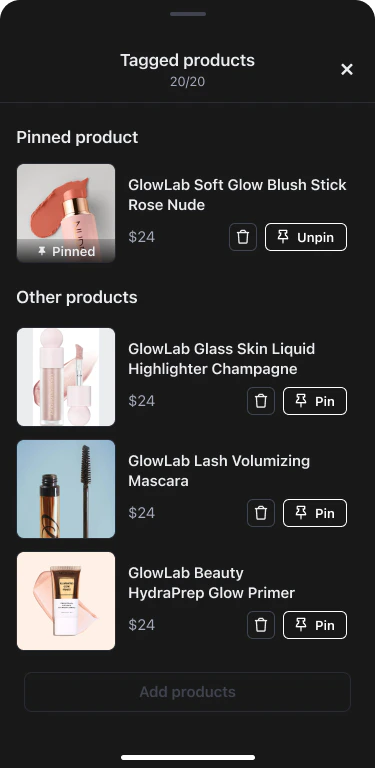
A management interface for hosts and co-hosts to tag, pin, and remove products during a livestream. Used in a bottom sheet (mobile) or popup (desktop). Also used in read-only mode for post-live replay.
 ### Render Mode Behaviour
| Mode | Pin controls | Used in |
| ------------ | ------------ | ------------------------------------------- |
| `livestream` | Enabled | Active livestream — host/co-host management |
| `playback` | Disabled | Post-live replay view |
When products are present, the list is organised into a pinned section at the top (single product) and an "Other products" section below. When empty, a call-to-action to add products is shown.
### Code Examples
```swift iOS theme={null}
import AmityUIKit4
AmityManageProductTagListComponent(
pageId: .livestreamPage,
viewModel: manageProductTagViewModel,
renderMode: .livestream,
onClose: { products in
// Update local tagged products state
taggedProducts = products
},
onAddProducts: {
// Present product selection sheet
},
onPinToggle: { productId, shouldPin in
viewModel.pinProduct(productId: productId, pin: shouldPin)
},
onProductRemove: { productId in
viewModel.removeProduct(productId: productId)
}
)
.environmentObject(host)
```
```kotlin Android theme={null}
import com.amity.socialcloud.uikit.community.compose.livestream.room.create.AmityManageProductTagListComponent
AmityManageProductTagListComponent(
taggedProducts = taggedProducts,
maxCount = 20,
pinnedProductId = pinnedProductId,
componentScope = componentScope,
canManageProducts = true,
isPostLive = true,
onDismiss = {
// Dismiss the bottom sheet
},
onRemoveProduct = { productId ->
viewModel.removeProduct(productId)
},
onPinProduct = { productId ->
viewModel.pinProduct(productId)
},
onAddProducts = {
// Navigate to product selection screen
},
onProductClick = { product, location ->
// Handle product tap (e.g. open product detail)
},
onProductViewed = { product, location ->
// Fire analytics impression event
}
)
```
```typescript Web/React theme={null}
import { AmityManageProductTagListComponent } from "@amityco/ui-kit-open-source";
{
setProductTags(tags);
}}
onUpdateProductTags={async (tags) => {
return await updatePostProductTags(tags);
}}
onRemove={(productTag) => {
removeProductTag(productTag);
}}
onPinnedProductIdChange={(newPinnedId) => {
setPinnedProductId(newPinnedId);
}}
isPinning={isPinning}
isUnpinning={isUnpinning}
onClose={(tags, pinnedId) => {
handleClose(tags, pinnedId);
}}
/>
```
## Related
Product tagging behaviour, limits, and UX rules for posts
Product tagging phases, pinning, co-host permissions, and viewer experience for livestreams
### Render Mode Behaviour
| Mode | Pin controls | Used in |
| ------------ | ------------ | ------------------------------------------- |
| `livestream` | Enabled | Active livestream — host/co-host management |
| `playback` | Disabled | Post-live replay view |
When products are present, the list is organised into a pinned section at the top (single product) and an "Other products" section below. When empty, a call-to-action to add products is shown.
### Code Examples
```swift iOS theme={null}
import AmityUIKit4
AmityManageProductTagListComponent(
pageId: .livestreamPage,
viewModel: manageProductTagViewModel,
renderMode: .livestream,
onClose: { products in
// Update local tagged products state
taggedProducts = products
},
onAddProducts: {
// Present product selection sheet
},
onPinToggle: { productId, shouldPin in
viewModel.pinProduct(productId: productId, pin: shouldPin)
},
onProductRemove: { productId in
viewModel.removeProduct(productId: productId)
}
)
.environmentObject(host)
```
```kotlin Android theme={null}
import com.amity.socialcloud.uikit.community.compose.livestream.room.create.AmityManageProductTagListComponent
AmityManageProductTagListComponent(
taggedProducts = taggedProducts,
maxCount = 20,
pinnedProductId = pinnedProductId,
componentScope = componentScope,
canManageProducts = true,
isPostLive = true,
onDismiss = {
// Dismiss the bottom sheet
},
onRemoveProduct = { productId ->
viewModel.removeProduct(productId)
},
onPinProduct = { productId ->
viewModel.pinProduct(productId)
},
onAddProducts = {
// Navigate to product selection screen
},
onProductClick = { product, location ->
// Handle product tap (e.g. open product detail)
},
onProductViewed = { product, location ->
// Fire analytics impression event
}
)
```
```typescript Web/React theme={null}
import { AmityManageProductTagListComponent } from "@amityco/ui-kit-open-source";
{
setProductTags(tags);
}}
onUpdateProductTags={async (tags) => {
return await updatePostProductTags(tags);
}}
onRemove={(productTag) => {
removeProductTag(productTag);
}}
onPinnedProductIdChange={(newPinnedId) => {
setPinnedProductId(newPinnedId);
}}
isPinning={isPinning}
isUnpinning={isUnpinning}
onClose={(tags, pinnedId) => {
handleClose(tags, pinnedId);
}}
/>
```
## Related
Product tagging behaviour, limits, and UX rules for posts
Product tagging phases, pinning, co-host permissions, and viewer experience for livestreams