> ## Documentation Index
> Fetch the complete documentation index at: https://learn.social.plus/llms.txt
> Use this file to discover all available pages before exploring further.
# Event
> Comprehensive event management UI components for creating, discovering, and managing scheduled events
**UIKit Component**: Event components are built on top of the social.plus SDK,
providing ready-to-use event creation and discovery UI with full data
management handled automatically.
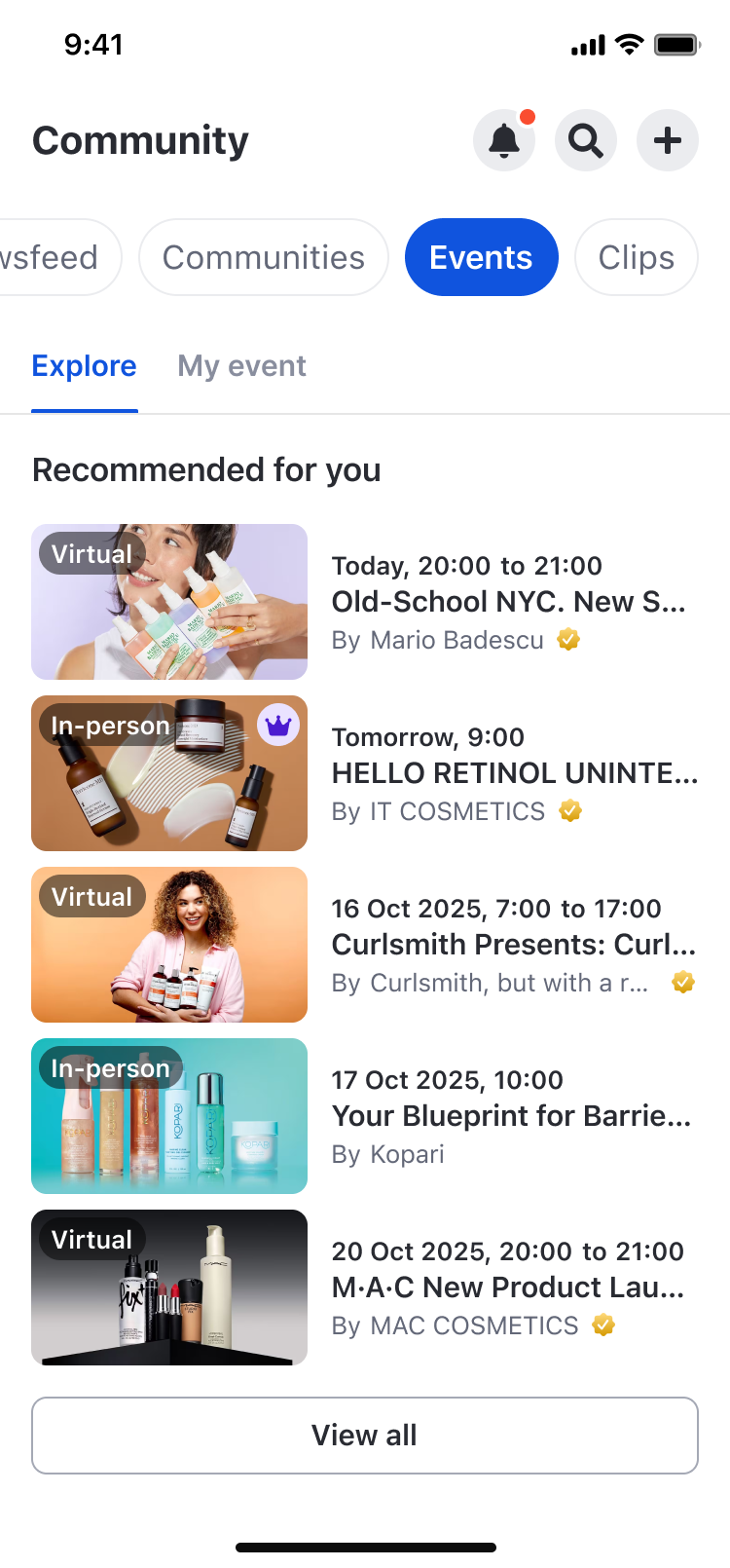 ## Feature Overview
The **Event** feature in social.plus UIKit v4 enables users to create scheduled events, discover upcoming/past events, manage attendees, and navigate between event-related experiences.
### Key Features
**Schedule events with rich details**
* Select where to create the event
* Configure details (name, description, date & time)
* In-person or virtual options
**Explore and manage your events**
* Explore events feed
* Upcoming events page
* Past events page
* Community-specific event feed
**Track and manage attendance**
* RSVP (Going/Not going)
* Attendees list
* Reminder Notifications
### Platform Support
| Feature | iOS | Android | Web | Flutter | React Native |
| -------------------------- | --- | ------- | --- | ------- | ------------ |
| Event Creation | ✅ | ✅ | ✅ | - | - |
| Event Detail & Attendees | ✅ | ✅ | ✅ | - | - |
| Event discovery | ✅ | ✅ | ✅ | - | - |
| Event in community profile | ✅ | ✅ | ✅ | - | - |
## Permission Handling
Spec 6 defines the visibility rules for entry points that trigger event creation:
1. **Global feed**: Only users with global permission will see the create event button
* Check: `client.hasPermission(AmityPermission.createEvent)`
2. **Community feed**: Users with global OR community permission will see the create event button
* Check: `client.hasPermission(AmityPermission.createEvent, communityId)`
UIKit applies these permission checks automatically. If you implement your own
custom entry points, keep the same permission logic for consistent UX.
## Implementation Guide
### Event Target Selection Page
Use **AmityEventTargetSelectionPage** to choose the destination for the event (Note: community only).
#### Customization Options
| Config ID | Type | Description |
| ----------------------------------------- | ------- | ---------------------------- |
| `select_event_target_page/*/*` | Page | Customize page theme |
| `select_event_target_page/*/close_button` | Element | Customize close button image |
| `select_event_target_page/*/title` | Element | Customize page title |
#### Code Examples
```swift iOS theme={null}
let page = AmityEventTargetSelectionPage()
let viewController = AmitySwiftUIHostingController(rootView: page)
navigationController?.pushViewController(viewController, animated: true)
```
```kotlin Android theme={null}
@Composable
fun composeEventTargetSelectionPage() {
AmityEventTargetSelectionPage()
}
// Using Activity
fun startEventTargetSelectionActivity(context: Context) {
val intent = AmityEventTargetSelectionPageActivity.newIntent(
context = context,
)
context.startActivity(intent)
}
```
```typescript React theme={null}
import { AmityUiKitProvider, AmityEventTargetSelectionPage } from '@amityco/ui-kit';
const SampleEventTargetSelectionPage = () => {
return (
);
};
```
### Event Setup Page
Use **AmityEventSetupPage** to create or edit an event.
## Feature Overview
The **Event** feature in social.plus UIKit v4 enables users to create scheduled events, discover upcoming/past events, manage attendees, and navigate between event-related experiences.
### Key Features
**Schedule events with rich details**
* Select where to create the event
* Configure details (name, description, date & time)
* In-person or virtual options
**Explore and manage your events**
* Explore events feed
* Upcoming events page
* Past events page
* Community-specific event feed
**Track and manage attendance**
* RSVP (Going/Not going)
* Attendees list
* Reminder Notifications
### Platform Support
| Feature | iOS | Android | Web | Flutter | React Native |
| -------------------------- | --- | ------- | --- | ------- | ------------ |
| Event Creation | ✅ | ✅ | ✅ | - | - |
| Event Detail & Attendees | ✅ | ✅ | ✅ | - | - |
| Event discovery | ✅ | ✅ | ✅ | - | - |
| Event in community profile | ✅ | ✅ | ✅ | - | - |
## Permission Handling
Spec 6 defines the visibility rules for entry points that trigger event creation:
1. **Global feed**: Only users with global permission will see the create event button
* Check: `client.hasPermission(AmityPermission.createEvent)`
2. **Community feed**: Users with global OR community permission will see the create event button
* Check: `client.hasPermission(AmityPermission.createEvent, communityId)`
UIKit applies these permission checks automatically. If you implement your own
custom entry points, keep the same permission logic for consistent UX.
## Implementation Guide
### Event Target Selection Page
Use **AmityEventTargetSelectionPage** to choose the destination for the event (Note: community only).
#### Customization Options
| Config ID | Type | Description |
| ----------------------------------------- | ------- | ---------------------------- |
| `select_event_target_page/*/*` | Page | Customize page theme |
| `select_event_target_page/*/close_button` | Element | Customize close button image |
| `select_event_target_page/*/title` | Element | Customize page title |
#### Code Examples
```swift iOS theme={null}
let page = AmityEventTargetSelectionPage()
let viewController = AmitySwiftUIHostingController(rootView: page)
navigationController?.pushViewController(viewController, animated: true)
```
```kotlin Android theme={null}
@Composable
fun composeEventTargetSelectionPage() {
AmityEventTargetSelectionPage()
}
// Using Activity
fun startEventTargetSelectionActivity(context: Context) {
val intent = AmityEventTargetSelectionPageActivity.newIntent(
context = context,
)
context.startActivity(intent)
}
```
```typescript React theme={null}
import { AmityUiKitProvider, AmityEventTargetSelectionPage } from '@amityco/ui-kit';
const SampleEventTargetSelectionPage = () => {
return (
);
};
```
### Event Setup Page
Use **AmityEventSetupPage** to create or edit an event.
.png?fit=max&auto=format&n=1NUkPv8NmKhPS-wU&q=85&s=b1ea7db571336128b914173b4e53ae74) **Public API:**
```swift theme={null}
enum AmityEventSetupPageMode {
case create(targetId, targetName)
case edit(AmityEvent)
}
AmityEventSetupPage(mode: AmityEventSetupPageMode)
```
#### Customization Options
| Config ID | Type | Description |
| ------------------------------------------ | ------- | ------------------------------- |
| `event_setup_page/*/*` | Page | Customize page theme |
| `event_setup_page/*/title` | Element | Customize title |
| `event_setup_page/*/camera_button` | Element | Customize camera label/icon |
| `event_setup_page/*/image_button` | Element | Customize photo label/icon |
| `event_setup_page/*/event_name_title` | Element | Customize “Event name” label |
| `event_setup_page/*/event_details_title` | Element | Customize “Event details” label |
| `event_setup_page/*/event_date_time_title` | Element | Customize “Date and time” label |
| `event_setup_page/*/event_location_title` | Element | Customize “Location” label |
#### Code Examples
```swift iOS theme={null}
// Create
let page = AmityEventSetupPage(mode: .create("", ""))
let viewController = AmitySwiftUIHostingController(rootView: page)
navigationController?.pushViewController(viewController, animated: true)
// Edit
// When you already have an AmityEvent object
let editPage = AmityEventSetupPage(mode: .edit(event))
```
```kotlin Android theme={null}
@Composable
fun composeCreateEventSetupPage(targetId: String, targetName: String) {
AmityEventSetupPage(mode = AmityEventSetupPageMode.Create(targetId, targetName))
}
@Composable
fun composeEditEventSetupPage(event: AmityEvent) {
AmityEventSetupPage(mode = AmityEventSetupPageMode.Edit(event))
}
```
```typescript React theme={null}
import { AmityUiKitProvider, AmityEventSetupPage } from '@amityco/ui-kit';
// Create mode
const SampleCreateEventSetupPage = ({ targetId, targetName }) => {
return (
);
};
// Edit mode
const SampleEditEventSetupPage = ({ event }) => {
return (
);
};
```
### Event Detail Page
Use **AmityEventDetailPage** to view event details and access event actions.
**Public API:**
```swift theme={null}
enum AmityEventSetupPageMode {
case create(targetId, targetName)
case edit(AmityEvent)
}
AmityEventSetupPage(mode: AmityEventSetupPageMode)
```
#### Customization Options
| Config ID | Type | Description |
| ------------------------------------------ | ------- | ------------------------------- |
| `event_setup_page/*/*` | Page | Customize page theme |
| `event_setup_page/*/title` | Element | Customize title |
| `event_setup_page/*/camera_button` | Element | Customize camera label/icon |
| `event_setup_page/*/image_button` | Element | Customize photo label/icon |
| `event_setup_page/*/event_name_title` | Element | Customize “Event name” label |
| `event_setup_page/*/event_details_title` | Element | Customize “Event details” label |
| `event_setup_page/*/event_date_time_title` | Element | Customize “Date and time” label |
| `event_setup_page/*/event_location_title` | Element | Customize “Location” label |
#### Code Examples
```swift iOS theme={null}
// Create
let page = AmityEventSetupPage(mode: .create("", ""))
let viewController = AmitySwiftUIHostingController(rootView: page)
navigationController?.pushViewController(viewController, animated: true)
// Edit
// When you already have an AmityEvent object
let editPage = AmityEventSetupPage(mode: .edit(event))
```
```kotlin Android theme={null}
@Composable
fun composeCreateEventSetupPage(targetId: String, targetName: String) {
AmityEventSetupPage(mode = AmityEventSetupPageMode.Create(targetId, targetName))
}
@Composable
fun composeEditEventSetupPage(event: AmityEvent) {
AmityEventSetupPage(mode = AmityEventSetupPageMode.Edit(event))
}
```
```typescript React theme={null}
import { AmityUiKitProvider, AmityEventSetupPage } from '@amityco/ui-kit';
// Create mode
const SampleCreateEventSetupPage = ({ targetId, targetName }) => {
return (
);
};
// Edit mode
const SampleEditEventSetupPage = ({ event }) => {
return (
);
};
```
### Event Detail Page
Use **AmityEventDetailPage** to view event details and access event actions.
.png?fit=max&auto=format&n=1NUkPv8NmKhPS-wU&q=85&s=0286d7edba374b4a63585ebe1581c020) **Public API:**
```swift theme={null}
AmityEventDetailPage(eventId: string)
```
#### Code Examples
```swift iOS theme={null}
let page = AmityEventDetailPage(eventId: "")
let viewController = AmitySwiftUIHostingController(rootView: page)
navigationController?.pushViewController(viewController, animated: true)
```
```kotlin Android theme={null}
@Composable
fun composeEventDetailPage(eventId: String) {
AmityEventDetailPage(eventId = eventId)
}
```
```typescript React theme={null}
import { AmityUiKitProvider, AmityEventDetailPage } from '@amityco/ui-kit';
const SampleEventDetailPage = ({ eventId }) => {
return (
);
};
```
### Event Attendees Page
Use **AmityEventAttendeesPage** to browse attendees and navigate to a user profile.
**Public API:**
```swift theme={null}
AmityEventAttendeesPage(eventId: string)
```
#### Code Examples
```swift iOS theme={null}
let page = AmityEventAttendeesPage(eventId: "")
let viewController = AmitySwiftUIHostingController(rootView: page)
navigationController?.pushViewController(viewController, animated: true)
```
```kotlin Android theme={null}
@Composable
fun composeEventAttendeesPage(eventId: String) {
AmityEventAttendeesPage(eventId = eventId)
}
```
```typescript React theme={null}
import { AmityUiKitProvider, AmityEventAttendeesPage } from '@amityco/ui-kit';
const SampleEventAttendeesPage = ({ eventId }) => {
return (
);
};
```
### Upcoming Events Pages
Use **AmityUpcomingEventsPage** to browse upcoming events.
**Public API:**
```swift theme={null}
AmityEventDetailPage(eventId: string)
```
#### Code Examples
```swift iOS theme={null}
let page = AmityEventDetailPage(eventId: "")
let viewController = AmitySwiftUIHostingController(rootView: page)
navigationController?.pushViewController(viewController, animated: true)
```
```kotlin Android theme={null}
@Composable
fun composeEventDetailPage(eventId: String) {
AmityEventDetailPage(eventId = eventId)
}
```
```typescript React theme={null}
import { AmityUiKitProvider, AmityEventDetailPage } from '@amityco/ui-kit';
const SampleEventDetailPage = ({ eventId }) => {
return (
);
};
```
### Event Attendees Page
Use **AmityEventAttendeesPage** to browse attendees and navigate to a user profile.
**Public API:**
```swift theme={null}
AmityEventAttendeesPage(eventId: string)
```
#### Code Examples
```swift iOS theme={null}
let page = AmityEventAttendeesPage(eventId: "")
let viewController = AmitySwiftUIHostingController(rootView: page)
navigationController?.pushViewController(viewController, animated: true)
```
```kotlin Android theme={null}
@Composable
fun composeEventAttendeesPage(eventId: String) {
AmityEventAttendeesPage(eventId = eventId)
}
```
```typescript React theme={null}
import { AmityUiKitProvider, AmityEventAttendeesPage } from '@amityco/ui-kit';
const SampleEventAttendeesPage = ({ eventId }) => {
return (
);
};
```
### Upcoming Events Pages
Use **AmityUpcomingEventsPage** to browse upcoming events.
.png?fit=max&auto=format&n=1NUkPv8NmKhPS-wU&q=85&s=77b84c6dcb6ca55f2eb79016f2cb72d8) #### Customization Options
| Config ID | Type | Description |
| -------------------------- | ---- | ------------------------------ |
| `upcoming_events_page/*/*` | Page | Customize upcoming events page |
#### Code Examples
```swift iOS theme={null}
// Show all upcoming events (Explore mode)
let upcomingEventsPage = AmityUpcomingEventsPage(
context: .init(onlyMyEvents: false)
)
let viewController = AmitySwiftUIHostingController(rootView: upcomingEventsPage)
navigationController?.pushViewController(viewController, animated: true)
// Show only user's upcoming events (My Events mode)
let myEventsPage = AmityUpcomingEventsPage(
context: .init(onlyMyEvents: true)
)
let myEventsViewController = AmitySwiftUIHostingController(rootView: myEventsPage)
navigationController?.pushViewController(myEventsViewController, animated: true)
```
```kotlin Android theme={null}
// Using Activity - All events
fun startUpcomingEventsActivityAllEvents(context: Context) {
val intent = AmityUpcomingEventsPageActivity.newIntent(
context = context,
showAllEvents = true
)
context.startActivity(intent)
}
// Using Activity - My events only
fun startUpcomingEventsActivityMyEvents(context: Context) {
val intent = AmityUpcomingEventsPageActivity.newIntent(
context = context,
showAllEvents = false
)
context.startActivity(intent)
}
```
```typescript React theme={null}
import { AmityUiKitProvider, AmityUpcomingEventsPage } from '@amityco/ui-kit';
const SampleAmityUpcomingEventsPage = () => {
return (
);
};
```
### Past Events Page
Use **AmityPastEventsPage** to browse past events.
#### Customization Options
| Config ID | Type | Description |
| -------------------------- | ---- | ------------------------------ |
| `upcoming_events_page/*/*` | Page | Customize upcoming events page |
#### Code Examples
```swift iOS theme={null}
// Show all upcoming events (Explore mode)
let upcomingEventsPage = AmityUpcomingEventsPage(
context: .init(onlyMyEvents: false)
)
let viewController = AmitySwiftUIHostingController(rootView: upcomingEventsPage)
navigationController?.pushViewController(viewController, animated: true)
// Show only user's upcoming events (My Events mode)
let myEventsPage = AmityUpcomingEventsPage(
context: .init(onlyMyEvents: true)
)
let myEventsViewController = AmitySwiftUIHostingController(rootView: myEventsPage)
navigationController?.pushViewController(myEventsViewController, animated: true)
```
```kotlin Android theme={null}
// Using Activity - All events
fun startUpcomingEventsActivityAllEvents(context: Context) {
val intent = AmityUpcomingEventsPageActivity.newIntent(
context = context,
showAllEvents = true
)
context.startActivity(intent)
}
// Using Activity - My events only
fun startUpcomingEventsActivityMyEvents(context: Context) {
val intent = AmityUpcomingEventsPageActivity.newIntent(
context = context,
showAllEvents = false
)
context.startActivity(intent)
}
```
```typescript React theme={null}
import { AmityUiKitProvider, AmityUpcomingEventsPage } from '@amityco/ui-kit';
const SampleAmityUpcomingEventsPage = () => {
return (
);
};
```
### Past Events Page
Use **AmityPastEventsPage** to browse past events.
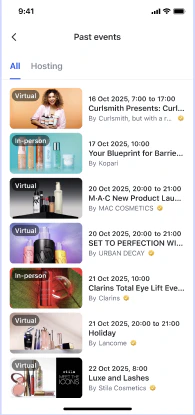 #### Customization Options
| Config ID | Type | Description |
| ---------------------- | ---- | -------------------------- |
| `past_events_page/*/*` | Page | Customize past events page |
#### Code Examples
```swift iOS theme={null}
// Show past events page
let pastEventsPage = AmityPastEventsPage()
let viewController = AmitySwiftUIHostingController(rootView: pastEventsPage)
navigationController?.pushViewController(viewController, animated: true)
```
```kotlin Android theme={null}
// Using Activity - All events
fun startPastEventsActivityAllEvents(context: Context) {
val intent = AmityPastEventsPageActivity.newIntent(context)
context.startActivity(intent)
}
// Using Activity - My events only
fun startPastEventsActivityMyEvents(context: Context) {
val intent = AmityPastEventsPageActivity.newIntent(context)
context.startActivity(intent)
}
```
```typescript React theme={null}
import { AmityUiKitProvider, AmityPastEventsPage } from '@amityco/ui-kit';
const SampleAmityPastEventsPageActivityPage = () => {
return (
);
};
```
### Feed Components
**Event discovery surfaces embedded in existing feature pages**
Spec 6 aligns the Event feature with these components:
* **AmityExploreEventFeedComponent**
* **AmityMyEventFeedComponent**
* **AmityEventInfoComponent**
* **AmityEventDiscussionFeedComponent**
These components are typically used inside existing UIKit pages (e.g., Social Home and Community Profile). If you’re using the standard Social Home experience, you get these feeds automatically.
#### Code Examples
#### AmityExploreEventFeedComponent
```swift iOS theme={null}
// Show explore event feed component
let exploreEventComponent = AmityExploreEventFeedComponent(pageId: .socialHomePage)
let viewController = AmitySwiftUIHostingController(rootView: exploreEventComponent)
navigationController?.pushViewController(viewController, animated: true)
```
```kotlin Android theme={null}
@Composable
fun composeExploreEventFeed() {
// Get flows directly from SDK repository
val liveEvents = remember {
AmitySocialClient.newEventRepository()
.getLiveEvents()
.cachedIn(viewModelScope)
}.collectAsLazyPagingItems()
val upcomingEvents = remember {
AmitySocialClient.newEventRepository()
.getUpcomingEvents()
.cachedIn(viewModelScope)
}.collectAsLazyPagingItems()
AmityExploreEventFeedComponent(
liveEvents = liveEvents,
upcomingEvents = upcomingEvents
)
}
```
```typescript React theme={null}
import { AmityUiKitProvider, AmityExploreEventFeedComponent } from '@amityco/ui-kit';
const SampleAmityExploreEventFeedComponent = () => {
return (
);
};
```
#### AmityMyEventFeedComponent
```swift iOS theme={null}
// Show my event feed component
let myEventComponent = AmityMyEventFeedComponent(pageId: .socialHomePage)
let viewController = AmitySwiftUIHostingController(rootView: myEventComponent)
navigationController?.pushViewController(viewController, animated: true)
```
```kotlin Android theme={null}
@Composable
fun composeMyEventFeed() {
// Get flows directly from SDK repository
val liveEvents = remember {
AmitySocialClient.newEventRepository()
.getLiveEvents()
.cachedIn(viewModelScope)
}.collectAsLazyPagingItems()
val upcomingEvents = remember {
AmitySocialClient.newEventRepository()
.getMyUpcomingEvents()
.cachedIn(viewModelScope)
}.collectAsLazyPagingItems()
val pastEvents = remember {
AmitySocialClient.newEventRepository()
.getPastEvents()
.cachedIn(viewModelScope)
}.collectAsLazyPagingItems()
AmityMyEventFeedComponent(
liveEvents = liveEvents,
upcomingEvents = upcomingEvents,
pastEvents = pastEvents
)
}
```
```typescript React theme={null}
import { AmityUiKitProvider, AmityMyEventFeedComponent } from '@amityco/ui-kit';
const SampleAmityMyEventFeedComponent = () => {
return (
);
};
```
#### AmityEventInfoComponent
```swift iOS theme={null}
let eventDetailViewModel = AmityEventDetailPageViewModel(event: event)
let eventInfoComponent = AmityEventInfoComponent(viewModel: eventDetailViewModel)
let viewController = AmitySwiftUIHostingController(rootView: eventInfoComponent)
navigationController?.pushViewController(viewController, animated: true)
```
```kotlin Android theme={null}
@Composable
fun composeEventInfo(
event: AmityEvent
) {
AmityEventInfoComponent(
event = event
)
}
```
```typescript React theme={null}
import { AmityUiKitProvider, AmityEventInfoComponent } from '@amityco/ui-kit';
const SampleAmityEventInfoComponent = ({ event }) => {
return (
);
};
```
#### AmityEventDiscussionFeedComponent
```swift iOS theme={null}
// Show event discussion feed component (requires an event and view model)
let eventDetailViewModel = AmityEventDetailPageViewModel(event: event)
let discussionFeedComponent = AmityEventDiscussionFeedComponent(viewModel: eventDetailViewModel)
let viewController = AmitySwiftUIHostingController(rootView: discussionFeedComponent)
navigationController?.pushViewController(viewController, animated: true)
```
```kotlin Android theme={null}
@Composable
fun composeEventDiscussionFeed(
eventId: String
) {
val viewModel: AmityEventDetailViewModel = viewModel()
val lazyListState = rememberLazyListState()
LaunchedEffect(eventId) {
viewModel.loadEvent(eventId)
}
AmityEventDiscussionFeedComponent(
viewModel = viewModel,
lazyListState = lazyListState,
shouldRefresh = false,
header = {
item {
Text("Event Discussion Header")
}
}
)
}
```
```typescript React theme={null}
import { AmityUiKitProvider, AmityEventDiscussionFeedComponent } from '@amityco/ui-kit';
const SampleAmityEventDiscussionFeedComponent = ({ event }) => {
return (
);
};
```
#### Customization Options
| Config ID | Type | Description |
| ------------------------------------------------------- | --------- | ------------------------------------------------ |
| `social_home_page/my_event_feed_component/*` | Component | Customize My Event feed section |
| `social_home_page/explore_event_feed_component/*` | Component | Customize Explore Event feed section |
| `community_profile_page/*/create_event_button` | Element | Customize create event button label |
| `social_home_page/create_post_menu/create_event_button` | Element | Customize create-event entry in create-post menu |
If you need to hook navigation (e.g., “View all upcoming”), use the corresponding Behavior class documented in the next tab.
## Customization
UIKit provides these customization keys for event entry points and pages.
```json theme={null}
{
"*/community_sidebar/communities_sidebar_menu_item": {
"text": "Communities",
"icon": ""
},
"*/community_sidebar/events_sidebar_menu_item": {
"text": "Events",
"icon": ""
},
"social_home_page/*/communities_button": {
"text": "Communities"
},
"social_home_page/*/events_button": {
"text": "Events"
},
"social_home_page/create_post_menu/create_event_button": {
"text": "Event",
"image": ""
},
"social_home_page/my_event_feed_component/*": {},
"social_home_page/explore_event_feed_component/*": {},
"community_profile_page/*/create_event_button": {
"text": "Event"
},
"select_event_target_page/*/*": {},
"select_event_target_page/*/close_button": {
"image": ""
},
"select_event_target_page/*/title": {
"text": "Create event in"
},
"event_setup_page/*/*": {},
"event_setup_page/*/title": {
"text": "Create event"
},
"event_setup_page/*/camera_button": {
"text": "Camera",
"image": ""
},
"event_setup_page/*/image_button": {
"text": "Photo",
"image": ""
},
"event_setup_page/*/event_name_title": {
"text": "Event name"
},
"event_setup_page/*/event_details_title": {
"text": "Event details"
},
"event_setup_page/*/event_date_time_title": {
"text": "Date and time"
},
"event_setup_page/*/event_location_title": {
"text": "Location"
},
"upcoming_events_page/*/*": {},
"past_events_page/*/*": {}
}
```
## Behavior Customization
UIKit provides behavior classes to customize navigation and actions for event-related pages and components.
### Page Behaviors
```swift theme={null}
class AmityEventTargetSelectionPageBehavior {
goToEventSetupPage(context): void {
// navigation logic
}
}
```
```swift theme={null}
class AmityEventSetupPageBehavior {
goToEventDetailPage(context): void {
// navigation logic
}
}
```
```swift theme={null}
class AmityEventDetailPageBehavior {
goToEventSetupPage(context): void {
// navigation logic
}
goToLivestreamPostComposerPage(context): void {
// navigation logic
}
goToPostDetailPage(context): void {
// navigation logic
}
goToPostComposerPage(context): void {
// navigation logic
}
goToPollPostComposerPage(context): void {
// navigation logic
}
goToCommunityProfilePage(context): void {
// navigation logic
}
goToEventAttendeesPage(context): void {
// navigation logic
}
}
```
```swift theme={null}
class AmityEventAttendeesPageBehavior {
goToUserProfilePage(context): void {
// navigation logic
}
}
```
```swift theme={null}
class AmityNotificationTrayPageBehavior {
// ... existing behaviors
goToEventDetailPage(context): void {
// navigation logic
}
}
```
```swift theme={null}
class AmityCommunityProfilePageBehavior {
// ... existing behaviors
goToEventDetailPage(context): void {
// navigation logic
}
}
```
### Component Behaviors
```swift theme={null}
class AmityExploreEventFeedComponentBehavior {
goToUpcomingEventsPage(context): void {
// navigation logic
}
}
```
```swift theme={null}
class AmityMyEventFeedComponentBehavior {
goToUpcomingEventsPage(context): void {
// navigation logic
}
goToPastEventsPage(context): void {
// navigation logic
}
}
```
```swift theme={null}
class AmityCreatePostMenuComponentBehavior {
// ... existing behaviors
goToSelectEventTargetPage(): void {
// navigation logic
}
}
```
```swift theme={null}
class AmityMyCommunitiesComponentBehavior {
// ... existing behaviors
goToCommunitySetupPage(): void {
// navigation logic
}
}
```
## Related Topics
SDK event APIs and data models
Community UI components
Livestream UI components
#### Customization Options
| Config ID | Type | Description |
| ---------------------- | ---- | -------------------------- |
| `past_events_page/*/*` | Page | Customize past events page |
#### Code Examples
```swift iOS theme={null}
// Show past events page
let pastEventsPage = AmityPastEventsPage()
let viewController = AmitySwiftUIHostingController(rootView: pastEventsPage)
navigationController?.pushViewController(viewController, animated: true)
```
```kotlin Android theme={null}
// Using Activity - All events
fun startPastEventsActivityAllEvents(context: Context) {
val intent = AmityPastEventsPageActivity.newIntent(context)
context.startActivity(intent)
}
// Using Activity - My events only
fun startPastEventsActivityMyEvents(context: Context) {
val intent = AmityPastEventsPageActivity.newIntent(context)
context.startActivity(intent)
}
```
```typescript React theme={null}
import { AmityUiKitProvider, AmityPastEventsPage } from '@amityco/ui-kit';
const SampleAmityPastEventsPageActivityPage = () => {
return (
);
};
```
### Feed Components
**Event discovery surfaces embedded in existing feature pages**
Spec 6 aligns the Event feature with these components:
* **AmityExploreEventFeedComponent**
* **AmityMyEventFeedComponent**
* **AmityEventInfoComponent**
* **AmityEventDiscussionFeedComponent**
These components are typically used inside existing UIKit pages (e.g., Social Home and Community Profile). If you’re using the standard Social Home experience, you get these feeds automatically.
#### Code Examples
#### AmityExploreEventFeedComponent
```swift iOS theme={null}
// Show explore event feed component
let exploreEventComponent = AmityExploreEventFeedComponent(pageId: .socialHomePage)
let viewController = AmitySwiftUIHostingController(rootView: exploreEventComponent)
navigationController?.pushViewController(viewController, animated: true)
```
```kotlin Android theme={null}
@Composable
fun composeExploreEventFeed() {
// Get flows directly from SDK repository
val liveEvents = remember {
AmitySocialClient.newEventRepository()
.getLiveEvents()
.cachedIn(viewModelScope)
}.collectAsLazyPagingItems()
val upcomingEvents = remember {
AmitySocialClient.newEventRepository()
.getUpcomingEvents()
.cachedIn(viewModelScope)
}.collectAsLazyPagingItems()
AmityExploreEventFeedComponent(
liveEvents = liveEvents,
upcomingEvents = upcomingEvents
)
}
```
```typescript React theme={null}
import { AmityUiKitProvider, AmityExploreEventFeedComponent } from '@amityco/ui-kit';
const SampleAmityExploreEventFeedComponent = () => {
return (
);
};
```
#### AmityMyEventFeedComponent
```swift iOS theme={null}
// Show my event feed component
let myEventComponent = AmityMyEventFeedComponent(pageId: .socialHomePage)
let viewController = AmitySwiftUIHostingController(rootView: myEventComponent)
navigationController?.pushViewController(viewController, animated: true)
```
```kotlin Android theme={null}
@Composable
fun composeMyEventFeed() {
// Get flows directly from SDK repository
val liveEvents = remember {
AmitySocialClient.newEventRepository()
.getLiveEvents()
.cachedIn(viewModelScope)
}.collectAsLazyPagingItems()
val upcomingEvents = remember {
AmitySocialClient.newEventRepository()
.getMyUpcomingEvents()
.cachedIn(viewModelScope)
}.collectAsLazyPagingItems()
val pastEvents = remember {
AmitySocialClient.newEventRepository()
.getPastEvents()
.cachedIn(viewModelScope)
}.collectAsLazyPagingItems()
AmityMyEventFeedComponent(
liveEvents = liveEvents,
upcomingEvents = upcomingEvents,
pastEvents = pastEvents
)
}
```
```typescript React theme={null}
import { AmityUiKitProvider, AmityMyEventFeedComponent } from '@amityco/ui-kit';
const SampleAmityMyEventFeedComponent = () => {
return (
);
};
```
#### AmityEventInfoComponent
```swift iOS theme={null}
let eventDetailViewModel = AmityEventDetailPageViewModel(event: event)
let eventInfoComponent = AmityEventInfoComponent(viewModel: eventDetailViewModel)
let viewController = AmitySwiftUIHostingController(rootView: eventInfoComponent)
navigationController?.pushViewController(viewController, animated: true)
```
```kotlin Android theme={null}
@Composable
fun composeEventInfo(
event: AmityEvent
) {
AmityEventInfoComponent(
event = event
)
}
```
```typescript React theme={null}
import { AmityUiKitProvider, AmityEventInfoComponent } from '@amityco/ui-kit';
const SampleAmityEventInfoComponent = ({ event }) => {
return (
);
};
```
#### AmityEventDiscussionFeedComponent
```swift iOS theme={null}
// Show event discussion feed component (requires an event and view model)
let eventDetailViewModel = AmityEventDetailPageViewModel(event: event)
let discussionFeedComponent = AmityEventDiscussionFeedComponent(viewModel: eventDetailViewModel)
let viewController = AmitySwiftUIHostingController(rootView: discussionFeedComponent)
navigationController?.pushViewController(viewController, animated: true)
```
```kotlin Android theme={null}
@Composable
fun composeEventDiscussionFeed(
eventId: String
) {
val viewModel: AmityEventDetailViewModel = viewModel()
val lazyListState = rememberLazyListState()
LaunchedEffect(eventId) {
viewModel.loadEvent(eventId)
}
AmityEventDiscussionFeedComponent(
viewModel = viewModel,
lazyListState = lazyListState,
shouldRefresh = false,
header = {
item {
Text("Event Discussion Header")
}
}
)
}
```
```typescript React theme={null}
import { AmityUiKitProvider, AmityEventDiscussionFeedComponent } from '@amityco/ui-kit';
const SampleAmityEventDiscussionFeedComponent = ({ event }) => {
return (
);
};
```
#### Customization Options
| Config ID | Type | Description |
| ------------------------------------------------------- | --------- | ------------------------------------------------ |
| `social_home_page/my_event_feed_component/*` | Component | Customize My Event feed section |
| `social_home_page/explore_event_feed_component/*` | Component | Customize Explore Event feed section |
| `community_profile_page/*/create_event_button` | Element | Customize create event button label |
| `social_home_page/create_post_menu/create_event_button` | Element | Customize create-event entry in create-post menu |
If you need to hook navigation (e.g., “View all upcoming”), use the corresponding Behavior class documented in the next tab.
## Customization
UIKit provides these customization keys for event entry points and pages.
```json theme={null}
{
"*/community_sidebar/communities_sidebar_menu_item": {
"text": "Communities",
"icon": ""
},
"*/community_sidebar/events_sidebar_menu_item": {
"text": "Events",
"icon": ""
},
"social_home_page/*/communities_button": {
"text": "Communities"
},
"social_home_page/*/events_button": {
"text": "Events"
},
"social_home_page/create_post_menu/create_event_button": {
"text": "Event",
"image": ""
},
"social_home_page/my_event_feed_component/*": {},
"social_home_page/explore_event_feed_component/*": {},
"community_profile_page/*/create_event_button": {
"text": "Event"
},
"select_event_target_page/*/*": {},
"select_event_target_page/*/close_button": {
"image": ""
},
"select_event_target_page/*/title": {
"text": "Create event in"
},
"event_setup_page/*/*": {},
"event_setup_page/*/title": {
"text": "Create event"
},
"event_setup_page/*/camera_button": {
"text": "Camera",
"image": ""
},
"event_setup_page/*/image_button": {
"text": "Photo",
"image": ""
},
"event_setup_page/*/event_name_title": {
"text": "Event name"
},
"event_setup_page/*/event_details_title": {
"text": "Event details"
},
"event_setup_page/*/event_date_time_title": {
"text": "Date and time"
},
"event_setup_page/*/event_location_title": {
"text": "Location"
},
"upcoming_events_page/*/*": {},
"past_events_page/*/*": {}
}
```
## Behavior Customization
UIKit provides behavior classes to customize navigation and actions for event-related pages and components.
### Page Behaviors
```swift theme={null}
class AmityEventTargetSelectionPageBehavior {
goToEventSetupPage(context): void {
// navigation logic
}
}
```
```swift theme={null}
class AmityEventSetupPageBehavior {
goToEventDetailPage(context): void {
// navigation logic
}
}
```
```swift theme={null}
class AmityEventDetailPageBehavior {
goToEventSetupPage(context): void {
// navigation logic
}
goToLivestreamPostComposerPage(context): void {
// navigation logic
}
goToPostDetailPage(context): void {
// navigation logic
}
goToPostComposerPage(context): void {
// navigation logic
}
goToPollPostComposerPage(context): void {
// navigation logic
}
goToCommunityProfilePage(context): void {
// navigation logic
}
goToEventAttendeesPage(context): void {
// navigation logic
}
}
```
```swift theme={null}
class AmityEventAttendeesPageBehavior {
goToUserProfilePage(context): void {
// navigation logic
}
}
```
```swift theme={null}
class AmityNotificationTrayPageBehavior {
// ... existing behaviors
goToEventDetailPage(context): void {
// navigation logic
}
}
```
```swift theme={null}
class AmityCommunityProfilePageBehavior {
// ... existing behaviors
goToEventDetailPage(context): void {
// navigation logic
}
}
```
### Component Behaviors
```swift theme={null}
class AmityExploreEventFeedComponentBehavior {
goToUpcomingEventsPage(context): void {
// navigation logic
}
}
```
```swift theme={null}
class AmityMyEventFeedComponentBehavior {
goToUpcomingEventsPage(context): void {
// navigation logic
}
goToPastEventsPage(context): void {
// navigation logic
}
}
```
```swift theme={null}
class AmityCreatePostMenuComponentBehavior {
// ... existing behaviors
goToSelectEventTargetPage(): void {
// navigation logic
}
}
```
```swift theme={null}
class AmityMyCommunitiesComponentBehavior {
// ... existing behaviors
goToCommunitySetupPage(): void {
// navigation logic
}
}
```
## Related Topics
SDK event APIs and data models
Community UI components
Livestream UI components