> ## Documentation Index
> Fetch the complete documentation index at: https://learn.social.plus/llms.txt
> Use this file to discover all available pages before exploring further.
# Content
> Track post volume, engagement, reach and impressions, and per-format performance — then inspect individual posts in the post summary table.
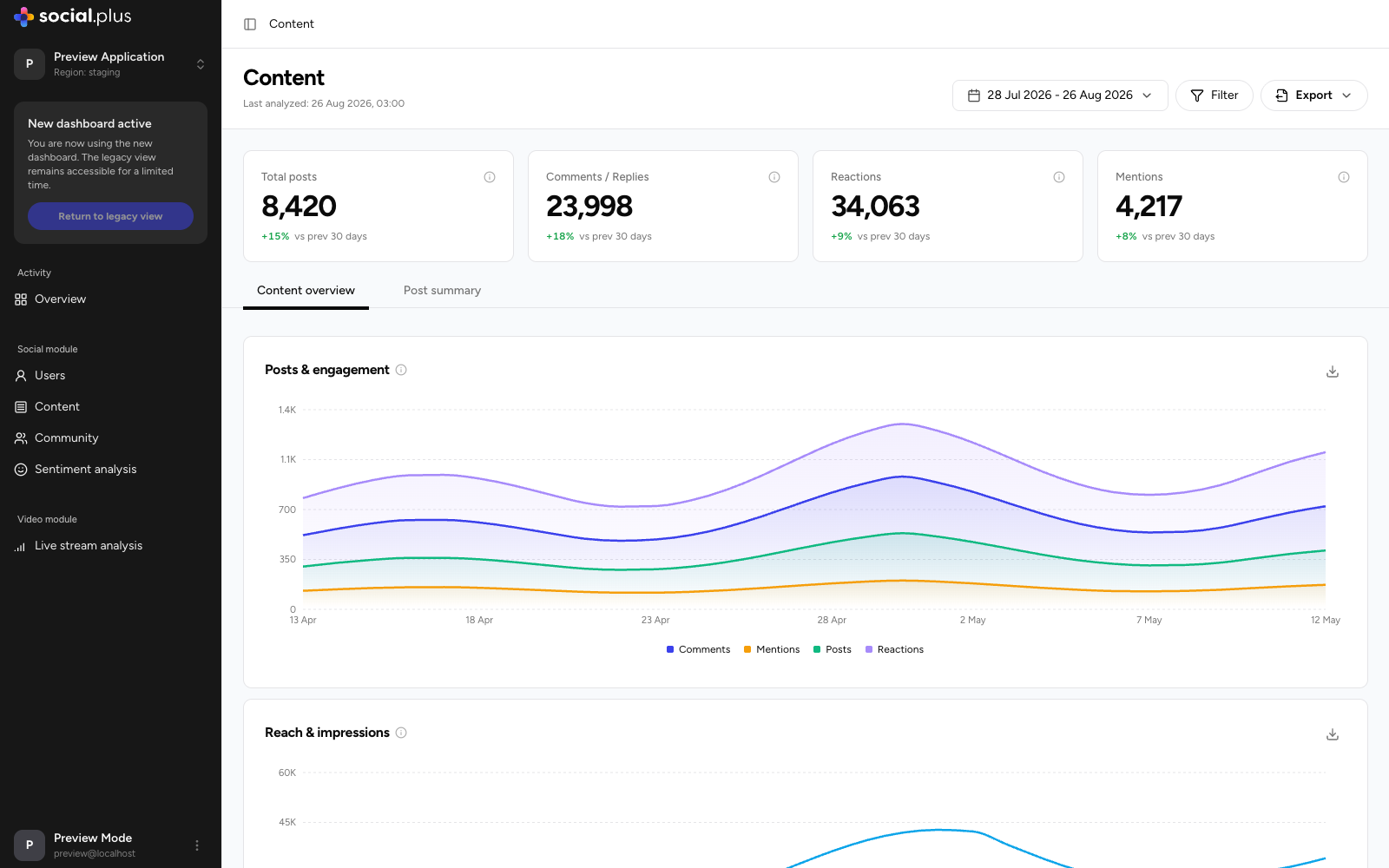
The **Content** page shows how much content your community produces, how far it travels, and which formats and individual posts earn the most engagement.
 Widget data is limited to the communities assigned to your account. Use **View community access** in the page banner to see which communities you can analyze.
## Key metrics
| Metric | What it tells you |
| ---------------------- | ----------------------------------------------- |
| **Total posts** | Posts published during the period. |
| **Comments / Replies** | Comments and replies created during the period. |
| **Reactions** | Reactions given during the period. |
| **Mentions** | Times users mentioned others in content. |
Each card shows the change versus the previous period of equal length.
## Filtering
Use **Filter** to scope the whole page by:
* **Community** — limit metrics to one or more communities.
* **User tag** — count only content from users with matching tags.
* **Role** — count only content from users with matching roles.
## Content overview tab
### Posts & engagement
A daily trend chart with toggleable series for **Posts**, **Comments**, **Reactions**, and **Mentions**. Use it to see whether engagement (comments, reactions) keeps pace with content volume — engagement growing faster than post count is a sign of a healthy, conversational community.
### Reach & impressions
Daily **Reach** (unique users who saw content) and **Impressions** (total views, including repeats). A widening gap between impressions and reach means the same users are viewing content repeatedly; flat reach with rising post volume means new content isn't finding new audiences.
### Engagement by content type
Compares performance across every post format — **Text**, **Image**, **Video**, **Poll**, **File**, **Live stream**, **Clip**, **Audio**, and **Custom** — showing post volume and the engagement each format generates. Switch between **Number** and **Percentage** views. Formats with no posts in the selected range are flagged, so gaps in your content mix are easy to spot.
If a format earns outsized engagement relative to its volume (for example, few video posts but high engagement per post), that's a cue to encourage more of it — through prompts, creator programs, or featured placement.
## Post summary tab
A searchable, sortable table of individual posts published in the period.
Widget data is limited to the communities assigned to your account. Use **View community access** in the page banner to see which communities you can analyze.
## Key metrics
| Metric | What it tells you |
| ---------------------- | ----------------------------------------------- |
| **Total posts** | Posts published during the period. |
| **Comments / Replies** | Comments and replies created during the period. |
| **Reactions** | Reactions given during the period. |
| **Mentions** | Times users mentioned others in content. |
Each card shows the change versus the previous period of equal length.
## Filtering
Use **Filter** to scope the whole page by:
* **Community** — limit metrics to one or more communities.
* **User tag** — count only content from users with matching tags.
* **Role** — count only content from users with matching roles.
## Content overview tab
### Posts & engagement
A daily trend chart with toggleable series for **Posts**, **Comments**, **Reactions**, and **Mentions**. Use it to see whether engagement (comments, reactions) keeps pace with content volume — engagement growing faster than post count is a sign of a healthy, conversational community.
### Reach & impressions
Daily **Reach** (unique users who saw content) and **Impressions** (total views, including repeats). A widening gap between impressions and reach means the same users are viewing content repeatedly; flat reach with rising post volume means new content isn't finding new audiences.
### Engagement by content type
Compares performance across every post format — **Text**, **Image**, **Video**, **Poll**, **File**, **Live stream**, **Clip**, **Audio**, and **Custom** — showing post volume and the engagement each format generates. Switch between **Number** and **Percentage** views. Formats with no posts in the selected range are flagged, so gaps in your content mix are easy to spot.
If a format earns outsized engagement relative to its volume (for example, few video posts but high engagement per post), that's a cue to encourage more of it — through prompts, creator programs, or featured placement.
## Post summary tab
A searchable, sortable table of individual posts published in the period.
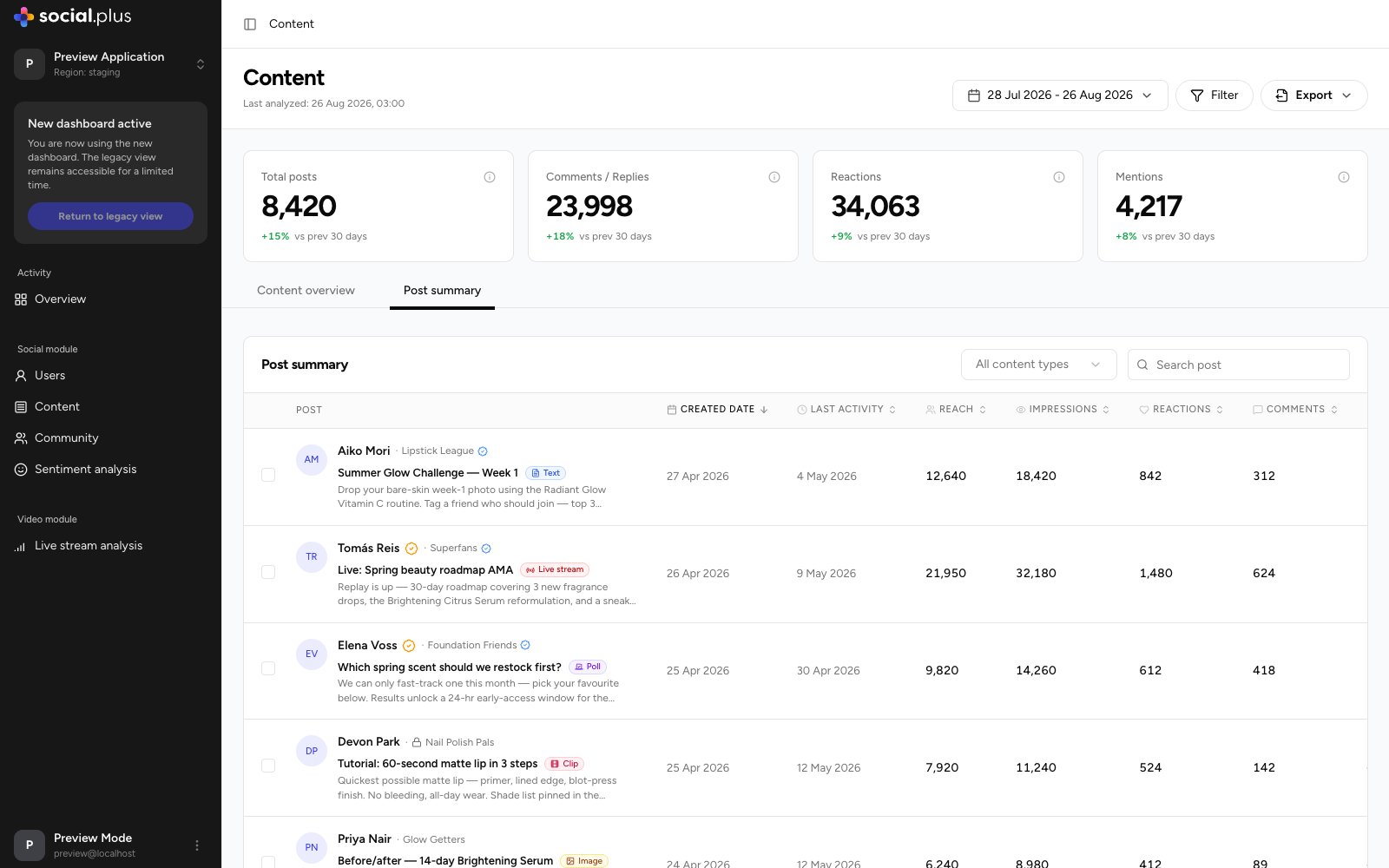 Narrow the table with the **content type** dropdown (for example, only polls or only live streams) or search for a specific post. Each row shows the post preview (author, community, format, and excerpt) alongside:
* **Created date** and **Last activity** — how long a post keeps generating engagement.
* **Reach** and **Impressions** — distribution performance.
* **Reactions**, **Comments**, and **Flags** — engagement and moderation signals.
* **Engagement rate** — engagement relative to reach, the best single measure for comparing posts of different sizes.
Sort by **Flags** to triage content that may need moderator review, or by **Engagement rate** to find repeatable content patterns worth promoting.
## Comparing posts
Use the checkbox on each row to select posts, then select **Compare** in the bar that appears at the bottom of the table.
Narrow the table with the **content type** dropdown (for example, only polls or only live streams) or search for a specific post. Each row shows the post preview (author, community, format, and excerpt) alongside:
* **Created date** and **Last activity** — how long a post keeps generating engagement.
* **Reach** and **Impressions** — distribution performance.
* **Reactions**, **Comments**, and **Flags** — engagement and moderation signals.
* **Engagement rate** — engagement relative to reach, the best single measure for comparing posts of different sizes.
Sort by **Flags** to triage content that may need moderator review, or by **Engagement rate** to find repeatable content patterns worth promoting.
## Comparing posts
Use the checkbox on each row to select posts, then select **Compare** in the bar that appears at the bottom of the table.
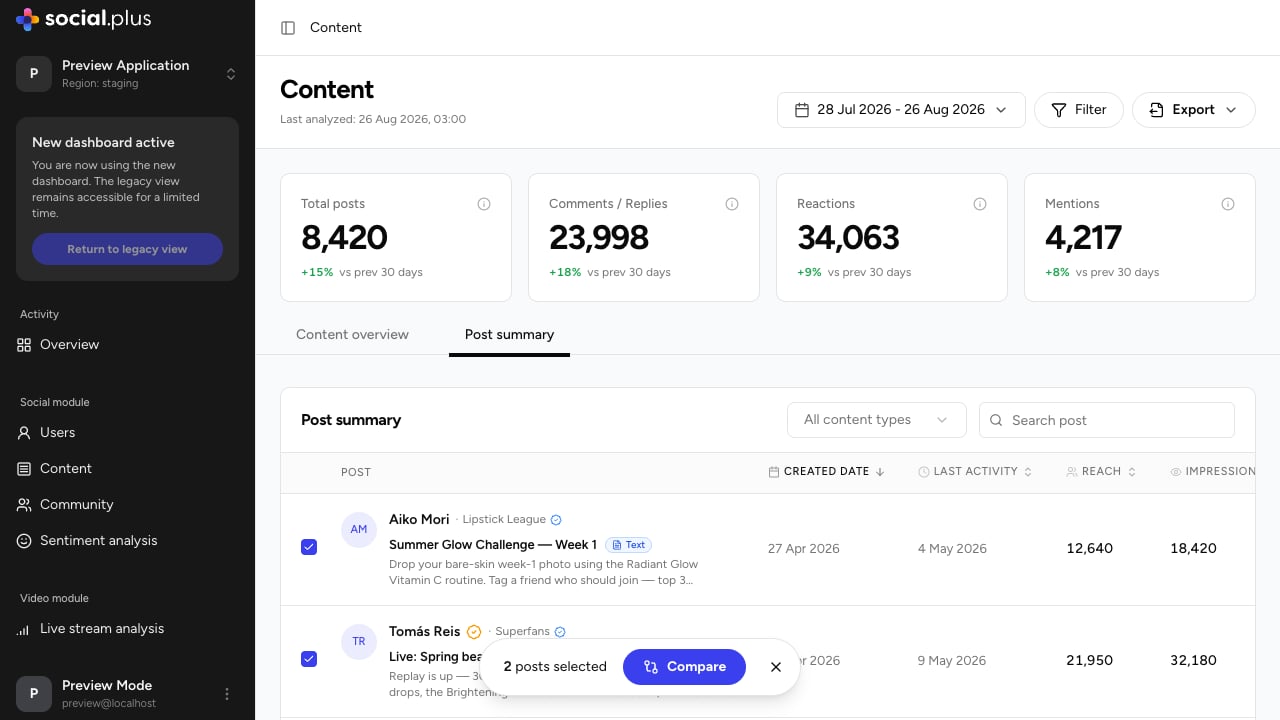 The comparison view places the selected posts side by side — author, publish date, title, and format — and charts their performance against each other across four metrics:
| Metric | Definition |
| --------------- | ----------------------------------- |
| **Reactions** | Number of reactions on these posts. |
| **Comments** | Number of comments on these posts. |
| **Reach** | Unique members who saw these posts. |
| **Impressions** | Total views across these posts. |
The comparison has its own date-range picker, so you can widen or narrow the window independently of the main page — useful for comparing posts published weeks apart over their full lifetime. Use **Clear all** to reset the selection and start a new comparison.
Compare a high-performing post against an average one of the same format to isolate what made it work — timing, community, or framing. Comparing across formats (for example, a poll versus a live stream announcement) shows which format earns more engagement for the same topic.
## Exporting
The page-level **Export** menu lets you pick any combination of widgets — Posts & engagement, Reach & impressions, Engagement by content type — and download them as CSV in one go. Individual widgets also offer their own **Export CSV** button.
The comparison view places the selected posts side by side — author, publish date, title, and format — and charts their performance against each other across four metrics:
| Metric | Definition |
| --------------- | ----------------------------------- |
| **Reactions** | Number of reactions on these posts. |
| **Comments** | Number of comments on these posts. |
| **Reach** | Unique members who saw these posts. |
| **Impressions** | Total views across these posts. |
The comparison has its own date-range picker, so you can widen or narrow the window independently of the main page — useful for comparing posts published weeks apart over their full lifetime. Use **Clear all** to reset the selection and start a new comparison.
Compare a high-performing post against an average one of the same format to isolate what made it work — timing, community, or framing. Comparing across formats (for example, a poll versus a live stream announcement) shows which format earns more engagement for the same topic.
## Exporting
The page-level **Export** menu lets you pick any combination of widgets — Posts & engagement, Reach & impressions, Engagement by content type — and download them as CSV in one go. Individual widgets also offer their own **Export CSV** button.