> ## Documentation Index
> Fetch the complete documentation index at: https://learn.social.plus/llms.txt
> Use this file to discover all available pages before exploring further.
# Webhooks & Push Notifications Integrations
> Configure webhooks, push notifications, and delivery infrastructure for real-time engagement.
Configure webhooks and push notification infrastructure to stream real-time events and engage users reliably.
Deliver real-time events to your backend
Upload APNs / FCM / Baidu credentials
Channel & conversation notifications
Post, comment, story & event notifications
Standalone live stream notifications
Tailor notification content per event
## Webhooks
Need full event catalog, payload schema, retry logic, and signature details? See the complete reference: Webhook Events Reference.
Enter HTTPS URL in **Settings → Webhook** section.
Console generates secret key tied to that URL.
Configure backend to verify HMAC (secret) per event.
Delete & re-add endpoint if compromise suspected.
Use publicly reachable HTTPS endpoints; avoid including query secrets in the URL.
Idempotent processing, 200 fast ACK then async work, exponential retry logic on your side.
Restrict IPs if possible; verify signature before queuing work.
Include event schema version in payload to future‑proof consumers.
## Push Notifications
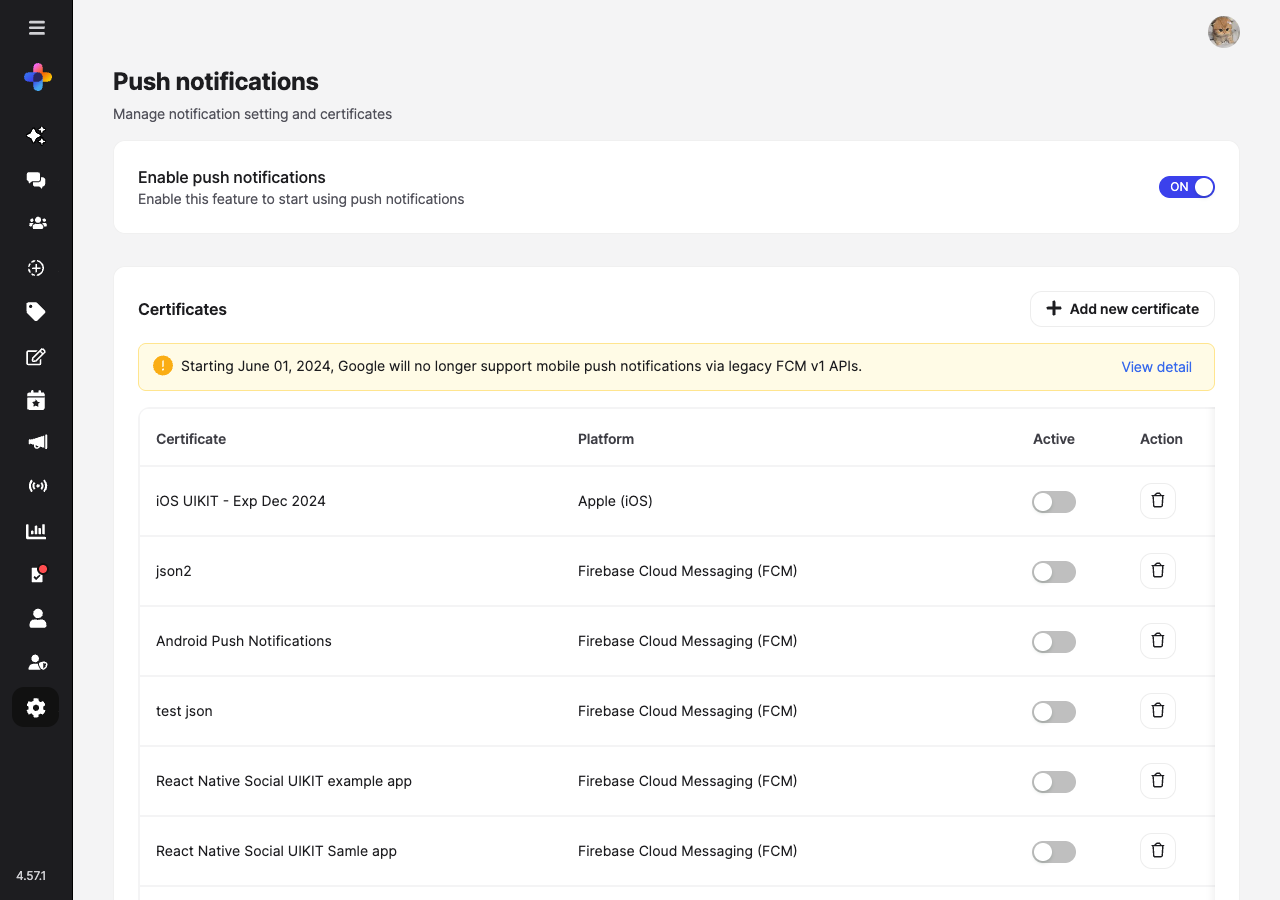
Navigate to **Settings → Push notifications** in the console to manage notification settings and certificates.
 ### Enable Push Notifications
Use the master toggle at the top of the page to enable or disable push notifications for the entire network.
Turning the master toggle OFF immediately disables **all** push events (Chat, Community, Live Stream). Certificates must be uploaded and active before toggling events, or notifications will silently fail.
### Certificates
Multiple certificates can be stored per platform (e.g., staging + production), but only **one can be active at a time** per platform/provider.
Starting June 01, 2024, Google will no longer support mobile push notifications via legacy FCM v1 APIs. Migrate to FCM v1 before this date.
| Field | Platform Scope | Purpose |
| -------------------------- | -------------- | ------------------------------------------------- |
| Certificate Name | All | Internal tracking label |
| Platform | iOS / Android | Target OS |
| Provider (Android) | Android | Firebase Cloud Messaging (FCM) / Baidu Cloud Push |
| Service Account JSON (FCM) | Android | FCM v1 service account credentials |
| .p12 / .p8 Upload | iOS | APNs authentication material |
| Credential Password | iOS | Password for .p12 if set |
Obtain APNs .p12/.p8 certificate or FCM service account JSON / Baidu server keys.
Console → **Settings → Push notifications → Certificates → Add new certificate**.
Toggle the **Active** switch for the certificate you want to use per environment.
Send a test notification to confirm delivery.
Keep staging & production certificates clearly labeled to avoid cross‑environment delivery errors.
### Notification Events
Configure which events trigger push notifications. Events are organized into three tabs:
### Enable Push Notifications
Use the master toggle at the top of the page to enable or disable push notifications for the entire network.
Turning the master toggle OFF immediately disables **all** push events (Chat, Community, Live Stream). Certificates must be uploaded and active before toggling events, or notifications will silently fail.
### Certificates
Multiple certificates can be stored per platform (e.g., staging + production), but only **one can be active at a time** per platform/provider.
Starting June 01, 2024, Google will no longer support mobile push notifications via legacy FCM v1 APIs. Migrate to FCM v1 before this date.
| Field | Platform Scope | Purpose |
| -------------------------- | -------------- | ------------------------------------------------- |
| Certificate Name | All | Internal tracking label |
| Platform | iOS / Android | Target OS |
| Provider (Android) | Android | Firebase Cloud Messaging (FCM) / Baidu Cloud Push |
| Service Account JSON (FCM) | Android | FCM v1 service account credentials |
| .p12 / .p8 Upload | iOS | APNs authentication material |
| Credential Password | iOS | Password for .p12 if set |
Obtain APNs .p12/.p8 certificate or FCM service account JSON / Baidu server keys.
Console → **Settings → Push notifications → Certificates → Add new certificate**.
Toggle the **Active** switch for the certificate you want to use per environment.
Send a test notification to confirm delivery.
Keep staging & production certificates clearly labeled to avoid cross‑environment delivery errors.
### Notification Events
Configure which events trigger push notifications. Events are organized into three tabs:
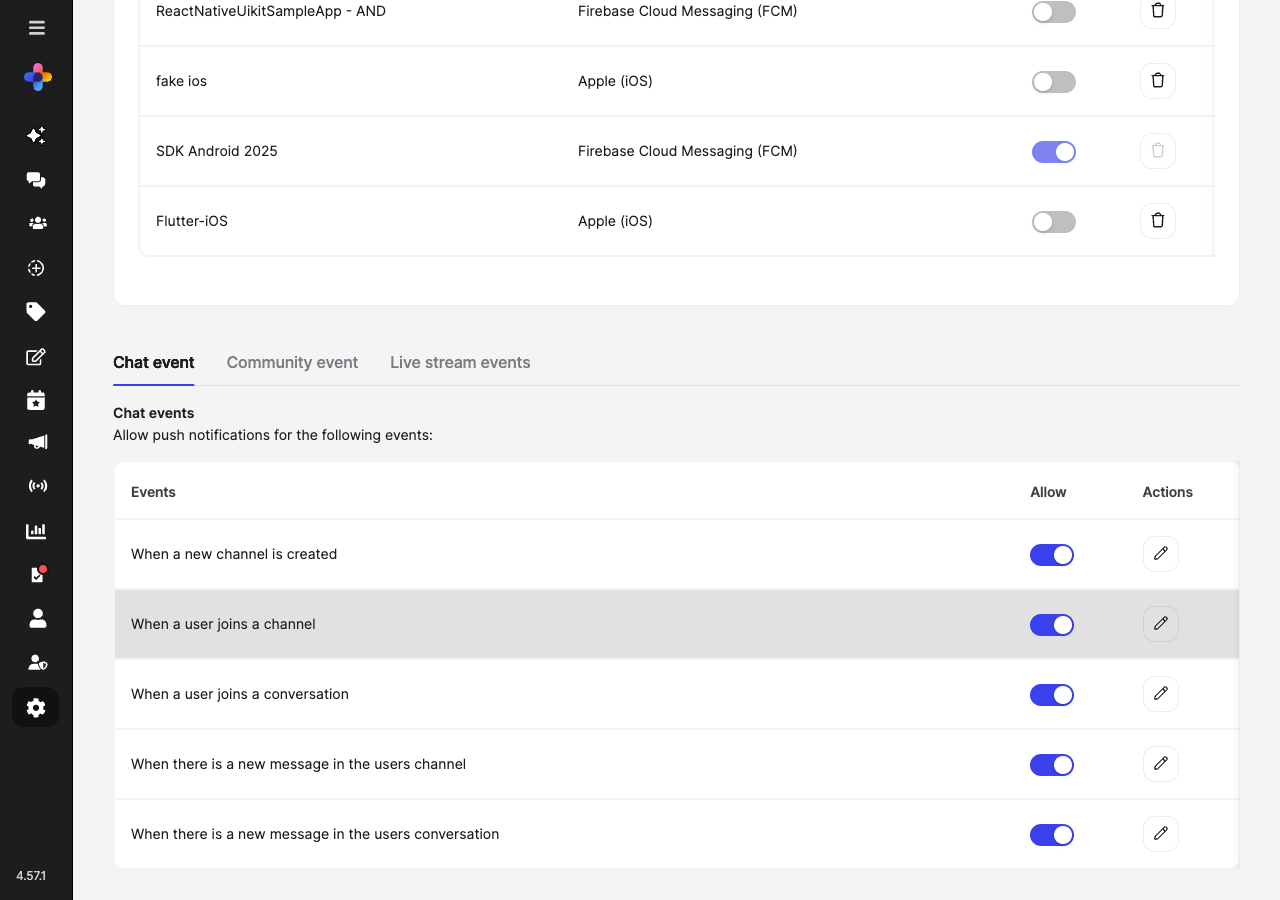 Chat-related push notification events:
| Event | Description |
| ----------------------------------------------------- | -------------------------------------------- |
| When a new channel is created | Notifies users when a new channel is created |
| When a user joins a channel | Notifies when a user joins a channel |
| When a user joins a conversation | Notifies when a user joins a conversation |
| When there is a new message in the users channel | Notifies on new messages in channels |
| When there is a new message in the users conversation | Notifies on new messages in conversations |
Each event has an **Allow** toggle and an **Actions** button to customize the notification message.
Community events are grouped into subcategories:
**Post-related events**
| Event | Description |
| -------------------------------------------------- | -------------------------------- |
| When someone creates a new post in the community | New post notification |
| When someone react to your posts | Reaction notification |
| When your post has been approved | Moderation approval notification |
| When there is a post that requires review from you | Moderator review request |
**Comment-related events**
| Event | Description |
| ------------------------------------- | ----------------------------- |
| When someone comments on your posts | Comment notification |
| When someone replies to your comments | Reply notification |
| When someone reacts to your comments | Comment reaction notification |
| When someone comments on your story | Story comment notification |
**Story-related events**
| Event | Description |
| ------------------------------------------------- | --------------------------- |
| When someone creates a new story in the community | New story notification |
| When someone reacts to your story | Story reaction notification |
**Live stream-related events**
| Event | Description |
| -------------------------------------------------- | ---------------------------------- |
| When someone starts a live stream in the community | Community live stream notification |
**Event-related events**
| Event | Description |
| ------------------------------------------------------ | -------------------------- |
| When an event user marked as 'Going' is about to start | Upcoming event reminder |
| When an event user marked as 'Going' has started | Event started notification |
Standalone live stream push notification events:
| Event | Description |
| -------------------------------------------- | ----------------------------------------------------- |
| When someone starts a standalone live stream | Notifies followers about a new standalone live stream |
This tab covers standalone live streams only. Community live stream notifications are configured under the **Community Events** tab.
### Custom Push Message
Click the **Actions** (pencil icon) button next to any event to customize the notification message template. Keep messages concise (\<140 chars) and actionable.
Store translation keys instead of raw strings; expand at client side.
Include displayName when appropriate but avoid sensitive content in payload.
Throttle bursts to prevent notification fatigue.
## Monitoring & Metrics
| Metric | Description | Trigger |
| -------------------- | ------------------------------------ | --------------------------------------------- |
| Delivery Success % | Successful pushes / total | Drop \< 95% → inspect certs & provider status |
| Cert Days to Expiry | Soonest certificate expiry | \< 30 days → schedule renewal |
| Event Coverage | Enabled events / intended events | Gap → enable missing categories |
| Webhook Failure Rate | 4xx/5xx responses / total deliveries | > 2% → investigate endpoint health |
## Troubleshooting
| Issue | Likely Cause | Fix |
| ----------------------- | --------------------------- | ------------------------------------------- |
| No push delivered | Inactive certificate | Activate correct cert in Certificates table |
| Some events silent | Event toggle off | Enable event under the appropriate tab |
| FCM legacy errors | Using deprecated FCM v1 API | Migrate to FCM v1 with service account JSON |
| Webhook 401 errors | Secret mismatch | Regenerate secret and update backend |
| Elevated retries | Endpoint latency | Optimize processing / return 200 quickly |
| Duplicate notifications | Missing idempotency | Track delivery IDs, discard repeats |
## Quick Reference
Enables all downstream push events
One active per platform/provider
Renew ≥30 days before expiry
Verify signature HMAC
## Related
Secure Mode & mTLS
Console visuals & brand account
Chat-related push notification events:
| Event | Description |
| ----------------------------------------------------- | -------------------------------------------- |
| When a new channel is created | Notifies users when a new channel is created |
| When a user joins a channel | Notifies when a user joins a channel |
| When a user joins a conversation | Notifies when a user joins a conversation |
| When there is a new message in the users channel | Notifies on new messages in channels |
| When there is a new message in the users conversation | Notifies on new messages in conversations |
Each event has an **Allow** toggle and an **Actions** button to customize the notification message.
Community events are grouped into subcategories:
**Post-related events**
| Event | Description |
| -------------------------------------------------- | -------------------------------- |
| When someone creates a new post in the community | New post notification |
| When someone react to your posts | Reaction notification |
| When your post has been approved | Moderation approval notification |
| When there is a post that requires review from you | Moderator review request |
**Comment-related events**
| Event | Description |
| ------------------------------------- | ----------------------------- |
| When someone comments on your posts | Comment notification |
| When someone replies to your comments | Reply notification |
| When someone reacts to your comments | Comment reaction notification |
| When someone comments on your story | Story comment notification |
**Story-related events**
| Event | Description |
| ------------------------------------------------- | --------------------------- |
| When someone creates a new story in the community | New story notification |
| When someone reacts to your story | Story reaction notification |
**Live stream-related events**
| Event | Description |
| -------------------------------------------------- | ---------------------------------- |
| When someone starts a live stream in the community | Community live stream notification |
**Event-related events**
| Event | Description |
| ------------------------------------------------------ | -------------------------- |
| When an event user marked as 'Going' is about to start | Upcoming event reminder |
| When an event user marked as 'Going' has started | Event started notification |
Standalone live stream push notification events:
| Event | Description |
| -------------------------------------------- | ----------------------------------------------------- |
| When someone starts a standalone live stream | Notifies followers about a new standalone live stream |
This tab covers standalone live streams only. Community live stream notifications are configured under the **Community Events** tab.
### Custom Push Message
Click the **Actions** (pencil icon) button next to any event to customize the notification message template. Keep messages concise (\<140 chars) and actionable.
Store translation keys instead of raw strings; expand at client side.
Include displayName when appropriate but avoid sensitive content in payload.
Throttle bursts to prevent notification fatigue.
## Monitoring & Metrics
| Metric | Description | Trigger |
| -------------------- | ------------------------------------ | --------------------------------------------- |
| Delivery Success % | Successful pushes / total | Drop \< 95% → inspect certs & provider status |
| Cert Days to Expiry | Soonest certificate expiry | \< 30 days → schedule renewal |
| Event Coverage | Enabled events / intended events | Gap → enable missing categories |
| Webhook Failure Rate | 4xx/5xx responses / total deliveries | > 2% → investigate endpoint health |
## Troubleshooting
| Issue | Likely Cause | Fix |
| ----------------------- | --------------------------- | ------------------------------------------- |
| No push delivered | Inactive certificate | Activate correct cert in Certificates table |
| Some events silent | Event toggle off | Enable event under the appropriate tab |
| FCM legacy errors | Using deprecated FCM v1 API | Migrate to FCM v1 with service account JSON |
| Webhook 401 errors | Secret mismatch | Regenerate secret and update backend |
| Elevated retries | Endpoint latency | Optimize processing / return 200 quickly |
| Duplicate notifications | Missing idempotency | Track delivery IDs, discard repeats |
## Quick Reference
Enables all downstream push events
One active per platform/provider
Renew ≥30 days before expiry
Verify signature HMAC
## Related
Secure Mode & mTLS
Console visuals & brand account